The IntelliSnap - Snap Prune Status report includes the following charts and tables.
IntelliSnap Prune Status
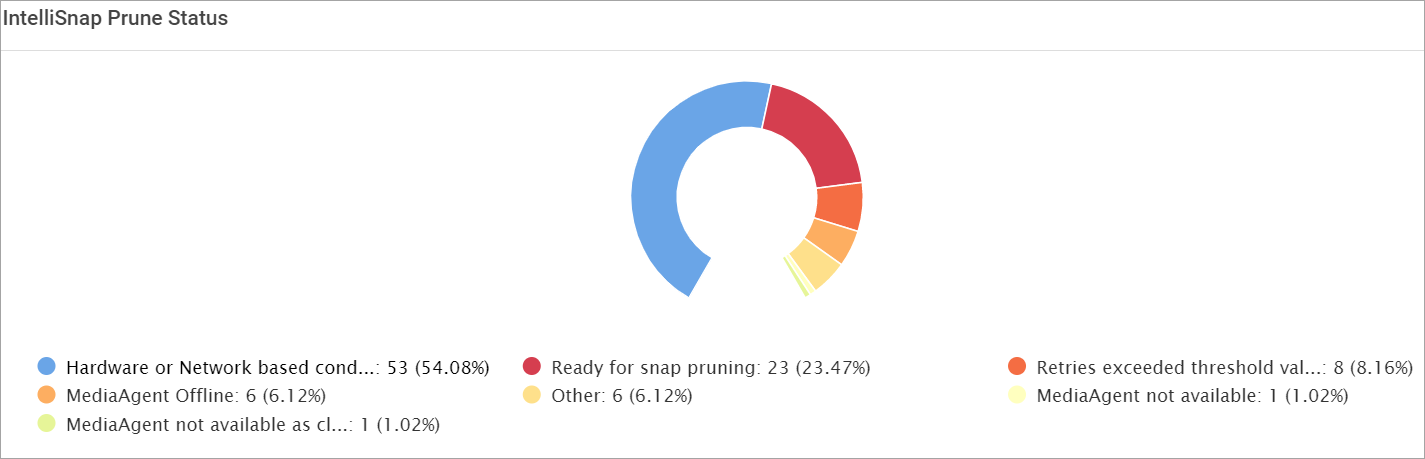
This chart displays the snap jobs prune status.
|
Status |
Description |
|---|---|
|
Hardware or Network based conditions |
The snaps are not deleted even when the MediaAgent is online. Check if there is a network issue between MediaAgent and array. |
|
Retires exceeded threshold value |
The aged or expired snap that were attempted for delete operation for more than 50 times and were unsuccessful are marked for exceeded threshold. |
|
Ready for snap pruning but not picked for delete in 24 hours |
The snaps that were not deleted in 24 hours which is due to large number of snaps to be deleted or pruning is disabled at array level. |
|
MediaAgent Offline |
The MediaAgent package is installed but is in offline state. Restart the MediaAgent services. |
|
MediaAgent not available |
The client is available but the MediaAgent package is not found. |
|
MediaAgent not available as client is uninstalled |
The client assigned for delete operation is in uninstalled state. The snaps to be deleted cannot be sent to the MediaAgent. |
|
Other |
The reason due to specific configuration or problem due to specific snap not deleted. |
Details
|
Column |
Description |
|---|---|
|
Array |
The name of the array where the snap is available. |
|
Snap vendor |
The name of the vendor for the array to which the snap is associated. |
|
Snap Engine |
The name of the snap engine. |
|
Snap Name |
The name of the snap. |
|
Client |
The name of the client associated with the snap. |
|
Job Id |
The snap job ID. |
|
Storage Policy |
The name of the storage policy containing multiple storage policy copies. |
|
Storage Policy Copy |
The storage policy copy indicates a backup data duplication. |
|
Snap Name |
The name of the snapshot. |
|
Delete Attempts |
The number of times delete operation is attempted after the snap is aged. |
|
Failure Code |
The code to indicate the specific failure category. |
|
Failure Reason |
The description of the failure code. |