The Storage Utilization report displays the used and available space for each configured storage target, providing clear visibility into current capacity and remaining free space.Use the CommCell,Company, Storage Type, and Library filters, then click Apply to generate and view the corresponding report.
-
Total Disk Capacity: The maximum amount of storage space available on a storage target or library.
-
Total Used Space: The amount of storage that is currently occupied by backup data, metadata, and any other files.
-
Total Size On Disk: The total amount of space currently occupied by all data stored in the library.
-
Total Application Size: The total amount of application data that is protected by all active jobs.
-
Space Savings(%): The percentage of storage space saved through deduplication and compression compared to the original size of the application data backed up.
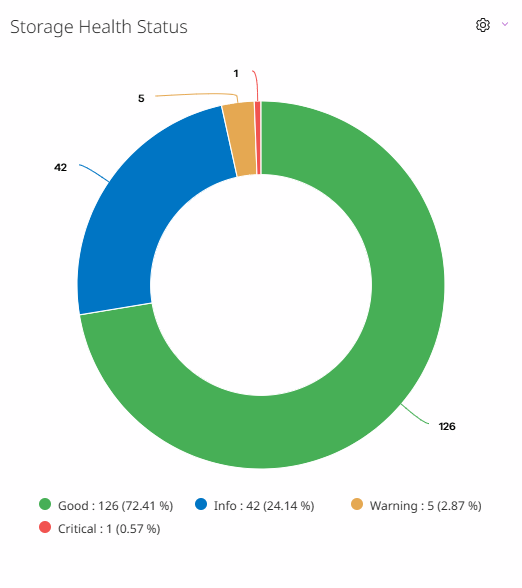
Storage Health Status
Displays the current status of the libraries, including whether the library is in the Good, the Info, the Critical, or the Warning status.
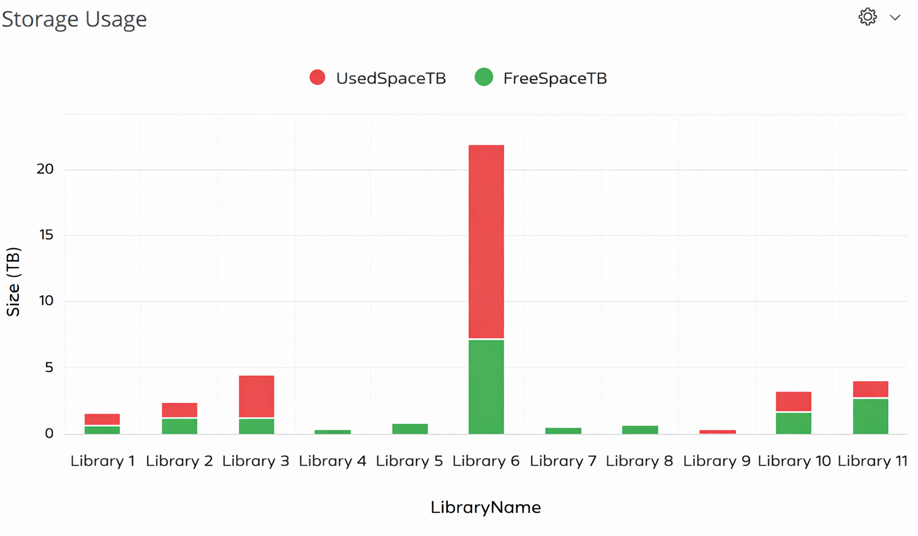
Storage Usage
The amount of storage space utilized by each library within the CommCell environment.
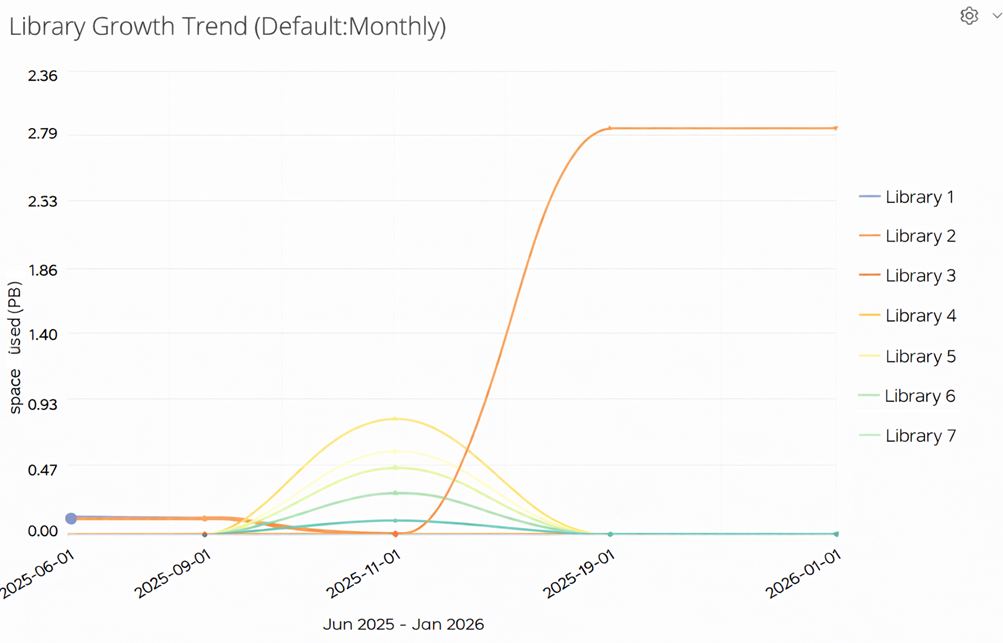
Library Growth Trend
Displays detailed insights into the growth of backed-up data stored on the library over time. You can refine the date range using the setting icon  to focus on a specific period of interest. The projected growth forecast is displayed as dotted lines.
Storage Details
This table displays the libraries associated with the CommCell and includes the capacity for each library, the date when the library will be full, and the current status of the library. All of this information appears at both the Worldwide and CommCell levels, except where otherwise indicated.
Note: You can view the Storage Utilization by Application report for each storage pool when the disk size value is greater than zero.
|
Column |
Description |
|---|---|
|
CommCell |
The CommCell environment where the libraries are configured. |
|
Storage Type |
Displays whether the storage type is Cloud or Disk. |
|
Storage |
The name of the storage pool. |
|
Capacity |
The total amount of capacity in the library. |
|
Available Space |
The amount of available space on the storage for writing data. |
|
Free Space |
The amount of available space on the storage for writing data. |
|
Used Space |
The amount of space on the storage target (library) that is currently occupied by backup data. |
|
Size on Disk |
Includes data written and the size occupied on storage by jobs. |
|
Available Space (%) |
The amount of available space as a percentage of the total storage space. |
|
Estimated Date to be Full |
The date when the library will be full and data can no longer be saved in it. For the disk libraries hosted in a HyperScale storage pool, the software considers 90% usage of the available space for full storage utilization. |
|
Previous Month Charge(MB) |
The difference between the consumed Space for the previous month and the month before that. |
|
Current Month Charge(MB) |
The difference between the Consumed Space for the current month and the previous month. |
|
Application Size |
The total amount of application data backed up. |
|
Status |
The current status of the storage library, such as Critical, Warning, or Good.
|