Commvault uses a service-based architecture where components communicate over secure, outbound-first connections. Use this page to confirm the required network paths for your deployment before you continue with setup. For ports and protocols for specific workloads (such as VMware, databases, and NAS), see the workload documentation.
Connectivity requirements
The following diagram shows baseline connectivity requirements for Commvault.
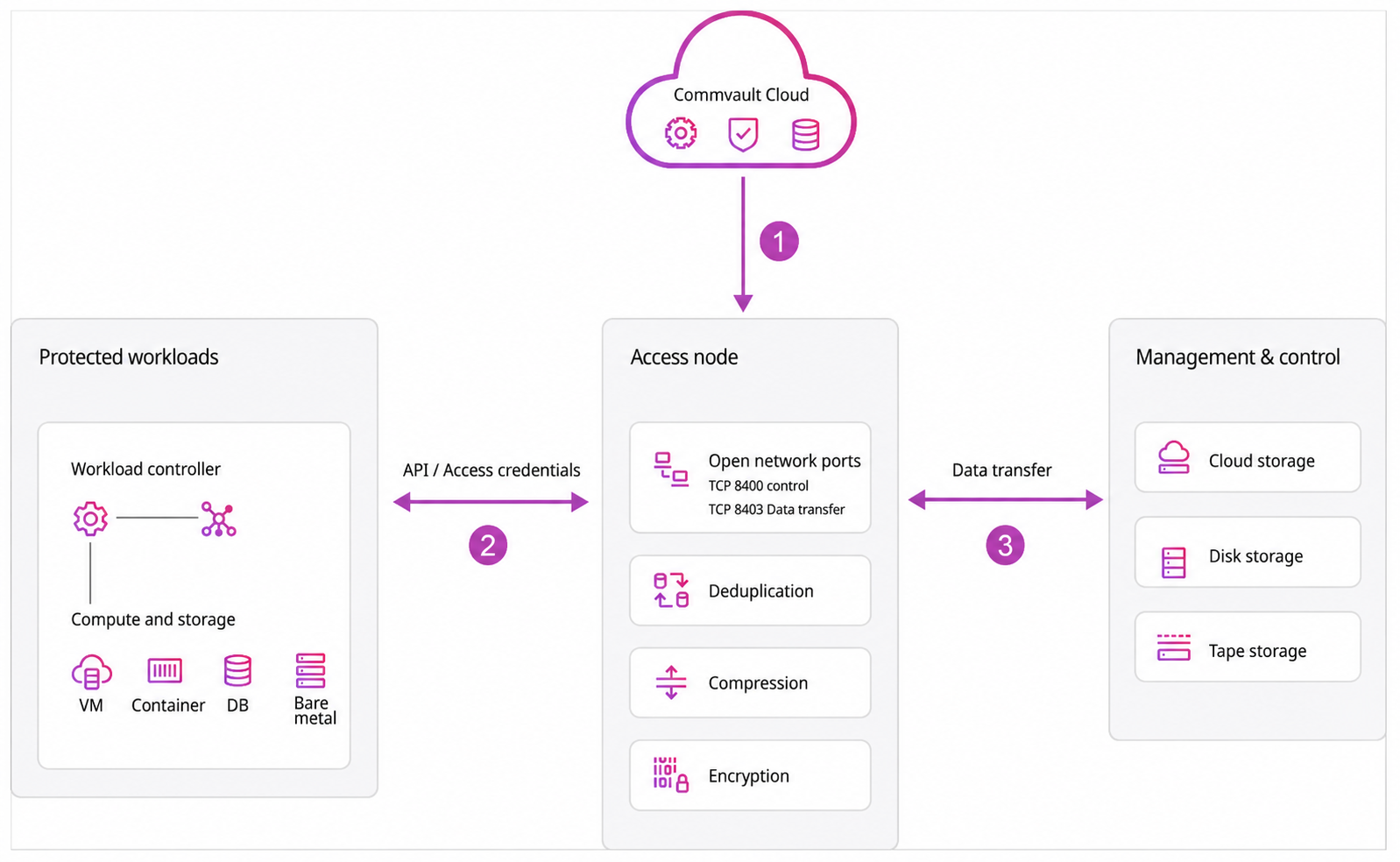
Access nodes initiate outbound connections to Commvault services, protected workloads, and backup storage.
| Callout | Connection | Ports |
|---|---|---|
| 1 | Access node → Commvault services | • HTTPS (TCP 443) • DNS (TCP/UDP 53) |
| 2 | Access node → Protected workloads | Workload examples: • Active Directory: LDAP (TCP 389), LDAPS (TCP 636) • VMware vSphere: HTTPS (TCP 443), data port (TCP 902) • SQL Server: TCP 1433 • PostgreSQL: TCP 5432 • Azure VM: HTTPS (TCP 443) • NAS: SMB TCP 445, NFS TCP 2049 |
| 3 | Access node → Backup storage | Storage examples: • Cloud storage: HTTPS (TCP 443) • SMB storage: TCP 445 • NFS storage: TCP 2049 |
If outbound TCP 443 is already open in your environment, most Commvault SaaS deployments are ready to proceed.
Commvault software components—the control plane, MediaAgents, and clients—communicate with each other and with workloads and storage.
| Callout | Connection | Ports |
|---|---|---|
| 1 | Control plane ↔ MediaAgents ↔ Clients | TCP 8400 (default CVD port, configurable) |
| 2 | Client or MediaAgent → Protected workloads | Workload examples: • Active Directory: LDAP (TCP 389), LDAPS (TCP 636) • VMware vSphere: HTTPS (TCP 443), data port (TCP 902) • SQL Server: TCP 1433 • PostgreSQL: TCP 5432 • Azure VM: HTTPS (TCP 443) • NAS: SMB TCP 445, NFS TCP 2049 |
| 3 | MediaAgent → Backup storage | Storage examples: • Cloud storage: HTTPS (TCP 443) • SMB storage: TCP 445 • NFS storage: TCP 2049 |
Data transfer port range: Backup and restore data transfer between MediaAgents and clients uses a configurable port range. For a POC, configure a small fixed range sized for the number of concurrent jobs you expect, and keep it consistent across all nodes that communicate with each other.
For the complete list of required ports, see Port requirements for Commvault.
Firewall requirements
If you need to configure firewall rules, use these baselines as your starting point. Then add workload-specific requirements based on what you're protecting.
Outbound connectivity
Allow outbound HTTPS (TCP 443) and DNS (TCP/UDP 53) from the access node to:
-
Commvault services
-
Any cloud or SaaS endpoints required by the workloads and storage you use
Workload connectivity
Allow the component that initiates the operation (for example, an access node or MediaAgent) to reach the workload over the workload's required ports and protocols. See the port table above for examples, and see the workload documentation for workload-specific requirements.
Troubleshooting connectivity
If you're troubleshooting connectivity, validate in this order:
-
DNS name resolution works.
-
HTTPS (TCP 443) to Commvault services works.
-
The initiating component can reach the workload over the workload's required ports.
-
The initiating component can reach the storage endpoints.
Storage connectivity
Allow the access node (or MediaAgent in Commvault software) to reach the storage endpoints used by your storage configuration.
Additional considerations
If your environment has additional constraints:
-
Endpoint allowlisting: Prefer allowlisting by FQDN. If you must allowlist by IP address, treat IP ranges as operational items that you review and update regularly, because cloud and SaaS provider IP ranges change over time. If you use URL filtering, make sure it doesn't block required hostnames or break redirects during sign-in flows.
-
HTTP proxy: If you route outbound traffic through an HTTP proxy, make sure the proxy doesn't block required Commvault service hostnames or break redirects during sign-in flows. If your proxy uses TLS interception, scope it carefully and test both backup and restore paths.