Configure cross-region AWS PrivateLink to provide private connectivity between a gateway in the production environment and an AWS cleanroom site. Use this configuration when the cleanroom network must communicate with the production environment without using public network paths.
This page applies when you select Use your own resources while configuring an AWS cleanroom site.
Architecture
The production and cleanroom environments are deployed in separate AWS Regions. The gateway in the cleanroom environment connects to a VPC interface endpoint. AWS PrivateLink connects the interface endpoint to an endpoint service, Network Load Balancer, and gateway in the production environment.
Private connectivity between a production environment and an AWS cleanroom
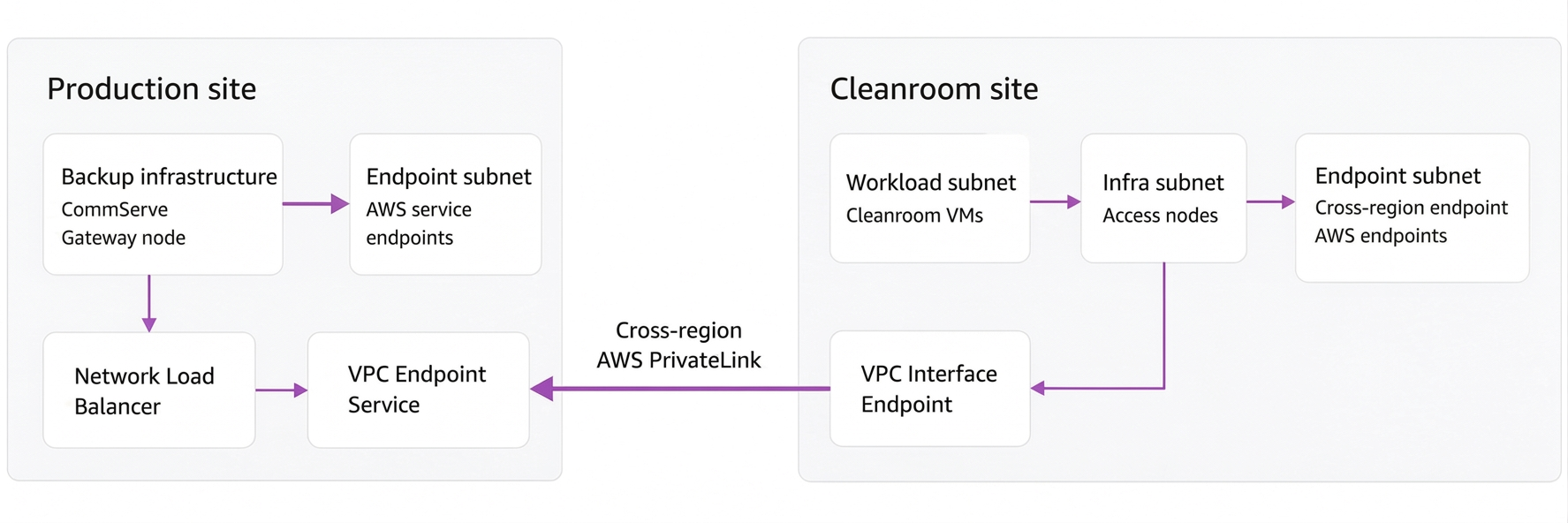
The expected traffic path is:
Cleanroom gateway -> Route 53 private DNS record -> Cleanroom interface endpoint -> Cross-region AWS PrivateLink -> Production endpoint service -> Network Load Balancer -> Production gateway
Requirements
-
AWS administrators who can create and configure VPCs, subnets, security groups, VPC endpoints, an endpoint service, a Network Load Balancer, and Route 53 private DNS records
-
A gateway in the production environment and a gateway in the cleanroom environment that can communicate on the port required by the cleanroom configuration. Port 8403 is recommended. You can use other ports if they are open in the applicable network security group (NSG) rules.
-
Commvault access node and network topology configuration for the AWS cleanroom environment
Configuration
Complete the following configurations in order. Each step depends on resources created in the preceding step. Replace the editable values with values from your AWS network design.
Step 1: Configure production AWS networking and prerequisites
-
Create or select the production VPC with the following settings:
Setting Value Region $[production aws region]CIDR $[production vpc cidr]DNS resolution Enabled DNS hostnames Enabled -
Create the production subnets:
Subnet CIDR Purpose Workload subnet $[production workload subnet cidr]Production CommServe and gateway Endpoint subnet $[production endpoint subnet cidr]VPC interface endpoints -
Create a dedicated security group for the production CommServe and gateway. Do not use the default security group.
Direction Traffic Port Source or destination Inbound All traffic All $[production vpc cidr]Outbound All traffic All $[production endpoint subnet cidr] -
Create a security group for the production VPC endpoints:
Direction Traffic Port Source or destination Inbound All traffic All $[production vpc cidr]Outbound HTTPS 443 $[allowed outbound cidr] -
Create the production VPC endpoints in the endpoint subnet. Associate them with the production endpoint security group.
Endpoint AWS service Type Notes $[production ssm endpoint name]com.amazonaws.$[production aws region].ssmInterface $[production ssm messages endpoint name]com.amazonaws.$[production aws region].ssmmessagesInterface $[production ec2 endpoint name]com.amazonaws.$[production aws region].ec2Interface $[production ec2 messages endpoint name]com.amazonaws.$[production aws region].ec2messagesInterface $[production sts endpoint name]com.amazonaws.$[production aws region].stsInterface Required for hypervisor creation $[production s3 endpoint name]com.amazonaws.$[production aws region].s3Interface Enable private DNS as required by the AWS design $[production kms endpoint name]com.amazonaws.$[production aws region].kmsInterface Encryption and decryption operations $[production ebs endpoint name]com.amazonaws.$[production aws region].ebsInterface Amazon EBS operations
Step 2: Configure the production gateway and PrivateLink endpoint service
-
Deploy or select the production CommServe and gateway in
$[production aws region]:Setting Value IAM role CommvaultCleanroomAdminRoleSecurity group $[production commserve security group name]Subnet Production workload subnet The production CommServe does not require the VPC endpoints to be deployed directly on the instance.
-
If you use Air Gap Protect, create the S3 bucket in the production Region. Confirm the one-time outbound requirements before accepting the Air Gap Protect terms and conditions.
Destination Protocol Port https://login.microsoftonline.comTCP 443 https://api.mcss.metallic.ioTCP 443 https://metallic.ioTCP 443 https://www.commvault.comTCP 443 -
Deploy the gateway proxy in the
$[production aws region]workload subnet. Associate it with the production security group. Register it with the CommServe using its private IP DNS name instead of its raw IP address. -
Create a target group in the production AWS Region for the gateway proxy:
Setting Value Target type IP Protocol TCP Port 8403 Target Gateway proxy private IP address Verify that the target is healthy after registration.
-
Create a Network Load Balancer in the production AWS Region and configure its listener:
Setting Value Load balancer type Network IP address type IPv4 VPC Production VPC Availability Zones Availability Zones that contain the gateway Security group Production CommServe security group Listener protocol TCP Listener port 8403 Default action Forward to the gateway target group Target group stickiness Off -
Create an interface endpoint service in the production AWS Region that uses the Network Load Balancer:
Setting Value Type Interface Load balancer type Network Load balancer Production Network Load Balancer Allowed Region $[cleanroom aws region]Require acceptance Enabled
Step 3: Configure cleanroom AWS networking and the interface endpoint
-
Create or select the cleanroom VPC with the following settings:
Setting Value Region $[cleanroom aws region]CIDR $[cleanroom vpc cidr]DNS resolution Enabled DNS hostnames Enabled -
Create the cleanroom subnets:
Subnet CIDR Purpose Workload subnet $[cleanroom workload subnet cidr]Cleanroom workloads Infrastructure subnet $[cleanroom infrastructure subnet cidr]Infrastructure services Endpoint subnet $[cleanroom endpoint subnet cidr]VPC endpoints -
Create security groups for the cleanroom workloads, infrastructure, and VPC endpoints. Use the following rules as the starting point and confirm the minimum required rules for your environment:
Security group Direction Traffic Port Source or destination Workload Inbound All traffic All $[cleanroom workload subnet cidr]Workload Outbound All traffic All $[cleanroom workload subnet cidr]Workload Outbound All traffic All $[cleanroom endpoint subnet cidr]Infrastructure Inbound All traffic All $[cleanroom infrastructure subnet cidr]Infrastructure Outbound All traffic All $[cleanroom infrastructure subnet cidr]Infrastructure Outbound TCP $[cleanroom gateway port]$[cleanroom endpoint subnet cidr]Infrastructure Outbound HTTPS 443 $[cleanroom endpoint subnet cidr]Endpoint Inbound All traffic All $[cleanroom vpc cidr]Endpoint Outbound All traffic All $[cleanroom endpoint subnet cidr] -
Create the cleanroom VPC endpoints in the endpoint subnet and associate them with the endpoint security group:
Endpoint AWS service Type Notes $[cleanroom s3 endpoint name]com.amazonaws.$[cleanroom aws region].s3Interface or gateway Enable private DNS as required by the AWS design $[cleanroom ssm endpoint name]com.amazonaws.$[cleanroom aws region].ssmInterface $[cleanroom ssm messages endpoint name]com.amazonaws.$[cleanroom aws region].ssmmessagesInterface $[cleanroom ec2 endpoint name]com.amazonaws.$[cleanroom aws region].ec2Interface $[cleanroom ec2 messages endpoint name]com.amazonaws.$[cleanroom aws region].ec2messagesInterface $[cleanroom sts endpoint name]com.amazonaws.$[cleanroom aws region].stsInterface Required for hypervisor creation $[cleanroom kms endpoint name]com.amazonaws.$[cleanroom aws region].kmsInterface Encryption and decryption operations $[cleanroom ebs endpoint name]com.amazonaws.$[cleanroom aws region].ebsInterface Amazon EBS operations $[cleanroom cloudformation endpoint name]com.amazonaws.$[cleanroom aws region].cloudformationInterface CloudFormation operations -
In the cleanroom VPC, create a cross-region interface endpoint for the production endpoint service:
Setting Value Service category Endpoint services that use Network Load Balancers or Gateway Load Balancers Service name Service name from the production endpoint service Enable cross-region Enabled Service Region $[production aws region]Subnet Cleanroom endpoint subnet Private DNS names NO -
Verify the production endpoint service, accept the endpoint connection in the production AWS Region, and associate the endpoint with the cleanroom endpoint subnet.
The resulting connectivity flow is:
Cleanroom gateway -> Route 53 private DNS record -> Cleanroom interface endpoint -> Cross-region AWS PrivateLink -> Production endpoint service -> Production Network Load Balancer -> Production gateway proxy
Step 4: Configure Route 53 DNS
-
In the cleanroom AWS Region, create a Route 53 private hosted zone and associate it with the cleanroom VPC.
-
Create an A record for the gateway proxy:
Setting Value Record name Gateway proxy DNS name Record type A Value IP address of the endpoint deployed through the endpoint service in the cleanroom AWS Region Routing policy Simple routing
Step 5: Configure Commvault
-
Configure the network topology for communication between the cleanroom environment and the production gateway.
-
Deploy or select the cleanroom access node according to the customer-managed AWS resource configuration.
-
Configure the gateway host name and port to use the private DNS name created for the interface endpoint.
For information about configuring the cleanroom network topology during recovery, see Recover workloads in a cleanroom.
Validate the configuration
-
Verify that the Network Load Balancer target is healthy.
-
From the cleanroom network, verify that the gateway DNS name resolves to the private interface endpoint address.
-
Verify that the cleanroom gateway can connect to the production gateway through the configured port.
-
Run a representative cleanroom recovery workflow and verify that the access node can communicate with the required Commvault components.