The Commvault software provides multiple Auto Recovery solutions. Select an Auto Recovery solution to replicate virtual machines (VMs) based on your recovery point objective (RPO), cost constraints, and workload criticality. Auto Recovery provides backup-based and periodic replication options that align with different availability and compliance requirements across regions and environments.
Review the following use cases to determine which replication approach fits your environment.
Use Case 1: Replicate Already Protected Virtual Machines Using Orchestrated Backup Replication (Backup RPO)
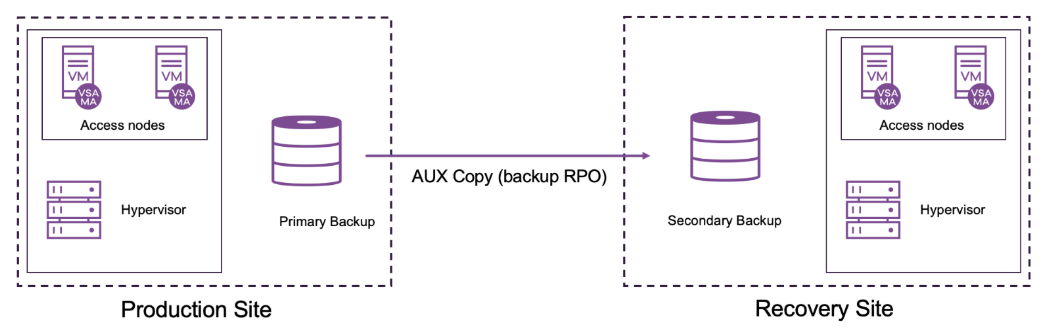
Use orchestrated backup replication feature to replicate VMs by leveraging existing backups instead of continuous, real-time replication. This approach aligns replication with the RPO defined by your backup frequency.
Replication occurs according to configured backup intervals, which reduces network and storage overhead while maintaining predictable recovery points. Because replication is based on completed backups, you avoid configuring additional replication streams and infrastructure that increase bandwidth and storage costs.
This approach is appropriate when backup frequency meets business RPO requirements and when cost control and operational simplicity are priorities.
Restrict Cross-Region Backup and Replication During Failback
After a successful failover, you can initiate a failback operation to reestablish replication operations for all replication pairs in the replication group. If the source and destination VMs reside in different regions, then failback backups trigger cross-region data transfers, which can increase storage and network costs.
To eliminate cross-region data transfers during failback operations, do the following:
-
Configure storage and access nodes in the source and destination regions.
-
Create a multi-region backup plan with storage policies having primary copy in the same region and auxiliary copy in cross-region. For more information, see Region-Based Storage for Laptop and Backup Plans.
Replication Flow Primary Copy Location Auxiliary Copy Location Region 1 -> Region 2 Region 1 Region 2 Region 2 Region 1 -
Restrict cross-region backups for your hypervisors. For more information about blocking cross-region backups for VMs, see Amazon EC2, Azure, Google Cloud, VMware and VMware Cloud Director.
-
Configure the bConsiderGeoLocationForRestores additional setting from the Command Center and set it to True. For information about configuring an additional setting, see Adding a CommCell Setting.
With these configurations, the Commvault software keeps failback backup and replication operations region-local. Inter-region data synchronization occurs through auxiliary copies rather than direct cross-region backups.
Use Case 2: Periodically Replicate Virtual Machines at Hourly RPO
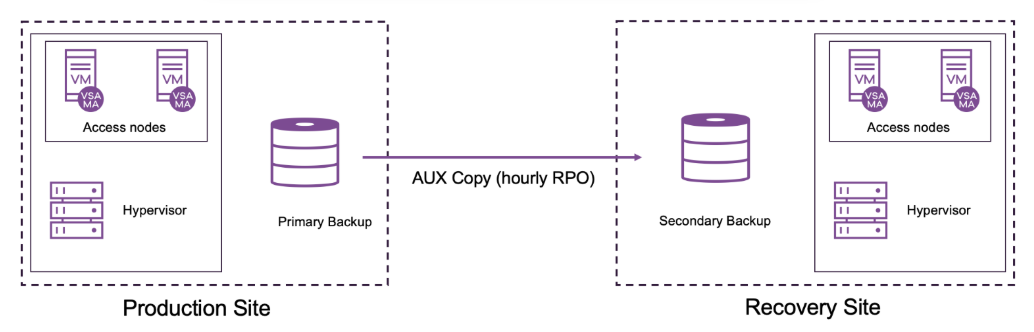
Use periodic replication to define lower RPOs for selected VMs that require more frequent replication than backup-based replication provides. This approach supports higher-priority workloads that cannot rely solely on standard backup intervals.
Note
To use periodic replication for VMs that are already protected, first remove the VMs from the existing VM groups. Then configure periodic replication in Auto Recovery for those VMs to enable automatic backup and replication.
Periodic replication enables you to configure replication intervals based on workload importance. You can replicate critical VMs more frequently than standard backup schedules, which reduces potential data loss during failover.
Unlike orchestrated backup replication, which follows backup schedules, periodic replication lets you define shorter replication intervals, such as every few minutes or hourly. This flexibility supports dynamic or transactional systems, including databases or virtual desktops, that require more current recovery points.
Comparison of Replication Types
The following table compares orchestrated backup replication and periodic replication.
| Feature | Ideal Scenarios | Less Suitable Scenarios |
|---|---|---|
| Orchestrated Backup Replication | General Data Protection: Suitable for non-critical applications and data where standard backup intervals meet RPO requirements. Cost-Conscious Environments: Ideal for organizations seeking data replication without the high costs of real-time or frequent replication. Multi-Site Data Synchronization: Suitable for organizations needing cross-site replication with moderate RPOs. |
High-Transaction Applications: Not suitable for applications that require very low RPOs or are highly transactional (e.g., financial trading, e-commerce). Mission-Critical Systems: Less ideal for critical systems where even small amounts of data loss are unacceptable. Strict Compliance Needs: May not meet regulations that require very frequent data replication. |
| Periodic Replication | Prioritized Workloads: Suitable for applications that need lower RPOs than backup-based replication can provide but do not require real-time replication. High-Value, Low-Latency Services: Suitable for moderately critical systems, such as customer databases, CRM systems, or applications with frequent data changes. Compliance and Recovery Requirements: Suitable for industries with moderate compliance requirements where sub-hourly replication can meet RPO needs |
Applications Requiring Near-Zero Data Loss: Not ideal for systems that require real-time data updates, as some data loss is still possible between replication intervals. High Frequency Transactional Systems: Less effective for applications with continuous, rapid data changes, as replication frequency may still be insufficient. Cost-Sensitive Environments: Requires more infrastructure resources than orchestrated backup replication |