Use the following steps to create a subclient for log backups:
-
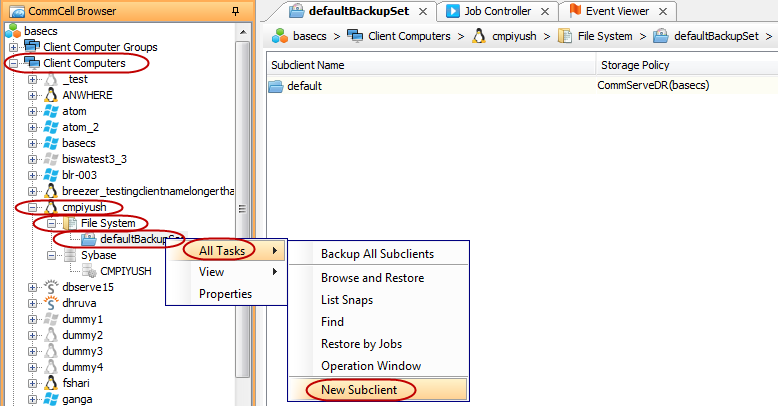
From the CommCell Browser, navigate to Client Computers | <Client> | File System iDataAgent.
-
Right-click the <BackupSet>, point to All Tasks, and then click New Subclient.
-
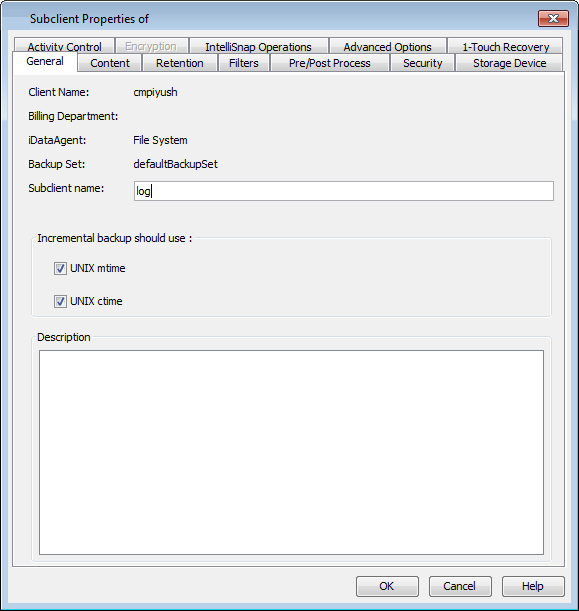
In the Subclient Name box, type the subclient name.
-
Click the Storage Device tab.
-
In the Storage Policy box, select the storage policy.
-
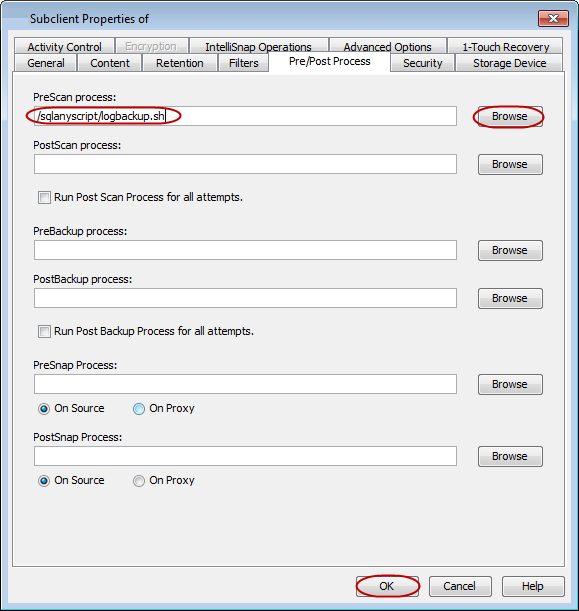
Click the Pre/Post Process tab.
-
Click Browse to locate the log directory path and add the script for log backup.
The script should contain the dbbackup command. This command should include the log backup directory path to backup the transaction log files as a pre-scan process.
-
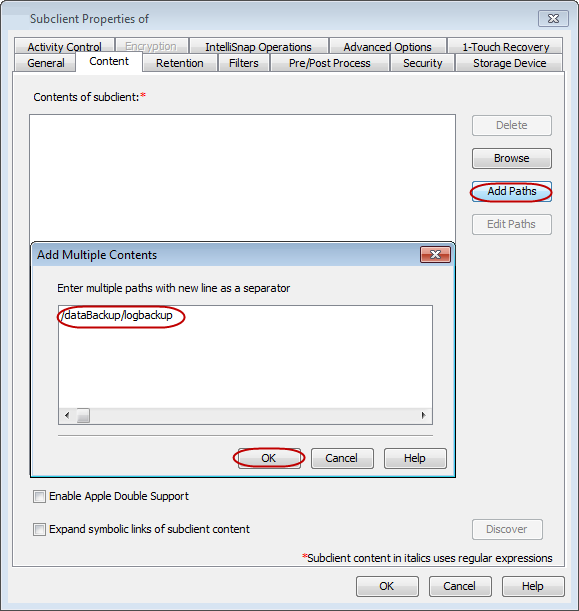
Click the Content tab.
-
Click Add Paths.
-
Add the local path for log backups and click OK.
-
Click OK to create a subclient for log backup. Perform Incremental backups for this subclient at periodic intervals as the system will pick up only the recent transaction log copies generated in the log backup directory.
The log backup script for UNIX and Windows based file systems will be as follows:
dbbackup -y -o log output file -c "connect string" -r -t -n log-backup-directorywhere
-t : Backup transaction log.
-r : Rename and restart the transaction log.
-n : Rename local backup of transaction log to match server.
-x : Delete/truncate the transaction log
-y : Creates the backup directory or replaces a previous backup file in the directory without confirmation. If you want to be prompted when an attempt is made to overwrite an existing file, do not specify -s or -y.
Example (UNIX)
dbbackup -y -o /temp/SqlAnywhereBackup.log -c "eng=demo11;dbn=mydb;uid=dba;pwd=sql;LINKS=ALL" -r -t -n /databackup/logBackup
Example (Windows)
dbbackup -y -o c:\temp\SqlAnywhereBackup.log -c "eng=demo11;dbn=mydb;uid=dba;pwd=sql;LINKS=ALL" -r -t -n d:\logBackup
Example (UNIX)
dbbackup -y -o /temp/SqlAnywhereBackup.log -c "eng=demo11;dbn=mydb;uid=dba;pwd=sql;LINKS=ALL" /dataBackup/full
Example (Windows)
dbbackup -y -o c:\temp\SqlAnywhereBackup.log -c "eng=demo11;dbn=mydb;uid=dba;pwd=sql;LINKS=ALL" d:\dataBackup