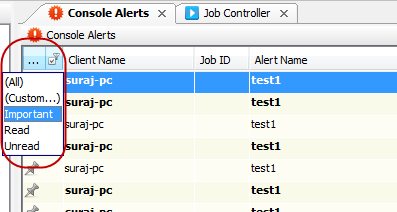
You can modify the list of console alerts displayed in the CommCell Console by using the following filters:
-
alert importance
-
read or unread alert status
Procedure
-
From the CommCell Console ribbon, on the Home tab, click the arrow under Alerts, and then select Console Alerts.
-
From the Console Alerts window, right-click the ellipsis (...) column and then click Filters.
-
Click the filter icon next to the ellipsis (...) column and select the filter that you want to apply.
Result
The alerts that fall under the selected filtering criteria are displayed.