Symptom
After installing a second or additional standby CommServe host, the LiveSync schedule is not created for replicating the data to the new standby CommServe host.
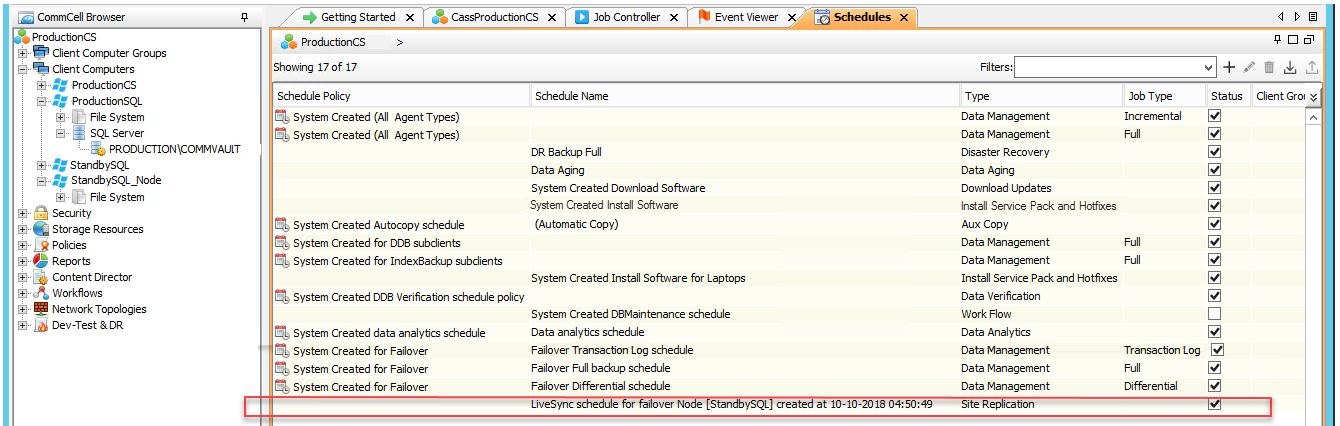
Click here to view an example of a LiveSync Schedule
Resolution
-
Disable the LiveSync operation.
For more information on disabling the LiveSync operation, see Enabling or Disabling CommServe LiveSync.
-
Verify and ensure that the Backup\Replication schedules associated with the SQL Client (installed in Instance002, by default) on the production CommServe host gets disabled.
For more information on viewing schedules, see Viewing Job Schedules.
-
Disable the Site Replication schedule Type.
For more information on disabling a schedule, see Disabling a Schedule.
Note
As this is a system created schedule, it cannot be deleted; it can only be disabled.
-
Enable the LiveSync operation.
For more information on enabling the LiveSync operation, see Enabling or Disabling CommServe LiveSync.
-
Verify that the LiveSync Schedule is created for ALL the passive nodes.