Where to Set Up
A Proxy Client is an intermediary computer between the Domino and the Domino Mailbox Archiver Agent. It can be setup on any non-Domino computer.
When to Set UP
The Proxy Client can be setup to balance resource load of the Domino.
However, it is recommended to setup Proxy Client only in such situations when the data protection jobs are failing due to intensive resource load on the Domino.
Requirements
Following versions of Notes and Windows are supported:
Notes Client
- Notes 8.5 and later
Windows
-
Windows Server 2003
-
Windows Server 2008
-
Windows Server 2012
-
Windows XP
-
Windows Vista
-
Windows 7 and later
Set Up Proxy Client
Follow the steps given below to configure the proxy client:
-
Ensure that the Proxy Client is not same as the Domino.
-
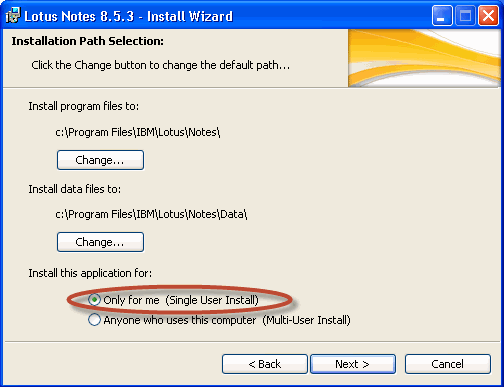
Install the Notes Client on the proxy computer.
You can select either the Single-User Install or the Multi-User Install.
-
Edit the user ID to access mailboxes on the Domino Server.
The user would be able to access the databases residing on the server from the Notes.
-
Click the Notes Client icon.
-
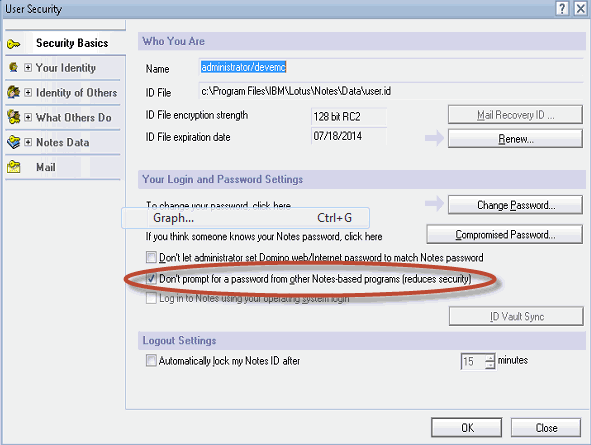
From the File menu, click Security and select User Security.
-
In the User Security box, select the Don't prompt for a password from other Notes-based programs (reduces security) check box.