Replication Using Warm Database Restore
This type of restore is also called Hot Server Restore. You can keep up-to-date copies of the production databases on alternate servers, thus minimizing down time in cases where the production database server has failed.
The advantages of Warm Database Restore over a traditional restore scenario is that the database is always kept in a near ready state. In the case of disaster, users do not need to wait for the time it would take to restore the database in its entirety. Only the latest backup may need to be applied to the target database before turning the application over to use it.
Prerequisites
Review the following requirements before performing a Warm Database Restore:
-
The primary MySQL server and hot standby server must be clients of the same CommServe and have the MySQL iDataAgent installed on each computer.
-
The primary MySQL server must be able to communicate with the hot standby server with one of the following network configurations:
-
Local Area Network (LAN) in the same domain
-
Local Area Network (LAN) in a different domain
-
Wide Area Network (WAN)
-
-
Two licenses for MySQL iDataAgent is required.
Back Up All the Subclients on the Primary Server
-
From the CommCell Browser, navigate to Client Computers | <Client> | MySQL| <Instance>.
-
Right-click the <subclient> and select Backup.
The Backup Options for Subclient dialog box appears.
-
Click OK.
Restore the MySQL Server on the Standby Server
Once you have taken a full backup of the Primary Server, perform a restore from the latest full backup on the Standby Server.
-
From the CommCell Browser, navigate to Client Computers | <Client> | MySQL.
-
Right-click the <Instance>, point to All Tasks, and select Restore MySql Server.
-
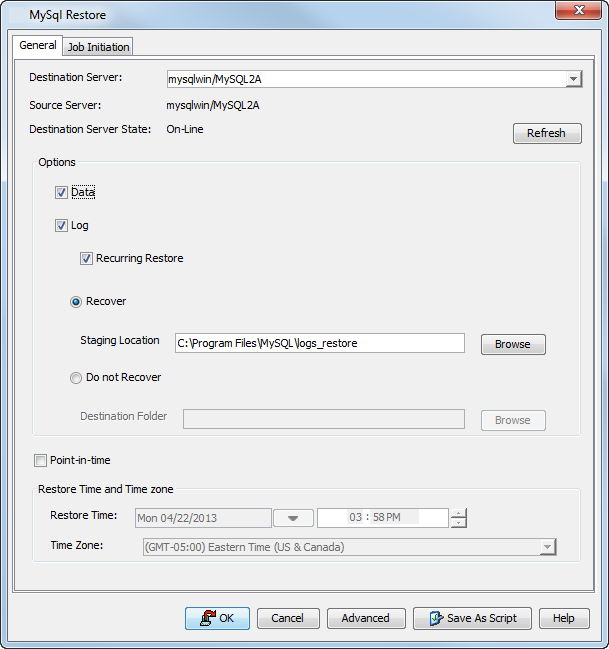
Select the Recurring Restore check box.
-
In the Staging Location box, type the location where the logs will be recovered. Alternatively, click Browse to select the staging location.
-
Click OK.