If a default dashboard was customized, you can revert the changes that were made.
Only CommCell administrators have permission to create, edit, and share custom dashboards in the Command Center.
Procedure
-
From the Command Center navigation pane, go to Explore > Dashboard.
The dashboard appears.
-
At the upper-right area of the page, from the list, select a default dashboard.
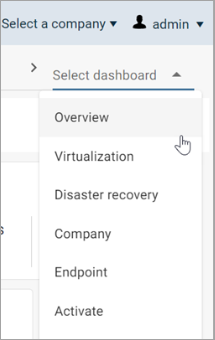
The dashboard appears.
-
At the upper-right area of the page, click the Menu
 button, and then select Revert.
A message that asks if you want to reset changes to the default layout appears.
-
Click Yes.
The default version of the dashboard appears.