You can use the revert operation to bring the MySQL database back to the point in time when the IntelliSnap backup was taken.
Note
Revert operations cannot be performed in a Windows cluster environment.
Before You Begin
Review the supported configurations for revert operation. For more information, see Revert for Storage Arrays.
Procedure
-
From the CommCell Browser, navigate to Client Computers | <Client> | MySQL.
-
Right-click the <Instance>, point to All Tasks and then click Browse and Restore.
-
Click View Content.
-
In the right pane of the window, select one or more databases that you wish to restore and click Recover All Selected.
-
Click Advanced.
-
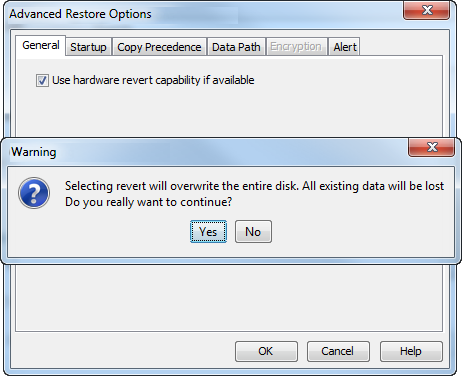
Select the Use hardware revert capability if available check box.
-
Click Yes in the confirmation box to shutdown the MySQL server. The server will be shutdown (if it is running) before the revert operation is performed.
-
Click OK to confirm the revert operation.