SCSI reservation can be enabled for IntelliSnap backups for all agents. Enabling SCSI reservation prevents other SCSI3-compliant applications from using the reserved SCSI device (the mounted snapshot).
Note: If this option is enabled and the hardware does not support this type of operation, subsequent backup jobs might fail.
Use the following steps to enable SCSI reservation:
-
From the CommCell Browser, navigate to Client Computers.
-
Right-click the <Client>, and then click Properties.
-
Click Advanced.
-
Click the Additional Settings tab.
-
Click Add.
-
In the Name box, type nSCSIReserveForSnap.
-
In the Category box, select iDataAgent.
-
In the Type box, select Integer.
-
In the Value box, type 1.
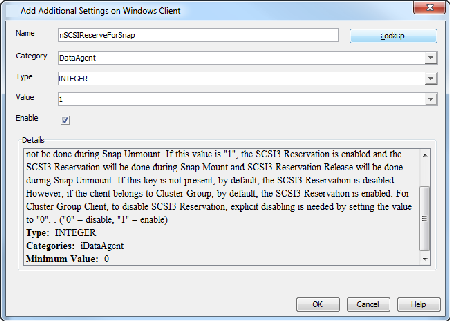
For more information on additional settings, see Additional Settings.