You can view activity for an alert, including alert times, CommCell environments notified, and alert statuses.
Procedure
-
From the Global Command Center navigation pane, go to Manage > Config blueprint > Alerts.
The Alerts definitions page appears.
-
For the alert you want to view, click the action button
 and then click View activity.
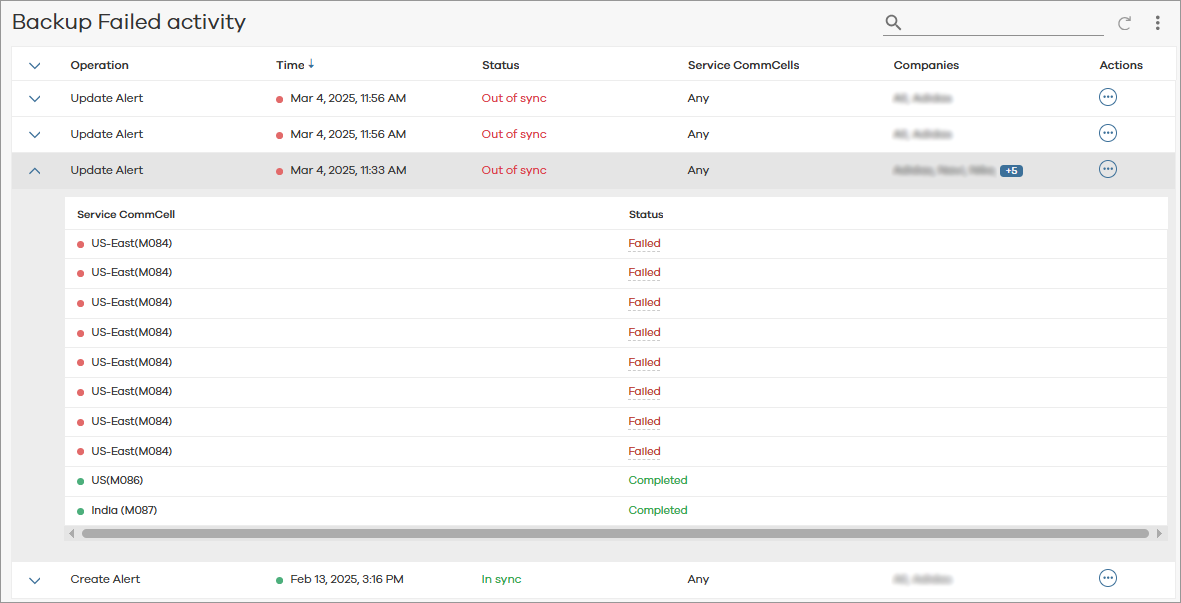
The activity page for the alert appears, as follows:
-
Click the expand button
 for an alert to view more detailed information. Statuses are defined as follows:
-
In sync: The entity created on service CommCell is in sync with alert blueprint.
-
Out of sync: The entity was not created, or service CommCell is not reachable.
-
In progress: The applied operation is in progress.
-
Delete In Progress: Delete operation is in progress.
For information about alert types, see Alert Type Details.
-