You can retire a backup gateway. Retire operation deletes the backup gateway permanently.
Important
-
In some conditions, retiring a backup gateway can have significant, negative effects on a CommCell environment. Before you retire a backup gateway, you must review the impact. (When you retire a backup gateway, a confirmation dialog box appears, and you can view an impact report from that dialog box.)
-
If you delete an active backup gateway, recall operations might fail.
Procedure
-
From the Command Center navigation pane, go to Manage > Infrastructure.
-
Click the MediaAgents tile.
The MediaAgents page appears.
-
For the backup gateway that you want to retire, click the action button
 , and then click Retire.
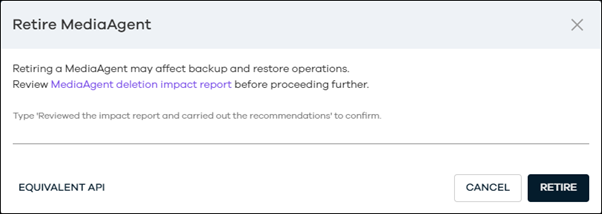
The Retire MediaAgent confirmation dialog box appears.
-
To review the impact of the MediaAgent retirement, open the MediaAgent deletion impact report in a new window, and then view the report.
-
To proceed with the retirement of the MediaAgent, enter the confirmation text, and then click Retire.