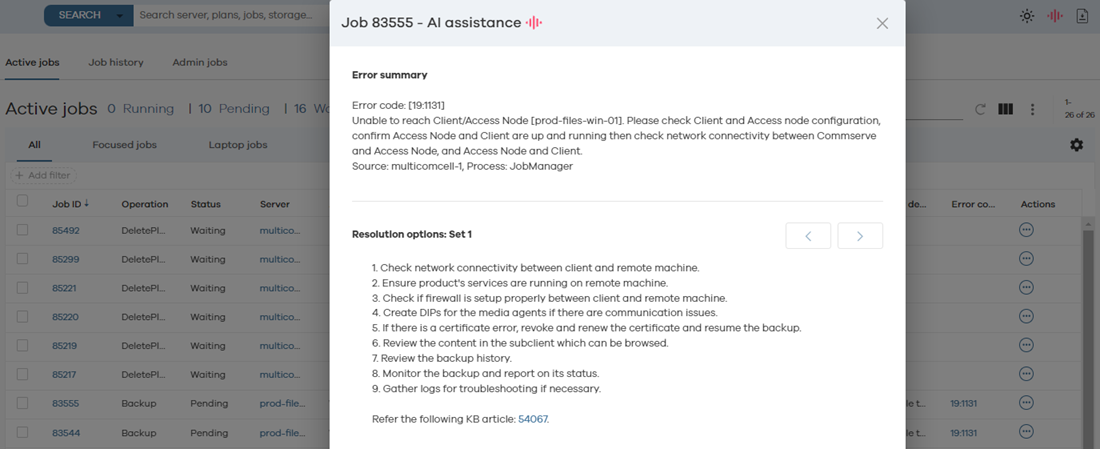
Use the Arlie Job Failure Insights feature to receive more accurate recommendations and steps for resolving job issues. Consequently, this shortens the operational failures that result from delayed resolution of failed or stalled jobs.
This feature utilizes the error code and error description of an error. It matches it with older and similar incidents to provide resolution steps. These resolution steps are more accurate than the recommendations based only on error codes or from the Commvault community website.
It can help you resolve failed or pending jobs by listing steps to resolve pending or failed jobs.
Before You Begin
Verify that you have enabled the Job Failure Insights setting for Arlie AI Assistant. For more information, see Enabling Arlie AI Assistant.
Procedure
-
From the Command Center navigation pane, go to Monitor > Jobs.
The Active jobs page appears.
-
In the row for the job that is in the pending or failed state, in the Error code column, click the error code.
Results
-
The Job <Job Number> AI Assistance dialog box appears with an error summary and resolution options.
-
To access other resolution options when multiple sets exist, next to Resolution options: set <number>, click the arrows.