Backup plans define how workloads are protected.
A backup plan specifies when backups run, how long backup data is retained, and where backup data is stored.
You can create backup plans during workload onboarding or create them separately and reuse them across multiple workloads.
Understanding how backup plans work helps you standardize protection, simplify administration, and improve cyber resilience across your environment.
How backup plans work
When you protect a workload, you assign a backup plan to that workload.
The backup plan defines:
-
Backup schedules
-
Retention periods
-
Storage destinations
-
Additional protection settings
Multiple workloads can share the same backup plan. Changing a backup plan affects all workloads that use it.
How backup plans and storage work together
A workload inherits protection settings from its assigned backup plan.
The backup plan uses one or more storage destinations to store backup data.
The relationship is:
Workload
  → Backup plan
      → Storage
          → Copies
A single storage destination can be used by multiple backup plans.
What is a copy?
A copy represents a backup data set and the storage location where that backup data is maintained.
The first copy is typically the primary copy.
You can create additional copies for:
-
Cyber resilience
-
Disaster recovery
-
Geographic redundancy
-
Long-term retention
Backup plan strategy
Most organizations create a small number of standardized backup plans and reuse them across many workloads.
Group workloads according to business and recovery requirements rather than by technology.
Examples:
| Workload type | Typical protection approach |
|---|---|
| Business-critical workloads | Frequent backups, longer retention, highly available storage; consider multiple copies, air-gapped storage, and separate recovery locations |
| Standard production workloads | Daily backups and standard retention |
| Development and test workloads | Less frequent backups and shorter retention |
| Compliance-sensitive workloads | Extended retention and additional copies; consider separate recovery locations for added resilience |
When designing backup plans:
-
Align retention with business and compliance requirements
-
Use additional copies only when they support a specific resilience or recovery objective
-
Review backup plans periodically as business requirements change
Create a backup plan
Note
Most customers create backup plans during workload onboarding. You can also create them separately—for example, to standardize protection before onboarding workloads, or to delegate onboarding while maintaining centralized policy control.
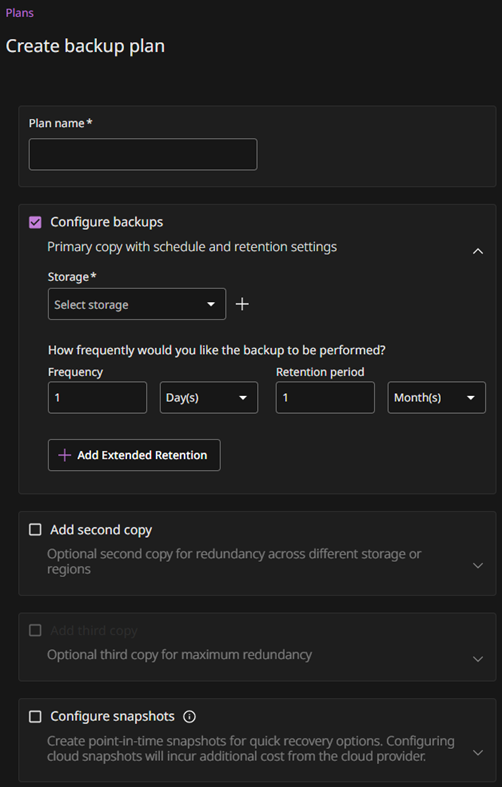
To create a backup plan, complete these steps:
-
In Commvault, go to Policy > Plans.
-
Click Create plan, and then select Backup.
-
Enter a name for the backup plan.
-
For Storage, click the add button to add storage for backups, and then select the type of storage to use.
-
Enter a name for the storage and specify where to store the primary copy.
The available settings depend on the storage type that you select.
-
Click Save.
-
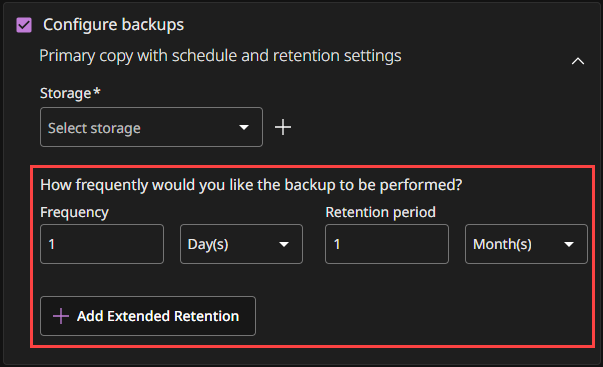
Configure the backup schedule and retention settings.
Snap copies
Don't add a snap copy during initial configuration.
After you onboard a workload and verify that backups work as expected, you can configure snapshot protection for workloads that support it.
-
Click Save.