Credentials provide authentication for workloads, infrastructure platforms, storage, and other resources that Commvault manages.
You can create credentials during workload onboarding or create them separately and reuse them across multiple workloads.
Understanding how credentials work helps you centralize authentication, simplify credential management, and reduce duplicate configuration across workloads.
How credentials are used
Commvault uses credentials to authenticate with the resources that it protects and manages.
Most environments require credentials for:
-
Workloads to protect, such as databases, file servers, and NAS devices
-
Infrastructure platforms such as hypervisors and cloud providers
-
Backup storage
-
Operating systems and services that Commvault manages
Credential vaults
Credentials can be stored in:
-
Commvault credential vault
-
An external privileged access management solution, such as Azure Key Vault and CyberArk solutions
Use the approach that aligns with your organization's security requirements.
Reusing credentials
Many workloads can share the same credential. For example, multiple hypervisors, databases, or storage resources can use the same administrative credential.
Reusing credentials reduces administration, simplifies credential rotation, and helps maintain consistent access across workloads.
Create a credential in the Commvault credential vault
Note
Most customers create credentials during workload onboarding. You can also create them separately — for example, to prepare for onboarding multiple workloads or to integrate with an existing privileged access management solution.
To create a credential, follow these steps:
-
In Commvault, go to Manage > Account.
-
On the Security tab, click the Credential vault tile.
-
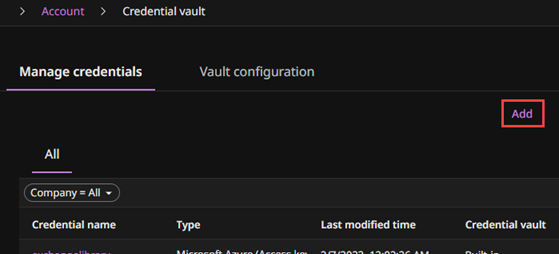
On the Manage credentials tab, click Add.
-
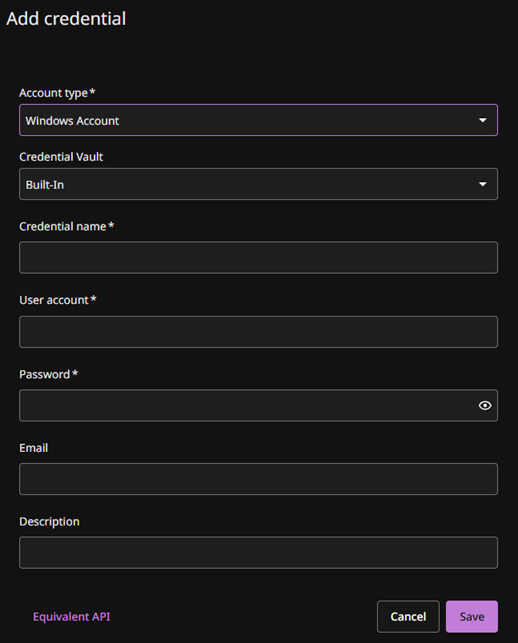
Select the account type, and then enter the credential details.
-
Click Save.