You can use an Azure private endpoint with a cleanroom recovery site.
Prerequisites
-
An Azure environment with a storage account that's configured to use a private endpoint.
-
A virtual network (VNet) and subnet.
Caution
The subnet must not have service endpoints for storage.
Procedure
-
In the Azure Portal, go to the storage account to enable the private endpoint for.
-
In the navigation pane, under Security + Networking, select Networking.
-
Go to Private endpoints, and then click Create private endpoint.
The Private Endpoint creation wizard appears.
-
Select the Subscription and Resource Group where the private endpoint will be created. You can use any existing resource group.
-
Enter a name for the private endpoint.
The Network Interface (NIC) name is auto-generated.
-
Select the region your Virtual Network (VNet) is in.
-
Proceed to the Resource step.
-
Confirm the Resource type is set to
Microsoft.Storage/storageAccounts. -
Verify that the Resource selected is the target storage account.
-
Under Target sub-resource, select Blob.
-
Proceed to the Virtual Network step.
-
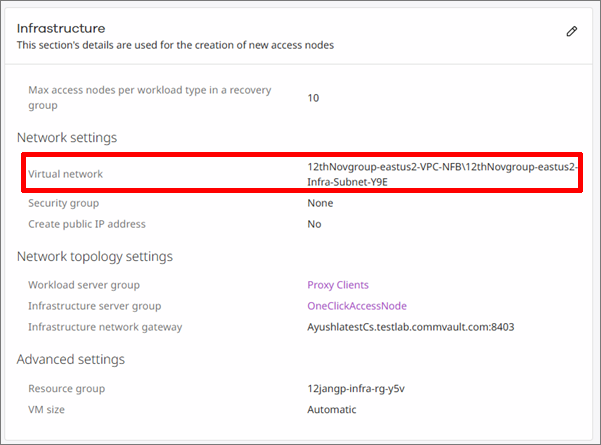
Select the Virtual network (VNet) where the infrastructure exists or will be created.
Make sure this is the same VNet selected in the Infrastructure settings for the cleanroom site. For more information, see Modify settings for cloud-based cleanroom resources.
-
Select a compatible subnet in the VNet.
-
Proceed to the DNS step.
-
Create or select a private DNS zone.
Private DNS ensures that the service hostname resolves to a private IP address instead of a public IP. If DNS is not configured:
-
The service hostname resolves to its public IP.
-
Traffic does not use the private endpoint.
-
If public access is disabled, the connection fails.
-
If public access is enabled, traffic uses the public endpoint, rendering the private endpoint ineffective.
-
-
Optional: Proceed to the Tags step, and then add any required or optional tags for the private endpoint and DNS resources.
-
Proceed to the Review + Create step.
Validate all settings.
-
Click Create, and then wait for the deployment to complete.