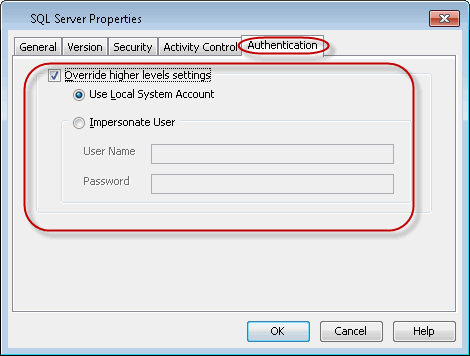
This user account will be used for all instances and associated subclients. Configure the user account at this level if one person will be conducting all backup and restore operations on the client on which the SQL Server iDataAgent is installed. This user account will override the user account configured at the CommCell and Client Computer Group levels.
-
Navigate to Client Computers | <Client>.
-
Right-click SQL Server and click Properties.
-
Click the Authentication tab.
-
Enable the Override higher levels settings check box.
-
Select the following:
Use Local System Account if the computer's Administrator account contains the required privileges.
Impersonate User if you want to use a different account that contains the required privileges. Type the User Name and Password for this account in the space provided.
-
Click OK.