You can restart a disabled report schedule. After you enable a report schedule again, the report generates and then saves to a location or sends to a recipient, according to the configured settings.
Only users who either created the report schedule or who have ownership of the report schedule can edit, disable, or delete the report schedule.
Procedure
-
Log on to the Web Console, and then click Reports.
The Reports page appears.
-
From the navigation pane, go to Configuration > Schedules.
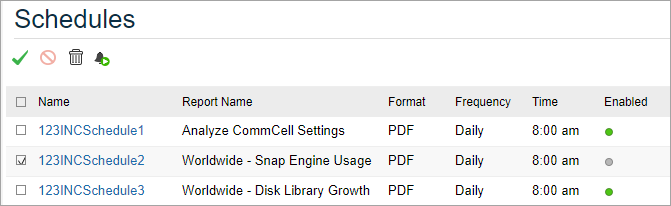
The Schedules page appears.
-
Select the report schedules that you want to enable:
-
To disable a report, beside the report name, select the check box.
-
To disable all reports, at the top of the page, beside Name, select the check box.
-
-
At the top of the page, click Enable
 .
.To indicate that the report is enabled, under Enabled, a green circle appears.