This task applies to the subclient on the production database.
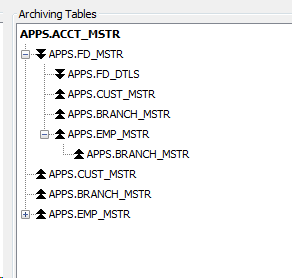
You can view the parent and child relationships when the parent and child tables are part of the archive.
The Archiving Table box (Subclient Properties dialog box, Content tab) lists all tables in the archive. Those tables that have a plus sign ("+") next to them contain dependent tables. Click the plus sign ("+") to expand them. A dependent table can be a child or a parent to the preceding table (see the Example section). A double arrow pointing down indicates that the table is a child. Parent tables have a double arrow pointing up. Table names in italics are not part of the RDBMS schema, You configure them by using virtual foreign keys. For information on how to set a new table relationship, see Defining New Oracle Archive Relationships through Virtual Keys.
Procedure
-
From the CommCell Browser, expand Client Computers > client > Oracle >instance.
-
Right-click the archive_subclient and click Properties.
The Subclient Properties dialog box appears.
-
Click the Content tab.
The software displays the tables in the Archiving Tables area.
Example
Note
For Oracle archiving, parent and child references are in the context of the Oracle foreign key definition. A table that contains a foreign key is the child table and the table that has the corresponding primary key or the table that the foreign key refers to is its parent. For example, if the table FD_MSTR has a foreign key INTRO_ACCT_NO that refers to the ACCT_NO of the ACCT_MSTR table, ACCT_MSTR is the parent and FD_MSTR is the child.