When recovering an Assembly that includes an SQL Server:
-
If the SQL Server uses Entra ID authentication, authentication will be automatically restored with no need for any manual configuration.
-
For SQL Servers that use SQL password-based authentication, authentication will not be recovered, but is required for the recovery process. In this case, recovery configuration displays Authentication Mapping:
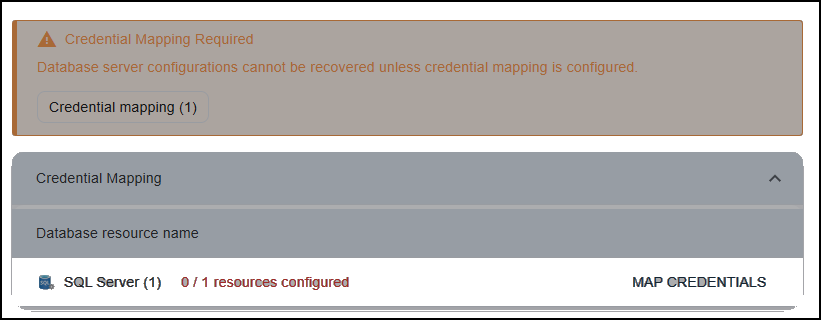
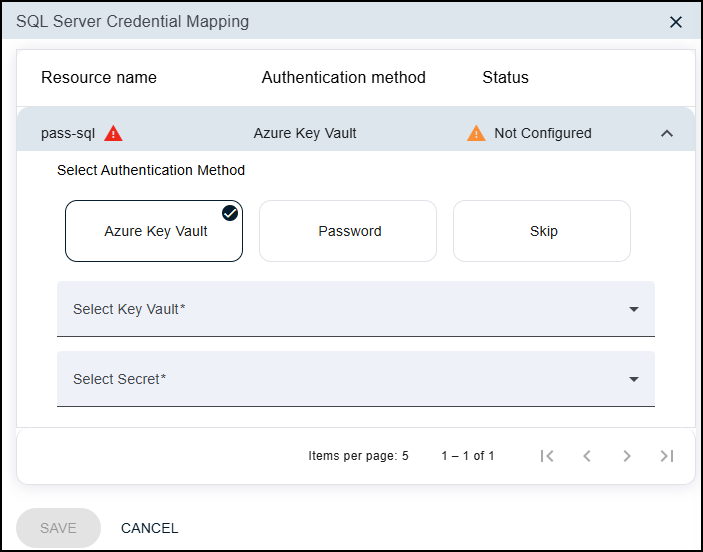
For each SQL Server in turn, click MAP CREDENTIALS and select one of the following options:
-
Password: Directly provide the SQL Server password.
-
Azure Key Vault: Provide access to an Azure Key Vault secret where the SQL Server password is stored.
You'll need to provide the names of the Key Vault and of the Secret whose value is the password.
For Cloud Rewind to be able to access the Key Vault, in Azure Key Vault settings the following must be selected:
-
Access configuration > Resource access > Azure Resource Manager for template deployment
-
Networking > Exception > Allow trusted Microsoft services to bypass this firewall
-
-
Skip: The SQL Server will not be recovered.
Make sure to Save each SQL Server's mapping, and continue configuring the recovery.