When Azure Virtual Network (VNet) peering is configured between VNets that are both included for recovery, the peering is automatically recovered, between the recovered VNets. No special configuration is needed. This includes VNets defined in VNet Mapping.
If a VNet being recovered is peered to a VNet that is not included in the Assembly, by default the peering is not recovered. To peer upon recovery, manually configure mapping of protected peered VNets to VNets that they should be peered with, as below.
In the cases when peering is not recovered (as above), the VNet is safely recovered without peering, and the non-peering is specified in logs.
Same-Subscription Peering and Cross-Subscription Peering
Peering recovery mapping is available for both same-subscription peering and for cross-subscription peering. The peering's type cannot be changed upon recovery:
-
VNets that in the protected Assembly were peered within the subscription can be mapped only to VNets in the recovery subscription;
-
VNets that in the protected Assembly were peered outside the subscription cannot be mapped to VNets in the recovery subscription.
Prerequisites
-
To be available for selection, peering target VNets must have been discovered by Cloud Rewind, either by existing in the same Azure subscription or via another Cloud Rewind Azure Cloud Connection. To be able to peer to a VNet in a subscription that Cloud Rewind has not yet been connected to, create a new Cloud Rewind Cloud Connection to that subscription.
Check that relevant VNet(s) appear in discovered resources. To make sure everything available appears, go to the relevant Cloud Connection and click Actions > Sync Now.
-
The Cloud Connection used for recovery targets (which in cross-subscription recovery is different than the Cloud Connection used for the Assembly source resources) and the Cloud Connection of any peering target VNets, if different, require the following Azure permissions for the relevant subscriptions.
If the relevant Cloud Connection client applications are Managed by Commvault authentication, the permissions exist by default. Otherwise, ensure that the following permissions are configured for all relevant client applications:
Microsoft.Network/virtualNetworks/virtualNetworkPeerings/read
Microsoft.Network/virtualNetworks/virtualNetworkPeerings/write
Microsoft.Network/virtualNetworks/virtualNetworkPeerings/delete
Configuring Peering Recovery
To configure VNet peering recovery:
-
When configuring recovery options, expand the Advanced section and enable Configure VNet peering mapping:
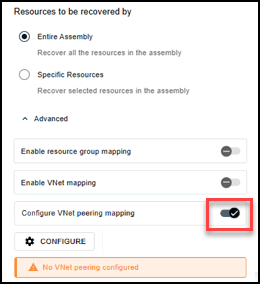
-
For each VNet whose peering to configure:
-
Click Configure.
-
From the drop-down at the top, select a VNet being recovered, to configure its peering. VNets that were peered to it but were not in the Assembly are then listed below it, under Source (referring to the recovery source):
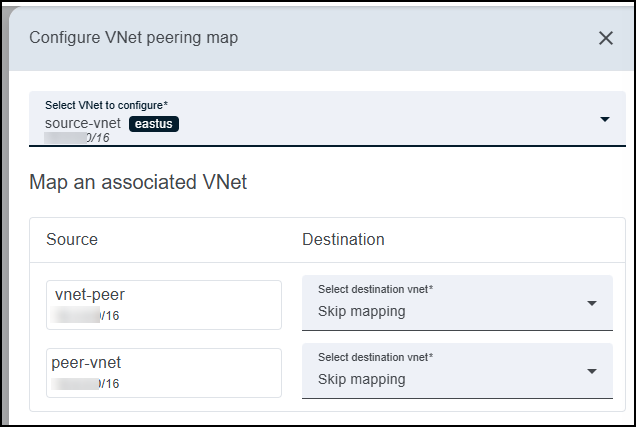
In the above example, VNet source-vnet was peered to two VNets not in the Assembly, listed on the left under Source.
-
For each VNet under Source, select a VNet in the recovery Destination that should take its place in the peering:
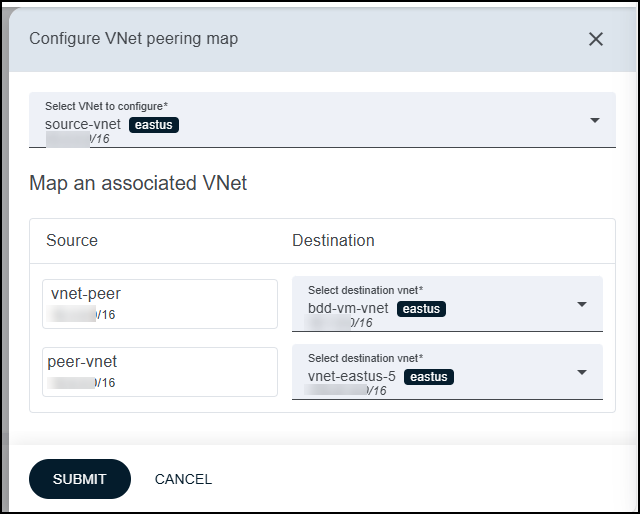
When the peered VNet under Source was in a different subscription than the Assembly, Destination options are grouped by the Cloud Connections where they were discovered:
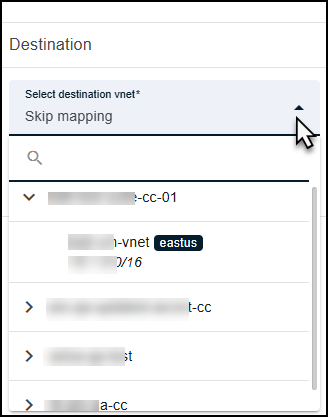
To skip a peering, select Skip mapping.
-
Click Submit.
-
-
Configure peerings of additional VNets as needed. When you're done configurig all mappings and any other recovery options, click Recover.