Review resources analyzed by Data Posture 360 to understand their risk, scan status, detected data categories, data age, and duplicate data. Filter the resources to focus your review, and open a resource in the Data Catalog to investigate its analyzed contents.
From the navigation pane, go to Secure > Data Posture 360, and then click the Resources tab.
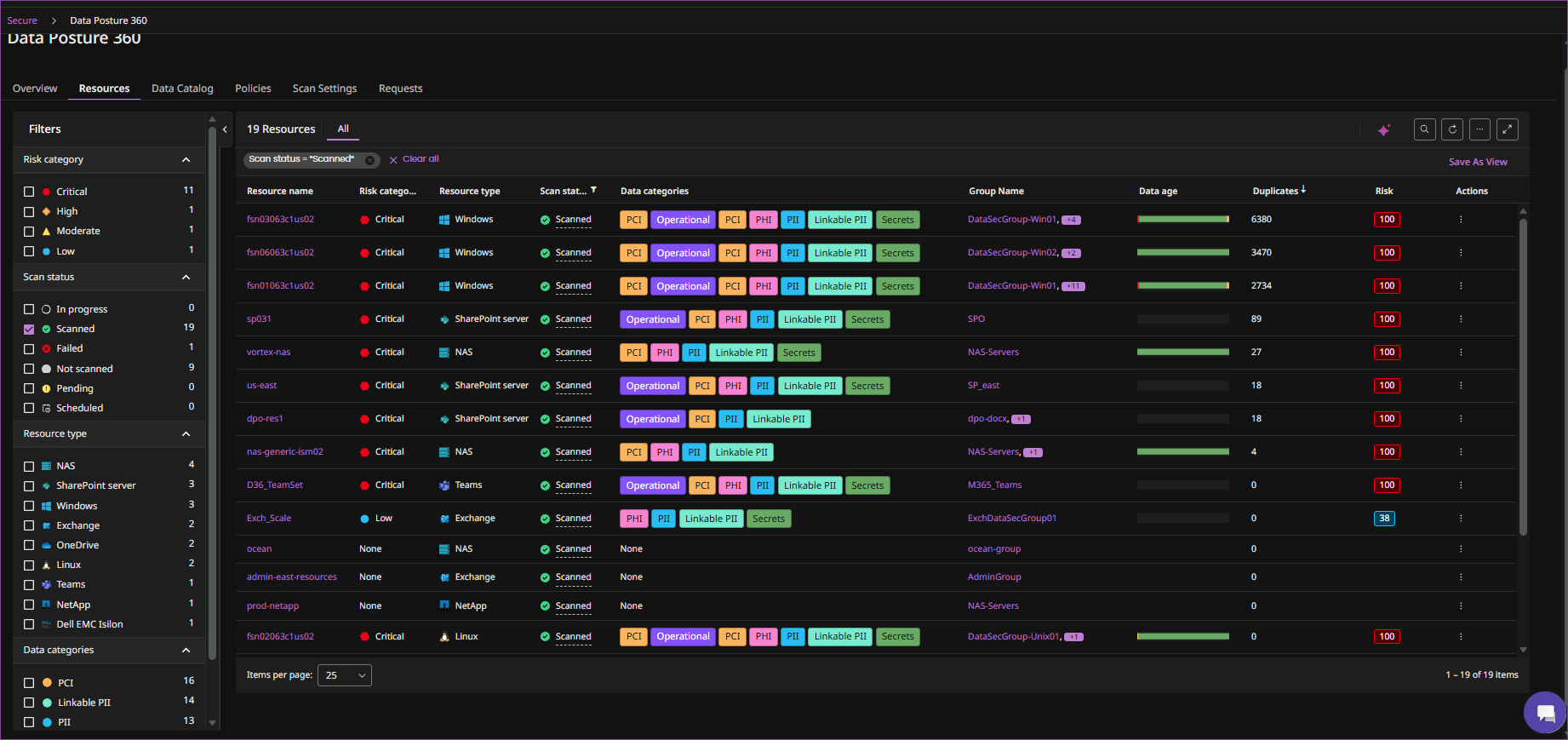
The Resources tab displays the following information for each resource:
| Column | Description |
|---|---|
| Resource name | Name of the analyzed resource. Click the resource name to open the resource in the Data Catalog. |
| Risk category | Risk category for the resource. |
| Resource type | Type of resource. |
| Scan status | Analysis status of the resource. |
| Data categories | Data categories detected in the resource such as PII, PCI, PHI and Secrets. |
| Group name | Data Posture 360 group associated with the resource. |
| Data age | Data age information for the resource. |
| Duplicates | Duplicate data information for the resource. |
| Risk | Risk information for the resource. |
Filter resources
Use the Risk category, Scan status, Resource type, and Data categories filters to narrow the resources displayed on the Resources tab.
Investigate a resource
To investigate the analyzed contents of a resource, click the Resource name. Alternatively, from the actions menu for the resource, click Data Catalog.
The Data Catalog displays detailed information about the resource and its analyzed contents.