This report includes both charts and tables that display data for all restore jobs that run in the CommCell environment.
Restore Jobs By Status
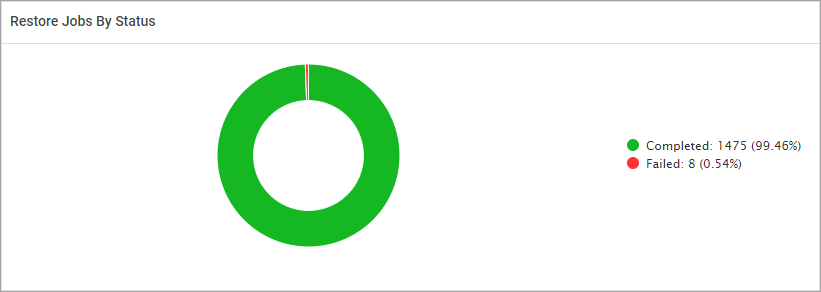
This chart displays the number and percentage of restore jobs in each status type, including Completed, Completed with Errors, Failed, and Completed with Warnings.
The following image is an example of the Restore Jobs By Status chart.
Restore Jobs By Agent Types
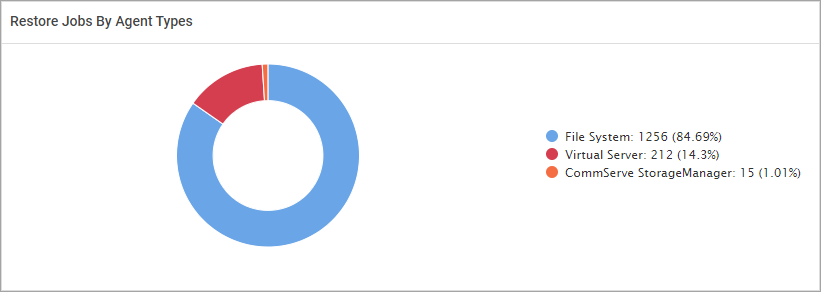
This chart displays the number and percentage of restore jobs that ran for each agent type in the CommCell environment.
The following image is an example of the Restore Jobs By Agent Types.
Restore Job Summary
This table displays the number of restore jobs in each status that ran for each agent type. The table also displays the total size of restore jobs for each agent type.
|
Column |
Description |
|---|---|
|
Data Source |
The CommCell environment where the restore job ran. |
|
Agent Type |
The type of agent, such as Oracle Database, Virtual Server, Windows File System. |
|
Completed |
The number of restore jobs that completed during the specified time period. |
|
Completed with Errors |
The number of restore jobs that completed with errors during the specified time period. |
|
Completed with Warnings |
The number of restore jobs that completed with warnings during the specified time period. |
|
Failed |
The number of restore jobs that failed during the specified time period. |
|
Killed |
The number of restore jobs were killed by a user during the specified time period. |
|
Delayed |
The number of restore jobs that were delayed during the specified time period. |
|
Running |
The number of restore jobs that are currently running during the specified time period. |
|
Total Size (GB) |
The total size of all the restore jobs that ran for the agent. |
Restore Jobs
This table displays information for each restore job that ran in the CommCell environment, including job type, duration, throughput ratio, and failure reason, if applicable.
|
Column |
Description |
|---|---|
|
CommCell |
The CommCell environment where the restore job ran. |
|
Client Groups |
The name of the client group. |
|
Job ID |
The unique identifier for the job. |
|
Job Type |
The type of restore job, such as Restore and Restore Validate. |
|
Status Code |
The numeric value associated with the job status. |
|
Status |
The status of the job during the specified time, such as Completed, Failed, and Running. |
|
Source Client |
The source computer for the restore job. |
|
Destination Client |
The destination computer for the restore job. |
|
Agent |
The type of agent. |
|
Instance |
The name of the instance, if applicable |
|
Backup Set |
The name of the backup set. |
|
Start Time |
The date and time that the restore job started. |
|
End Time |
The date and time that the restore job ended. |
|
Duration (dd:hh:mm:ss) |
The amount of time the restore job took to complete. |
|
Total Objects (Successful/Skipped/Failed) |
The total number of objects, including the number of objects that restored successfully, were skipped, or that failed. |
|
Size (GB) |
The amount of data in the restore job. |
|
Throughput (GB/Hr) |
The data throughput ratio for the job. |
|
Error Code |
The error code associated with the job, if an error occurred. |
|
Failed Reason |
The reason the job failed, if the job failed. |
|
Initiating User |
The user who started the restore job. |
|
Initiated From |
An indication of whether the user started the job from the user interface (GUI) or the command line. |
|
Job Description |
Information that was entered by the user who started or scheduled the job. |
|
Workload |
The name of the workload application. |
Virtual Machine Restore Path
This table displays information for each restore job that was restored from/to a virtual machine.
Note
The information displayed in this table relies on job option details stored in the CommServe database. By default, the system retains job options history for 7 days. To extend this retention period, you can use the qcommand provided below.
qoperation execscript -sn setConfigParam -si DA_CONFIG_DAYS_TO_KEEP_JOB_OPTIONS_IN_JMTABLES -si value -si authentication_codeReplace
For more information about setting the SetConfigParam configuration parameter, see Available Qscripts.
Caution
Longer retention of job options can cause the database tables to become overly large, which may negatively affect the performance of the database.
|
Column |
Description |
|---|---|
|
Job ID |
The unique identifier for the job. |
|
Source VM |
The name of the source virtual machine. |
|
Virtualization Client |
The name of the source virtualization client. |
|
Files |
The names of the files restored. |
|
Destination VM |
The name of the destination virtual machine. |
|
Destination Path |
The path of the destination virtual machine. |