You must change your client secret for Azure Active Directory every 90 days as a best practice.
Important
This procedure is partly completed on the Microsoft Entra admin center. The application is subject to change without notice. Consult the Microsoft documentation, for example, see What is the Microsoft Entra admin center?.
Change Client Secret for the Azure App on Microsoft Entra Admin Center
-
Log on to the Microsoft Entra admin center.
-
In the navigation pane, go to App registrations.
The App registrations page appears.
-
Select the Azure Active Directory app from the list of applications displayed.
You can also use the Search box to find the app.
The Overview page of the app appears.
-
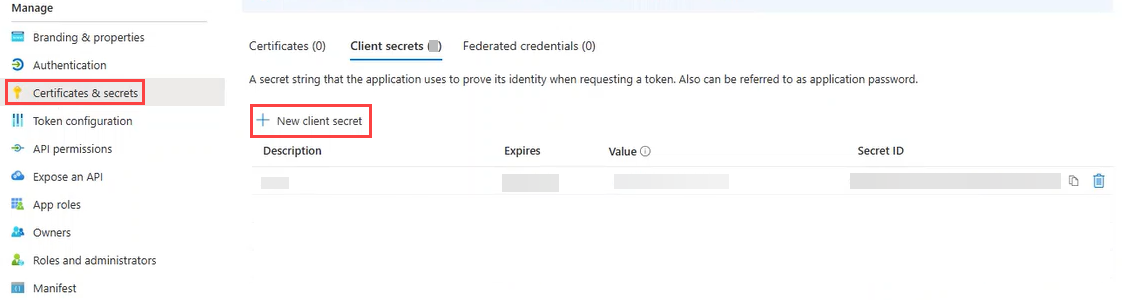
From the left pane, select Certificates & secrets.
-
Above Description, click New client secret.
The Add a client secret screen appears.
-
Provide the required details and then click Add.
-
Description: Provide a descriptive name for your client secret.
-
Expires: Select 90 days (3 months) from the dropdown.
Copy and paste the client secret Value in a secure location that you can access later.
-
-
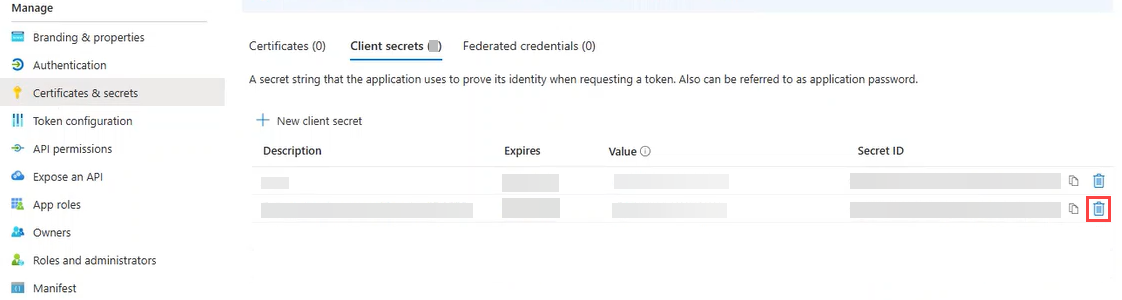
From the list of client secrets, delete the old secret using the Delete button.
As a best practice, delete all old client secrets.
Update Client Secret for Azure app in the Command Center
-
From the Command Center navigation pane, go to Protect > Active Directory.
The Overview page appears.
-
On the Apps tab, click the Azure AD app.
The Overview page of the app appears.
-
On the Configuration tab, in the Azure AD connection settings tile, in the row of the Azure AD, click the action button
 , and then click Edit.
The Edit Azure app dialog box appears.
-
In the Application secret box, enter the new client secret, and then click Save.
Once you have updated the client secret in the Command Center, delete the copied client secret Value.