This report displays information about all database jobs completed for the entities that you specify, in the time period that you specify.
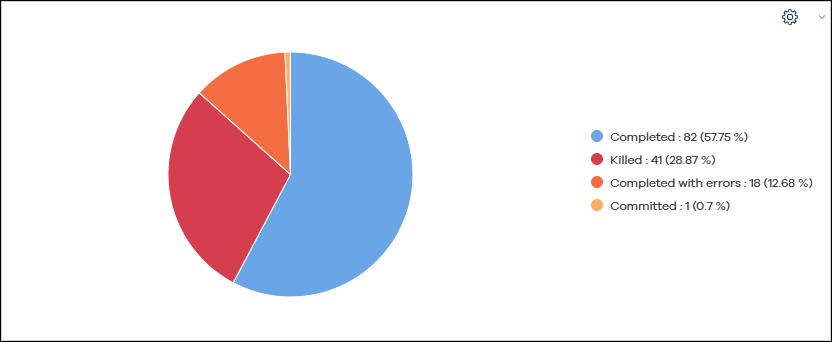
Job Status
This chart displays the number of database jobs in each status during the specified time period. The percentage of jobs in each status is also displayed.
Jobs by App type/ Workload
This chart displays the number of apps or workloads installed in the CommCell environment.
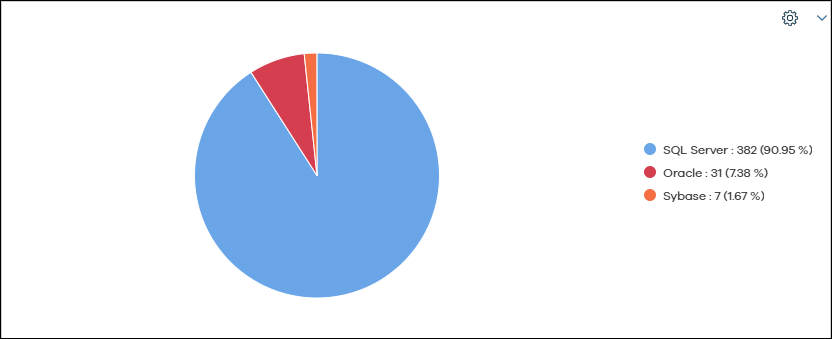
Databases in SQL Server, Oracle and Sybase Backup Jobs
This table includes information about each job that ran during the specified time period.
|
Column |
Description |
|---|---|
|
CommCell |
The name of the CommServe computer. |
|
Job ID |
The identifier that was assigned to the database job. |
|
Server |
The name of the client computer where the database job ran. |
|
Client ID |
The ID for the server. |
|
Company |
The company associated with the client computer. |
|
App type |
The type of application where the database job ran. |
|
Instance |
The name of the instance where the database job ran. |
|
Backup Set |
The name of the backup set where the database job ran. |
|
Subclient |
The name of the subclient where the database job ran. |
|
Workload |
The type of workload where the database job ran. |
|
Type |
Type of job, such as Backup or Synthetic Full. |
|
Backup Type |
The type of backup job, such as Full, Transaction log, or Incremental. |
|
Start Time |
The date and time when the database job initiated. |
|
End Time |
The date and time when the database job stopped. |
|
Storage Policy |
The storage policy associated with the subclient. |
|
Database Name |
The name of the database. |
|
Database Size |
The size of the database. |
|
Database Status |
The status of the database server. |
|
Job Status |
The status of the database job such as Completed, Killed, or Failed. |
|
Job Phase |
The current phase of the database job running on the CommCell environemnt. |
|
Retain Data Until |
The final date that data is retained. |