This report displays information about all backup jobs completed for the entities that you specify, in the time period that you specify.
Job Status
This chart (sample shown below) displays the number of backup jobs in each status during the specified time period. The percentage of jobs in each status is also displayed.
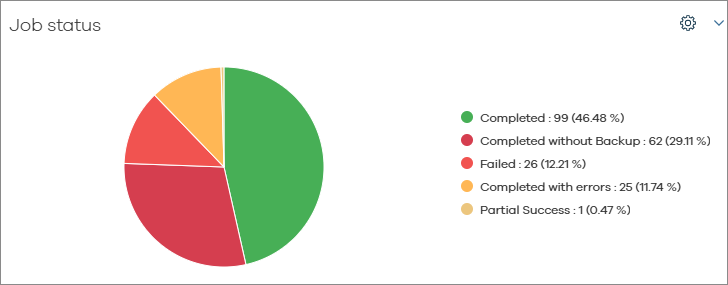
The following table defines each job status type.
|
Status |
Description |
|---|---|
|
Running |
Jobs that were running at the time of the report. |
|
Completed |
Jobs that completed during the specified time. |
|
Delayed |
Jobs that were delayed at the time of the report generation. |
|
No Run |
Jobs that are scheduled to run, but did not run which are in suspended state. Reasons that scheduled jobs do not run include:
|
|
Failed |
Jobs that failed. |
|
Killed |
Jobs that were killed. |
|
Completed with Errors |
Jobs that completed with errors. |
|
Completed with Warnings |
Jobs that completed with warnings. |
|
Committed |
Jobs that committed during the specified time. |
Jobs by App Type/Workload
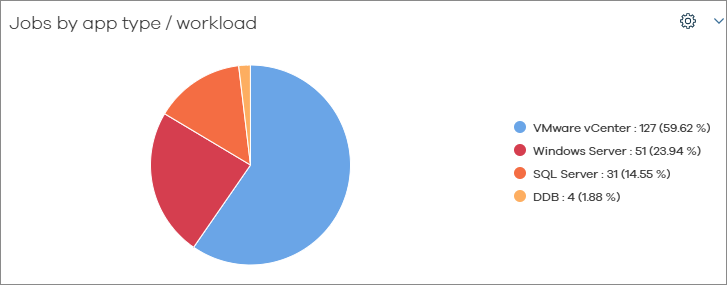
This chart (sample shown below) displays the number of backup jobs by app type/workload during the specified time period. The percentage of jobs by app type is also displayed.
Summary
This table includes information about all backup jobs that ran during the specified time period.
|
Column |
Description |
|---|---|
|
Job Status |
Type of status, such as Completed or Killed. |
|
Total Jobs |
Total number of jobs in this status. |
|
Size of Application |
Size of backup jobs in this status. |
|
Estimated Media Size |
Amount of storage media consumed by jobs in this status. |
|
Protected Objects |
Number of objects protected by jobs in this status. |
|
Failed Objects |
Number of objects that were not backed up by jobs in this status. |
|
Failed Folders |
Number of folders that were not backed up by jobs in this status. |
Job Details
This table includes information about each backup job that ran during the specified time period.
|
Column |
Description |
|---|---|
|
CommCell |
The CommCell where the original data resided. |
|
Job ID |
The identifier that was assigned to the backup job. |
|
Server Display Name |
The server where the original data resided. |
|
App Type |
The app type of the data that was backed up. |
|
Subclient |
The name of the subclient where the backup job ran. |
|
Backup Type |
The type of backup job, such as Full or Incremental. |
|
Start Time |
The time the backup job began. |
|
End Time |
The time the backup job ended. |
|
Application Size |
The amount of data that was included in the backup job. |
|
Media Size |
The amount of media that was consumed by the backup job. |
|
Job Status |
The status of the backup job such as Completed, Killed, or Failed. |
|
Failure Reason |
If applicable, reason that the job failed. |
|
Throughput (GB/Hour) |
The amount of data throughput in gigabytes per hour. |
|
Plan Name |
The name of the storage plan for the backup job. |
Databases in SQL Server and Sybase Backup Jobs
|
Column |
Description |
|---|---|
|
CommCell |
The CommCell where the original data resided. |
|
Job ID |
The identifier that was assigned to the backup job. |
|
Server |
The server where the original data resided. |
|
App Type |
The app type of the data that was backed up. |
|
Instance |
The instance name containing the data that was backed up. |
|
BackupSet |
The name of the backup set for the data that was backed up. |
|
Subclient |
The name of the subclient for the data that was backed up. |
|
Type |
The type of operation, such as Archive, Backup, or Snap Backup:
|
|
Backup Type |
The type of backup job, such as Full or Incremental. |
|
Start Time |
Start time of the backup job. |
|
End Time |
End time of the backup job. |
|
Storage Policy |
The name of the storage policy for the data that was backed up. |
|
Database Name |
The name of the database that was backed up. |
|
Database Size |
The size of the database that was backed up. |
|
Job Status |
The status of the backup job such as Completed, Killed, or Failed. |
Note
Sybase backups are not supported on Commvault Cloud.