You can configure access to the vCenter server on Port 443 using a port-forwarding gateway.
Use case: When a VSA proxy client computer does not have direct access to the vCenter server on Port 443, and the CommServe server does have direct access (shown in the figure below), then you can use this procedure.
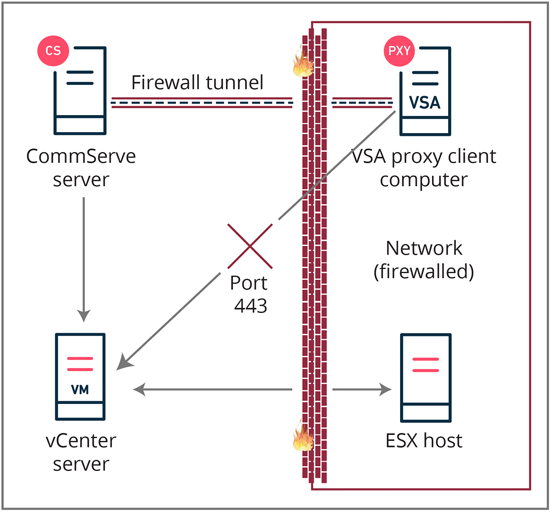
Before You Begin
Configure network routes between the CommServe server/MediaAgent and the vCenter Server Appliance (VSA) proxy client computer. For more information, see Direct Connections.
Procedure
-
On the VSA proxy client computer, go to the Commvault Base folder and then do the following:
-
Open the FwConfig.txt file and then copy the network route between the VSA proxy client computer and the CommServe server.
-
Open FwConfigLocal.txt file and paste the route under the [outgoing] section.
-
At the end of the pasted network route, append the following code:
tppm=Sourceport:vCenterhostname:443Where Sourceport = any local port on that machine (for example, 9000).
-
Save the FwConfigLocal.txt file.
-
-
On the CommServe server, go to the Commvault Base folder and then do the following:
-
Open the FwConfigLocal.txt file.
-
Insert the following code under the [incoming] section:
allowed_tppms=vCenterHostname:443Where vCenterHostname = the hostname of the vCenter server.
-
Save the FwConfigLocal.txt file.
-
-
From the CommCell Console, do the following:
-
Go to Client Computers > vCenter clientname > Virtual Server, right-click VMware, and then right-click Properties.
The Virtual Server Instance Properties dialog will appear.
-
Change the value of vCenter host name to 127.0.0.1:9000, and then confirm your user credentials.
-
Click OK.
-
Result
All connections that connect to 127.0.0.1:9000 on the VSA proxy client computer will be forwarded to vCenterhostname:443 via the CommServe server using tunnel port 8403.