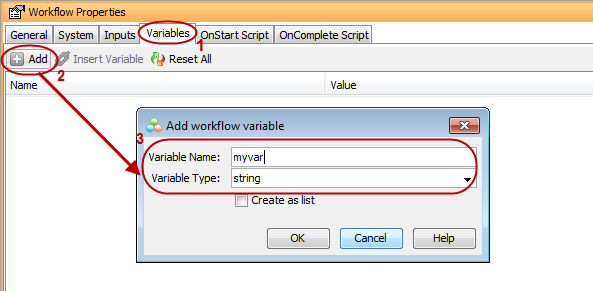
Variables allow you to hold a specific value type and use it anywhere in the workflow process. For example, you can insert a variable in an activity containing a message to indicate the resulting value of the variable.
The creation of variables is very similar to creation of inputs. However, in terms of usage, they differ: workflow variables are used internally in the Workflow and are never seen by the user during execution. Workflow inputs are exposed to the user during execution as they require a value provided by the user.
You can define the following types of variable:
-
string
-
integer
-
boolean
-
date/Time
-
double
-
float
-
long
-
short
-
XML
-
other, such as pre-defined CommCell entity types (for example, ClientEntity)
Procedure
-
From the Workflow window, go to the Workflow Properties pane.
-
On the Variables tab, click Add.
-
In the Variable Name box, type the name of the variable.
-
From the Variable Type list, select the type, for example, string.
-
To store all processed values in a list, select the Create as list check box.
-
Click OK.