What are some common error codes to be used with error decision rules?
The following table displays common error codes examples on Windows and Solaris computers which you can define in an error decision rule:
|
Error Code Value |
System Error Message |
|
1 |
Operation not permitted |
|
2 |
No such file or directory |
|
3 |
No such process |
|
5 |
I/O Error |
|
6 |
No such device or address |
|
13 |
Permission denied |
|
16 |
Mount device busy |
|
32 |
Broken pipe |
For a comprehensive list of error codes, refer to the operating system vendor documentation.
What is the difference between error decision and error threshold rules?
|
Error Decision Rules |
Error Threshold Rules |
|---|---|
|
You can define multiple decision rules for an agent based on the following criteria:
|
You can define up to two threshold rules for an agent based on the following criteria:
|
Examples
|
Error Decision Rule Examples |
Error Threshold Rules Examples |
|---|---|
|
The following are some examples that show when it is useful to define error decision rules: Example 1 Define the following criteria to ignore any error found in temporary files: File Pattern: C:\temp\* System Error Code: All Error Codes On error mark Job as: Complete Example 2 Define the following criteria to mark the backup job as failed when an error is found in system data files: File Pattern: /**/*.dat System Error Code: 1 - 10 On error mark Job as: Failed |
The following are some examples that show when it is useful to define error threshold rules: Example 1 Define the following criteria to mark the job as completed with errors when 10 or more files failed to back up: Count: 10 On error mark Job as: Failed Example 2 Define the following criteria to mark the job as failed when 1/4 of files failed to back up: Percentage: 20 On error mark Job as: Completed with Error Example 3 Define the following criteria to mark the job as failed when 10 and 20% of files fail to back up. In this scenario, both conditions (count and percentage) need to apply for the rule to take effect. Count: 10 Percentage: 20 On error mark Job as: Failed |
How do the error rules work?
Once created, the agent applies error decision rules first at the end of the backup operation. During this process, the agent traverses the failures.cvf file and determines which are the rules that match (based on priority). The failures.cvf file includes information of all the backup files that failed along with their associated error code.
If the job is not marked as Failed based on the decision rules, the agent continues to traverse the failures.cvf file applying error threshold rules.
The following describes the process for each error rule:
-
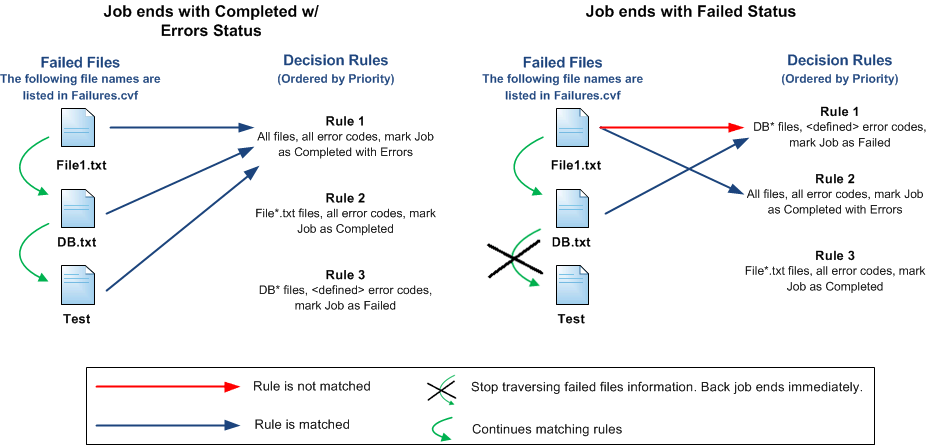
In the case of decision rules, when a file and its error codes match a rule, the file is marked with the defined status, and the agent continues to traverse the failures.cvf file. However, if a file matches a rule that will mark the job as failed, the backup job ends immediately with the failed status. The following graph describes the process:
-
In the case of threshold rules, if the number of failed files matches the amount specified in a rule that will mark the job as failed, the backup job ends immediately with the failed status. Otherwise, the agent continues to traverse the failures.cvf file.
What happens if I define two threshold rules with the same condition?
You can define up to two threshold rules for each agent (one rule per job status). When you define the same condition for both threshold rules, the agent will continue to traverse the threshold rules until it meets the Failure status.