IntelliSnap Guide Objective and Overview
This guide is an introductory overview of the storage array with its built-in technology and feature sets, along with the licenses and configuration requirements to integrate these controls with the Commvault software. This guide also provides detailed descriptions for configuring hardware-based snapshot mechanisms using the Commvault software.
The IntelliSnap technology of the Commvault software is a modernized approach for data protection, allowing hardware storage systems snapshots to merge directly into the backup process. By automatically integrating application intelligence with array snapshot abilities, Commvault is able to reach through the application and file systems into the storage array to accomplish the following:
-
discover volume/disk configurations for the snapshot operations
-
coordinate snapshot operations with proper application quiesce
-
minimize administrative configuration and eliminating scripting requirements
When a scheduled backup job for a defined application runs, the source system quiesces the selected applications and automatically creates a set of persistent snapshots within the production storage system. With a confirmation of the successful snapshot creation by the host, the workload in the protection job shifts to a secondary proxy server to offload backup operations. This shift releases the production host, which returns to full production side operations. This allows the creation of a consistent data image in minutes with Recovery Point Objectives (RPOs) aligning with the frequency of schedule.
The Proxy completes the second half of the protection job by reaching into the SAN, mounting the snapshot and automatically indexing and cataloging the file-level contents of the snapshot(s). Unlike the hardware-based snapshot approach, Commvault blends the speed and efficiency of array snapshots directly into the backup and restore process, offering full system recovery or single file restore. Once the content-aware indexing completes, the snapshot is retained in the array as a persistent recovery copy to provide a quick recovery option to revert or restore the data volumes.
The Proxy serves a secondary role after the snapshot executes. The same snapshots will mount and copy the relevant file contents from the snapshot and apply deduplication to the data during transport to the backup copy destination. The backup copy employs a separate retention than the snapshot allowing aggressive snapshot retention to preserve tier1 space to meet the RTO/RPO needs. As data moves into the backup copy, the original indices are preserved and stored along with the data to ensure access from any location. Data encryption is also another critical feature to apply to data to keep it highly secured from unwanted eyes.
IntelliSnap supports the leading SAN/NAS storage solutions from Dell EMC, NetApp, LSI, HPE, SUN, IBM and Hitachi Vantara.
Dell EMC VNX / CLARiiON Storage System Overview
Dell EMC provides customers Clariion Storage System platform for mid-range to entry level storage needs.
Dell EMC VNX / CLARiiON is a Storage Subsystem dedicated for mid-range system LUN-based use. It also does not provide CIFS/NFS capabilities unlike many Network Attached Storage systems. Dell EMC leverages the Celerra platform for NAS based storage offerings.
This guide will provide an in-depth storage technology overview, examples of configuration and necessary steps to configure Commvault with Dell EMC VNX / CLARiiON systems.
For further Dell EMC VNX / CLARiiON training material, see powerlink.emc.com.
Architecture of Clariion and Navisphere
The architecture of Dell EMC VNX / CLARiiON is based on the following components:
Hardware Components
2 Storage Processors
Software Components
-
Disk Array Enclosure
-
FLARE Code
These components provide the storage-system performance and functionality for today's Small-to-Medium Business needs. The following sections provide a brief description for each component.
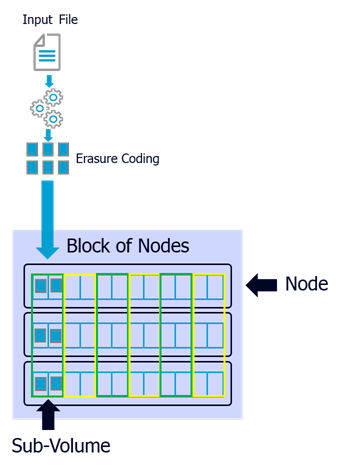
Storage (or Service) Processors/Storage Processor Enclosure
Dell EMC provides connectivity between the customer environment and the Clariion through Storage Processors. There are two Storage Processors for each of the Clariion systems for Trespassing capability (Fail-over capability). Each storage processors have their own Memory for processing all input/output locally with trespassing capabilities. Each storage processor provide the following:
-
Front-End connectivity (customer environment) using either Fibre Channel and/or iSCSI
-
Back-End connectivity (storage) using Fibre Channel Loops.
Both storage processors reside within a Storage Processor Enclosure, and each provide user interface and command line interface level console connection to provide customers ways to manage Disk provisioning through Navisphere (Clariion management software).
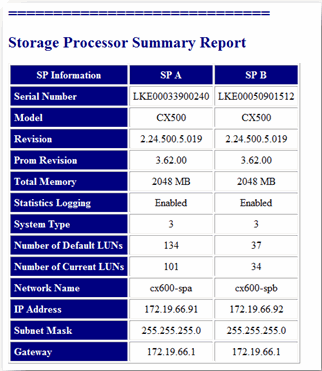
An example report from Navisphere with the basic configuration of each Storage Processor is shown below.
Disk Array Enclosure
Disk Array Enclosure (DAE) is a main component that connects with the Back-End modules from each of the storage processors presenting raw disks for use. Each DAE contains 15 disk drives in a Fibre Channel loop, and can be daisy chained to loop up to 120 disk drives per loop.
FLARE Code
FLARE (Fibre Logic Array Runtime Environment) is the proprietary code from Dell EMC that controls each component in Clariion, much like Enginuity running throughout the high-end Dell EMC Symmetrix family. FLARE code usually runs off the first five disks of the first Disk Array Enclosure, which is also supplied by the integrated Uninterrupted-Power-Supply (UPS). All write cache contents will be stored in an event of power failure for complete restoration upon power-on.
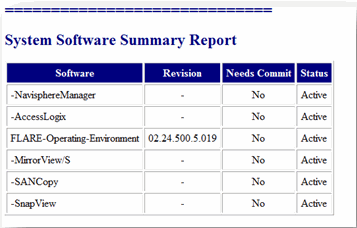
An example of the Flare code running on a particular Clariion model is shown below.
Navisphere
Navisphere is Dell EMC’s customer software product that allows customers to configure, monitor and manage Dell EMC VNX / CLARiiON disk-array storage systems connected to hosts on a network. Navisphere has a server and client side where each of the clients talk to the server to request changes and updates to the Dell EMC VNX / CLARiiON storage system.
|
Component |
Description |
|
Navisphere Host and SP Agents |
Navisphere Agents relay configuration and status requests from Navisphere Manager to Dell EMC VNX / CLARiiON storage systems. These agents also periodically retrieve information from the storage system events and can notify personnel by e-mail, pager, or modem when any specific event occurs.
|
|
Navisphere Manager (Navisphere Command Line Interface) |
The Navisphere Manager is a centralized storage-system management tool to configure and manage Dell EMC VNX / CLARiiON storage systems. It allows the following basic functions:
|
|
Navisphere Storage Manager Server |
This component allows you to:
|
SnapView
SnapView is an Dell EMC VNX / CLARiiON feature that allows internal operations in a single Clariion system to create a point-in-time view of a logical unit (LUN) without disrupting the source volume. The SnapView software is installed by default and resides on the Dell EMC VNX / CLARiiON storage-system. Dell EMC runs a Non-Disruptive Update to enable the feature.
SnapView requires a separate licensing component that is usually provided by Dell EMC to allow Clariion customers to take advantage of the Clone/Snap feature.
The following snapshot capabilities are available:
Dell EMC VNX / CLARiiON SnapView Clone
It is the traditional way to take a full copy of the source volume to a clone volume at a block by block level. Dell EMC VNX / CLARiiON SnapView Clone requires a full or incremental synchronization before a clone fracture can be initiated, allowing the clone to be available for reuse by another server or presented as another LUN.
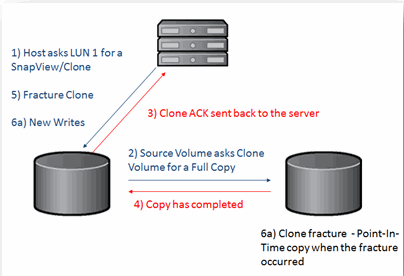
Dell EMC VNX / CLARiiON SnapView / VNX Snap
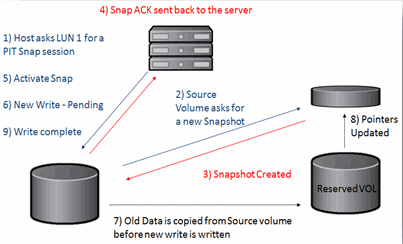
It provides the ability to provide a Point-In-Time view of the source volume using pointers with reserved volumes. Pointers will initially point to the original data on the source volume. Once new data is written to the source volume, the original data is copied to the reserved volume to preserve the Point-In-Time view.
During the first SnapView session on a given source volume, a reserved volume is assigned to the source volume. If the SnapView session runs long enough that the reserved volume is filled, the next reserved volume will be assigned to the source volume.
Storage Systems Series Support
The Commvault software supports all CX series models. AX series are not supported.
For information on the supported storage systems for the Commvault software, see Hardware Snapshot Engine Compatibility Matrix.
AX Series
AX Series are considered an entry level version of the Dell EMC VNX / CLARiiON storage system. Serial-ATA drives are only supported in this model.
|
Model |
Connectivity |
Max Connection Speed |
Max Number of Disks |
|
AX150 |
FC |
2 Gb/s |
12 |
|
AX150 SC |
FC |
2 Gb/s |
12 |
|
AX150i |
iSCSI |
1 Gb/s |
12 |
|
AX150i SC |
iSCSI |
1 Gb/s |
12 |
|
AX4-5F |
FC |
4 Gb/s |
60 |
|
AX4-5I |
iSCSI |
1 Gb/s |
60 |
CX Series
The CX series support both Serial-ATA and Fibre Channel disk drives.
|
Model |
Connectivity |
Max Connection Speed |
Max Number of Disks |
|
CX300 |
FC / iSCSI |
2 Gb/s and 1 Gb/s |
60 |
|
CX500 |
FC / iSCSI |
2 Gb/s and 1 Gb/s |
120 |
|
CX700 |
FC Only |
2 Gb/s |
240 |
CX3 Series
CX3 series support both Fibre Channel and iSCSI connectivity with double the number of disks for the high end of the CX series.
|
Model |
Connectivity |
Max Connection Speed |
Max Number of Disks |
|
CX3-10 |
FC / iSCSI |
2 Gb/s and 1 Gb/s |
60 |
|
CX3-20 |
FC / iSCSI |
2 Gb/s and 1 Gb/s |
120 |
|
CX3-40 |
FC / iSCSI |
2 Gb/s and 1 Gb/s |
240 |
|
CX3-80 |
FC / iSCSI |
2 Gb/s and 1 Gb/s |
480 |
CX4 Series - Ultrafex
CX4 series increases the Fibre Channel speed up to 4 Gb/s, while iSCSI support is still for 1Gb/s. This series also allows for Solid State Drives (SSD) to be used as Back-End disk drives, and also features 64-bit FLARE code due to the introduction of the 64-bit Intel Xeon CPUs in the Storage Processors. Again, the high end doubles the maximum number of disks.
|
Model |
Connectivity |
Max Connection Speed |
Max Number of Disks |
|
CX4-120 |
FC / iSCSI |
4 Gb/s and 1 Gb/s |
120 |
|
CX4-240 |
FC / iSCSI |
4 Gb/s and 1 Gb/s |
240 |
|
CX4-480 |
FC / iSCSI |
4 Gb/s and 1 Gb/s |
480 |
|
CX4-960 |
FC / iSCSI |
4 Gb/s and 1 Gb/s |
960 |
Integration Requirements for IntelliSnap
Array and Solutions Enabler Software Licenses
The Commvault software requires enabling certain array components and licenses on the Dell EMC VNX / CLARiiON storage system to achieve a successful integration with the software. Refer to the Getting Started for Dell EMC VNX / CLARiiON documentation for more information.
Supported Applications and Operating Environments
Refer to the IntelliSnap Backup - Support document for a complete list of supported applications and platforms.
Commvault Software
IntelliSnap solutions require the appropriate agents as defined by the customer configuration. See the following terminology for reference in this document:
|
Terms |
Description |
|
Production Host |
Server hosting the actual production LUN for snapshot or clone operations. |
|
Proxy Host |
Server mounting the snapshot or clone for backup purposes off of the Production Host |
|
Array |
Hardware Storage Array executing the snapshots. |
|
File System iDataAgent |
Agent for protecting the file system of a host. It is the base requirement for most Application iDataAgent. |
|
MediaAgent |
Agent for creating and managing snapshots as well as for writing data to backup targets. |
|
Application iDataAgent |
Agent for protecting applications such as SQL, Exchange, DB2, SAP and Oracle. Enables application-aware snapshots to be created when backups are scheduled. |
|
Virtual Server Agent (VSA) |
Agent providing protection of Virtualization Environments without installing backup iDataAgents internal to the guests. |
|
VSS Provider |
This software allows programmatic controls of the Windows VSS components. |
A CommServe, a necessary storage capacity, and MediaAgents must exist to enable a completely functional solution. See the Getting Started for Dell EMC PowerMax/VMAX3/VMAX/Symmetrix for instructions on:
-
CommServe, MediaAgent and File System installation
-
Storage Device and Storage Policy Configuration
On top of this basic infrastructure, you can configure the environments described below.
Basic File System Environments
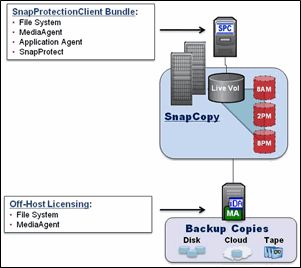
The IntelliSnap base configuration requires the following agents on the Production Host:
-
Windows/UNIX File System iDataAgent
-
MediaAgent
-
VSS Software Provider (Windows Only)
For a configuration where snapshots mount off the host to a Proxy server, implement the following agents on the Proxy:
-
File System iDataAgent (Must be similar to Production Host Operating System)
-
MediaAgent
Refer to Getting Started - Setup Clients to select Windows/UNIX iDataAgent and perform the required deployment and configuration steps.
Application Environments
Protecting application databases and log volumes through an Array snapshot provide fast access for recovery and many flexible options for backups. IntelliSnap integrates application awareness together with the Array and Commvault to deliver all of the benefits of traditional streaming backups with all of the performance and proxy capabilities of a snapshot. This application awareness allows backups with appropriate log management operations based on the snapshot data.
When implementing for Application Environments simply add the appropriate Application iDataAgent to the IntelliSnap base configuration as follows on the Production Host:
-
Windows/UNIX File System iDataAgent
-
MediaAgent
-
VSS Software Provider (Windows Only)
-
Application iDataAgent for selected Application (e.g., Exchange, SQL, Oracle)
For a configuration where snapshots mount off the host to a Proxy server, implement the following agents on the Proxy.
-
File System iDataAgent (Must be similar to Production Host Operating System)
-
MediaAgent
-
Application specific iDataAgent (Must be the same to Production Host) to enable Proxy. This is required for RMAN integrated backups.
-
Application API (e.g., Exchange Management Pack, Oracle for RMAN integration)
Refer to
Getting Started - Setup Clients to select your application
iDataAgent and perform the required deployment and configuration steps.
Virtual Environments
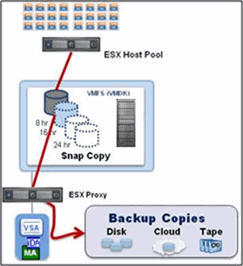
IntelliSnap enables fast protection of large or volatile VMware environments without placing load on the production Virtualization Farm. IntelliSnap technology integration with the Virtual Server Agent enables the Array to perform backups in minutes even with large numbers of virtual machines and sizable data stores. A dedicated ESX server for proxy data movement removes any utilization on the ESX farm providing file and folder recovery from the secondary tier of storage.
To enable IntelliSnap for the Virtual Environment install the following on the physical server(s) or virtual hot-add guest(s):
-
Windows/UNIX File System iDataAgent
-
MediaAgent
-
Virtual Server Agent (VSA)
Refer to Getting Started - VMware for deployment and configuration steps.
IntelliSnap Array Configuration Details with Clariion
The Commvault software utilizes two different local replication mechanisms provided by Dell EMC: Dell EMC VNX / CLARiiON SnapView Clone and Dell EMC VNX / CLARiiON SnapView / VNX Snap. Dell EMC VNX / CLARiiON SnapView Clone provides full replication of a Production logical device to a Clone Target volume (target LUN), block by block. Dell EMC VNX / CLARiiON SnapView / VNX Snap provides a block level pointer-based approach using reserved volume so blocks of the active LUN will be copied to a reserved volume upon a new write generated on the Production LUN. In other words, Dell EMC VNX / CLARiiON SnapView Clone generates a reference-able clone on separate disks, while Dell EMC VNX / CLARiiON SnapView / VNX Snap leverages the Copy-on-Write model and pointers to provide Snapshot access.
Refer to the Getting Started for Dell EMC VNX / CLARiiON documentation for array configuration steps.
The IntelliSnap Process
The following sections describe the different IntelliSnap operations.
Backup Operation
IntelliSnap backups consist of the following operations:
-
The backup job (on-demand or scheduled) starts from the CommCell Console.
-
The file system, associated applications, or Virtual Machines properly acquiesce (VSS calls Windows or through application interfaces such as RMAN the database goes in a Hot Backup mode). In VMware configurations, vStorage APIs are called to create software snapshots and enable delta file creation for each of the guests targeted as contents of the snapshot.
-
Array API is called to:
-
Verify the backup job contents (validating the underlying disk structure for file systems, databases, etc).
Dell EMC VNX / CLARiiON SnapView Clone establishes the Clone Volume to the Production Volume, waits for synchronization and fractures the Clone from the Production volume.
Dell EMC VNX / CLARiiON SnapView / VNX Snap creates and actives a Snap session between the Production and reserved volume.
-
Assign the Clone/Snap to the appropriate Storage group (either the production or the proxy computer).
-
Mount the snapshot on the source or the selected proxy computer for post-snapshot operations (e.g., Scan and Catalog for File System). For VMware and RMAN proxy configurations, the Virtual Machines and database files are registered by the proxy application software.
-
-
Unmount the snapshot.
This snapshot now provides availability for backup copy operations and high speed restore, mount and revert operations.
Backup Copy Operation
A backup copy operation provides the capability to copy the snapshots to media and can be useful for creating additional standby copies of data. When you enable backup copy, the snapshots are copied to media (based on the rules specified for the snapshot copy) during the IntelliSnap backup or at a later time.
During the Backup Copy operation:
-
The snapshots are copied to media in a sequential order.
-
The snapshots are mounted to the source or proxy computer. The mounted snapshot receives commands to scan, and backups like a normal file system reading the required contents.
-
The file system backup is performed in the Primary Copy of the storage policy of all defined files. The data is indexed and linked back to the original production host.
-
When the backup copy job is finished, the snapshot is unmounted and retained based upon Snapshot Copy retention settings.
Proxy Configuration
IntelliSnap provides a modernized architecture for handling backup operations within the datacenter. Proxy capabilities enable an array-based snapshot to mount off the host eliminating backup processes on the production servers. Each operating system with a IntelliSnap client requires a similar operating system for proxy execution. Commvault will automatically link indexing information back to the original host enabling full application protection for recovery purposes. Execution of application integrity checks may also occur on the Proxy servers to validate the data prior to backup creation.
For a configuration where snapshots mount off the host to a proxy server, deploy the following agents on the proxy server:
-
File System iDataAgent (Must be similar to Production Host Operating System)
-
MediaAgent
-
Application specific binaries for proxy (e.g., Exchange Management Pack, Oracle for RMAN, etc)
Verify Configuration Using SnapTest Tool
You can validate the IntelliSnap configuration prior to running production jobs using the SnapTest utility. Refer to the IntelliSnapBackup - SnapTest Tool documentation for usage information.
Security and Storage Policy Best Practices
Security Roles
The Storage Array technology can be potentially dangerous without proper controls. Typical script based tools lack these controls and expose environments to high risk side effects with very little oversight or reporting. A single miss-aligned scripted argument could cause massive data loss.
Rather than risking the business with scripts or standalone tool sets, the embedded role based security system that Commvault provides allows you to entrust critical actions to the right users at the right time. In most medium to large environments, application, backup, and audit responsibilities may be distributed functions that need to be coordinated into a single policy.
For Example, a customer may have three specific roles within an operations environment:
-
Backup Administrators. They are the day to day operators with access to perform standard backup and recoveries, manage media, issue reports, etc.
-
Application owners (or Database Administrators). They manage the applications running the business such as application level recoveries and array-based operations.
-
Audit & Business Compliance leads. They provide security and process proof of who can perform what and how.
Specific roles should be defined for the IntelliSnap and Application iDataAgents within the CommCell. The following table is an example of the Commvault Security Roles basic structure:
|
Security Roles (for Application Clients or Groups) |
Backup |
Application |
Audit Team |
|
Administrative Management |
|
||
|
Agent Management |
|
|
|
|
Agent Scheduling |
|
|
|
|
Alert Management |
|
|
|
|
Browse |
|
|
|
|
Browse and In-Place Recover |
|
||
|
Browse and Out-of-Place Recover |
|
||
|
Compliance Search |
|
||
|
Data Protection |
|
|
|
|
Data Protection Management |
|
|
|
|
End User Search |
|
||
|
Job Management |
|
|
|
|
Library Management |
|
||
|
Library Administration |
|
||
|
License Management |
|
||
|
MediaAgent Management |
|
||
|
Report Management |
|
|
|
|
Storage Policy Management |
|
|
|
|
User Management |
|||
|
Vault Tracker Operations |
|

Storage Policies
Managing proper retention on snapshot copies becomes another critical requirement. Improper retention may cause the following:
-
increase the amount of tier 1 storage that is holding recovery points.
-
cause the snapshots to fall short of fully meeting SLA requirements for the business.
Commvault storage policies are broken down into copies for managing retention on the proper tier of storage. In a typical storage policy for IntelliSnap, three copies will be available:
-
Primary snapshot copy
-
Primary backup copy (movement to media)
-
Offsite disk/tape copy
Storage policy configuration varies from environment to environment. For example, SLAs for Sub 24 hours RPO/RTO drastically lower the returns on leveraging snapshot technology on copies beyond 48 hours. Based on this example, you may set the retention in the following way:
-
Primary snapshot copy – 2 days & 0 Cycles
-
Primary backup copy – 28 days & 1 Cycle
-
Offsite Disk/Tape copy – 60 days & 1 Cycle
This configuration allows snapshot retention on a 48 hour rotation providing multiple high-speed recovery points available on the array to meet the SLA requirement. It also requires storage space allocation to maintain two persistent days of change for the associated clients. By setting “cycles” to 0, the removal of old snapshots occurs regardless of success, so proper alerting and monitoring is required. Improperly setting retention and effects of days and cycles can adversely affect the available recovery scenarios for the business applications.
Managing Snapshots
You can also perform other operations with snapshots such as out of place refresh, single file recoveries, mount and browse capabilities, etc. which provide flexibility to execute daily IT operations. Refer to any of the Advanced documents for an specific Agent for the available operations you can perform to manage snapshots. For example, see IntelliSnap - Advanced Snapshots - VMware.
Managing Clariion SnapView Clone/Snap and Commvault Data Aging
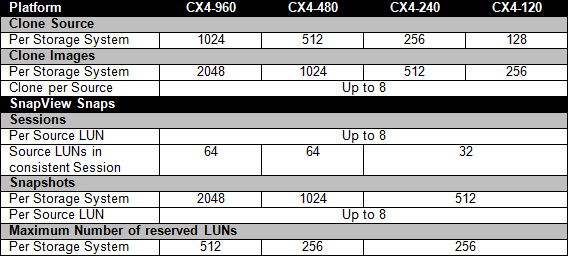
SnapView Clone and Snap allow 1-to-Many relationships between the production volume and the clone volume (or reserved volume). When a IntelliSnap job starts, each job consumes a volume residing on a particular RAID group for each production volume as shown in the table.
Each job will behave differently during the cataloging phase as required by the Application iDataAgent during backup. Since each Clone and Snap contains a single job, the very first IntelliSnap job against the production volume will always be a Full Synchronization, which requires the snapshots to be activated. Once the Clone has been attached with the production volume, the Clone target requires to be synchronized before it can be reused against the production volume.
Depending on the maximum number of Clones/Snaps listed in the table – please check powerlink.emc.com for other systems. Data Aging must run against aged Clones/Snaps to free up resources to be reused for the next IntelliSnap Job.