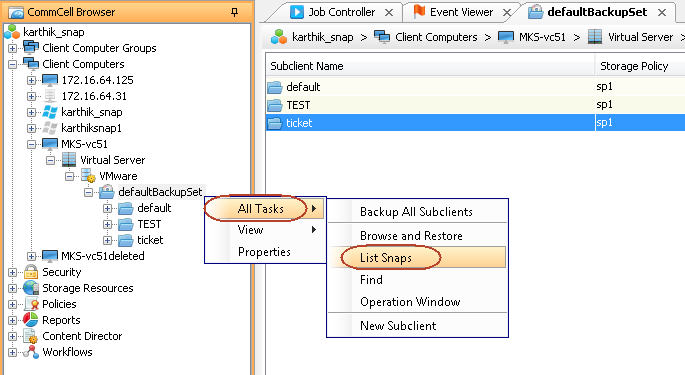
The browse operation provides the capability to see the snapshots created for an agent, job, or a snapshot copy. The list of the snapshots displayed corresponds to the entity selected for the browse operation. For example, browsing the snapshots for an agent displays the snapshots created for the selected agent. You can also view volume or disk information for the snapshots.
Note
To view snapshots for a virtual machine that is configured for VM-centric operations and that uses the Virtual Server Agent Snap engine, perform the browse from the client computer entry for the virtual machine.
Procedure
Perform the following steps to browse snapshots:
-
From the CommCell Browser, navigate to Client Computers > virtualization_client > VMware.
-
Right-click the backup set and click All Tasks > List Snapshots.
-
The Snaps created during IntelliSnap operation dialog box displays a list of all the snapshots created for the selected subclient. It also displays important information about each snapshot, including the source mount path, snap mount path, the storage array, and the source client.
-
Right-click the snapshot and click Details to view the snapshot properties.
-
Click the Disk View tab to display the snapshot name, e.g. SP_2_79_1286222629.
-