Performing a Proxy Backup
You will be performing the proxy backups on a master instance. However, the backup job will actually run on a proxy instance if the replication is online (example: linux3_CN/slave), and the subclient on the master server is configured to use the proxy instance for backups.
Use the following steps to perform a proxy backup:
-
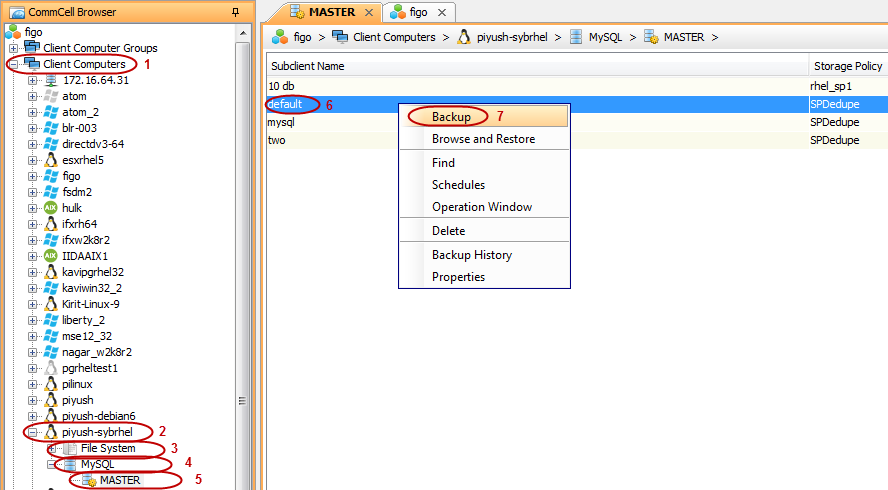
From the CommCell Browser, navigate to the Client Computers | <Client> | MySQL | master <Instance>.
-
Right-click the <subclient> and then click Backup.
The Backup Options for Subclient dialog box appears.
-
Click OK.

-
You can view the progress of the backup in the Job Manager.
-
Right click the Job ID in the Job Controller to view the details of the Proxy Backup. You can view that the backup job is running on proxy server even as you performed the job on a master server instance.
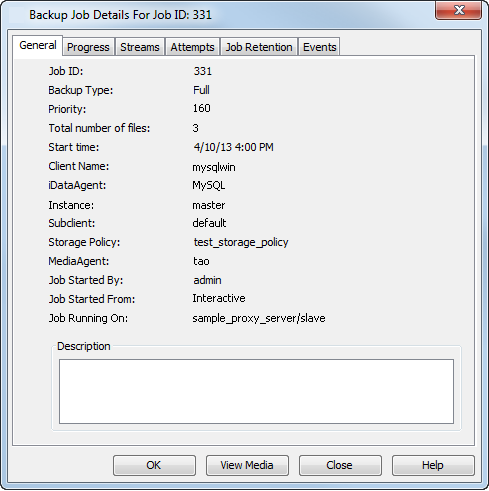
MySQL proxy backup performs backups on proxy and registers them on master server.
However, the restore is similar to Commvault’s MySQL restore operation. You can browse and restore the proxy backups from the master server itself.
For more information, see Restore - MySQL iDataAgent.