By default, services run as a local system account. However, an administrator can create a user to run services and operations only for the Windows File System agent and SQL Server agent. This is useful if you are troubleshooting service failures or if you need to change the security account under which a service runs. The created user can run services to back up and restore files and folders regardless of ownership, permissions, encryption, or auditing settings.
To run services, a user can be assigned to built-in groups like Backup Operators, Administrator and Local Administrator. These groups have the necessary permissions and user rights defined to perform a specific task. Only a member of the Administrator group can assign users as Backup Operators.
Procedure
-
Go to Control Panel > Administrative Tools.
-
Double-click Computer Management.
-
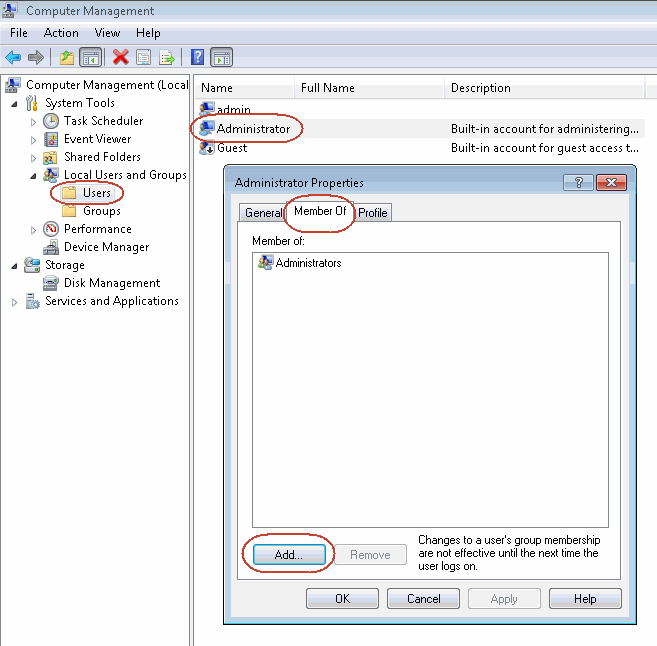
On the Computer Management browser, expand Local User and Groups > Users.
-
Right-click the user who will perform backups and click Properties.
-
On the Member Of tab, click Add to add the Backup Operators group to the User.
-
Click OK.
-
Log off and log on to the computer as an Administrator for the policies to take effect.