-
In the CommCell Console ribbon, select the Home tab, and then click Control Panel.
-
Click Audit Trail.
-
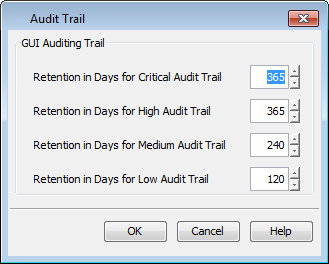
Review the Retention in Days settings by severity level in the Audit Trail dialog box.
Click OK.
×
In the CommCell Console ribbon, select the Home tab, and then click Control Panel.
Click Audit Trail.
Review the Retention in Days settings by severity level in the Audit Trail dialog box.
Click OK.
Loading...