Storage Acceleration (also known as Client-Direct Mode) can be set up on clients to directly send the backup data to a configured Data Domain Boost Client storage library. (Without Storage Acceleration, clients send the backup data to the MediaAgent first, and then the MediaAgent writes the data into the Data Domain Boost Client storage library.)
Storage Acceleration has the following advantages:
- Speeds up backup and restore process by directly backing up and restoring from the Data Domain.
- Boost Client library and avoiding additional network transmission.
- Clients would have the Dell Data Domain Boost SDK module on it which allows it to perform client-side deduplication and compression of the data before sending to the Data Domain device. Reduces the load on the MediaAgent by eliminating the need for processing backup data. (Metadata and Indexing operations would continue to be processed by the MediaAgent).
The data flow diagram for the storage acceleration feature is given below:
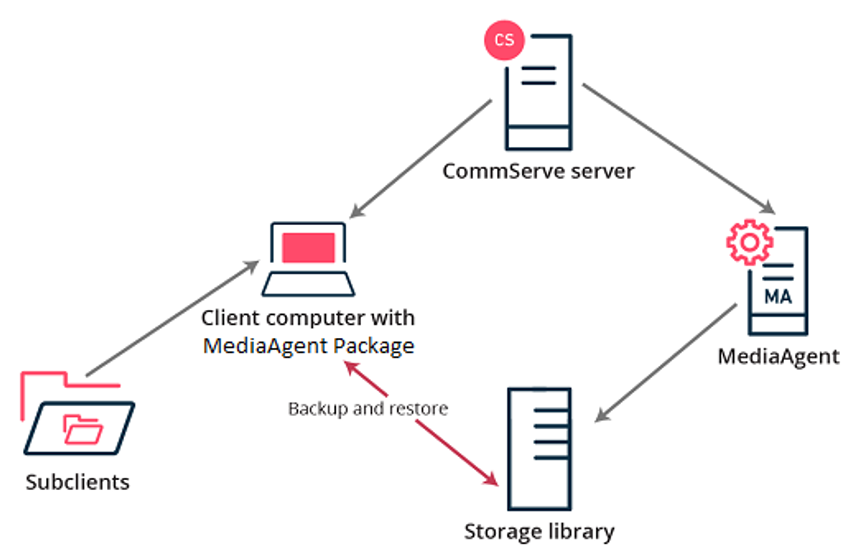
Note
To use the Storage Accelerator, you must install the Storage Accelerator and Storage Accelerator Add-on packages on the clients.
Support:
- The MediaAgent package can be installed on 64-bit Windows and Linux clients. (All the agents supported on Windows and Linux clients are supported.) However, you can backup data directly to the cloud on all the platforms that support MediaAgent.
- The MediaAgent package is not supported on 32-bit operating systems.
- The MediaAgent package is not supported for Edge Endpoint offline backups.
Before You Begin
Ensure that the client has network connectivity to the cloud server. The client must be able to reach the service host endpoint when there is a firewall.
Procedure
- Configure a Data Domain Boost Client Storage library using an appropriate MediaAgent as described in Data Domain Boost Client.
- Create a Storage Policy using the MediaAgent or the Data Domain Boost Client Storage library as the data path in the storage library. For more information, see Creating Storage Policy.
- Install the Storage Accelerator and Storage Accelerator Add-on packages on all clients that you want to backup directly to the Data Domain.
- Associate the Storage Policy with the sub-client used to backup data from the client.
- Run a backup from the subclient.
Result
The software sends the backup data directly to the Data Domain Boost Client Storage Library. The name of the client appears as the MediaAgent in the Streams tab of the Job Details dialog box of the running backup job.
-
For instructions about viewing the job details of a running backup job, see View Job Details.
-
For information about the Streams tab, see Backup/Information Management Job Details (Streams) section in Job Controller Online Help.
Additional Information
Accelerated backups may not work when the client is behind firewall and hence unable to connect to the Data Domain Boost Client Storage Library.
If necessary, you can disable the Storage Accelerator mode on a client which will cause it to send backup data to the MediaAgent, and then the MediaAgent will write the data to the library. For more information, see Enabling or Disabling Storage Accelerator.