For VMware, you can perform backups of designated content, and then transfer the data to backup media using the NAS transport mode.
The following diagram shows the data flow of the VMware backup process using the NAS transport mode.
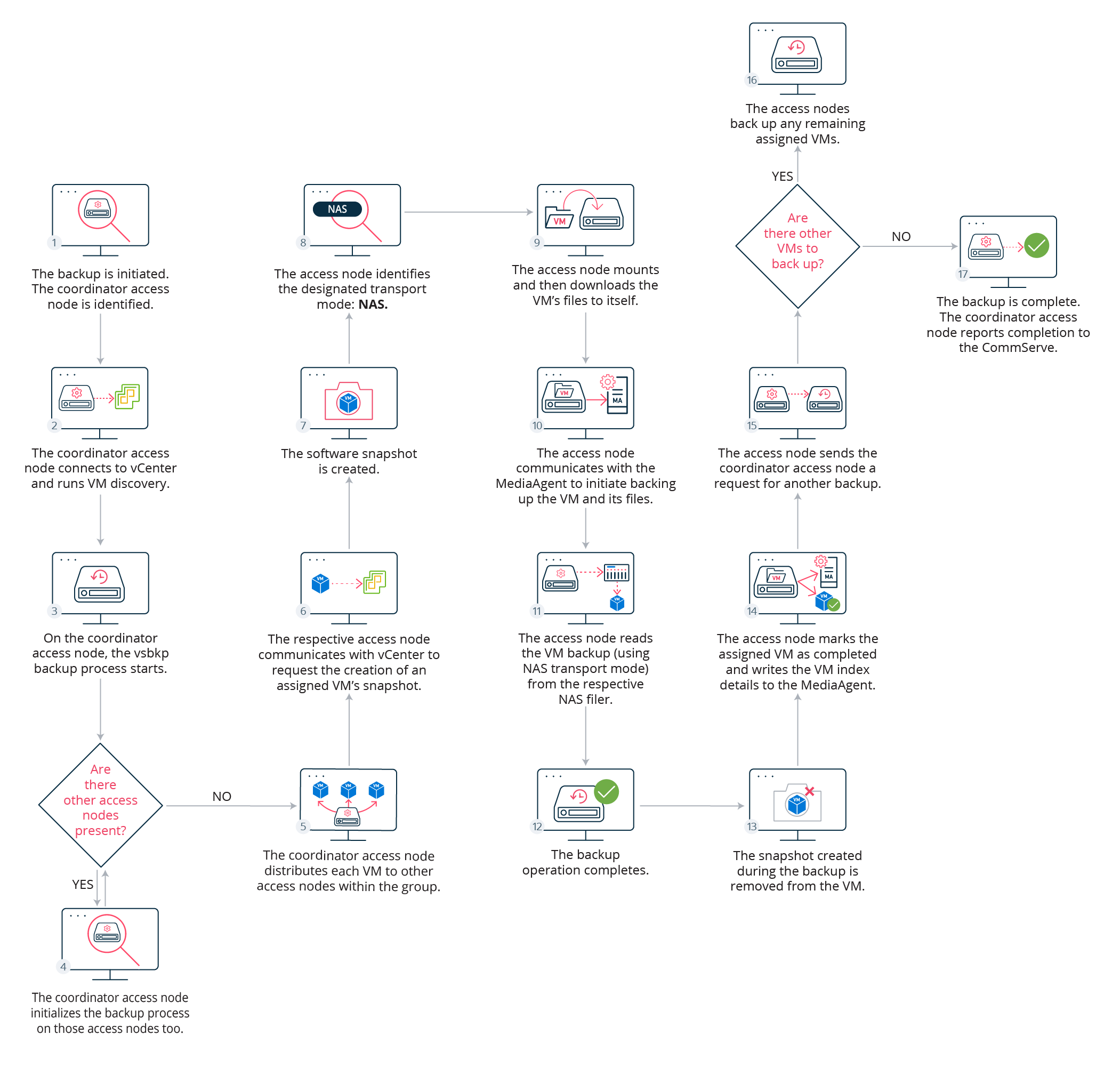
Description
|
Step |
Description |
|---|---|
|
1 |
The CommServe server identifies and assigns a VSA proxy computer as the coordinator access node. |
|
2 |
The coordinator access node connects to the vCenter and runs a discovery operation to identify the VMs configured in the VM group. After discovery completes, each VM is uniquely identified by its VC.GUID. |
|
3 |
On the coordinator access node, the vsbkp backup process starts. |
|
4 |
If other access nodes are present, the coordinator access node initializes the backup process on those access nodes too. |
|
5 |
The coordinator access node distributes (either dynamically or statically) each VM to access nodes within in the group based on their current load and overall processing power. |
|
6 |
The respective access node communicates with vCenter to request the creation of an assigned VM's snapshot. |
|
7 |
The software snapshot is created. |
|
8 |
The access node verifies the designated transport mode (in this case, NAS) to leverage for the protection of the VMs assigned per disk. |
|
9 |
The access node mounts, and then downloads the VM’s files to itself. |
|
10 |
The access node communicates with the MediaAgent component to initiate backing up the VM and its files. |
|
11 |
The access node reads the VM (using the NAS transport mode) from the respective NAS filer. |
|
12 |
The VM backup operation completes. |
|
13 |
The access node reverts the VM to its previous state, which includes removing the snapshot. Only the snapshot created during the backup (step 7) is removed. |
|
14 |
After the snapshot is successfully removed, the access node marks the assigned VM as completed and writes the VM Index details to the MediaAgent. |
|
15 |
When each access node completes backing up all its assigned VMs and there are no VMs in the local queues waiting to be backed up, the access nodes will send the coordinator access node a request for another VM to backup. |
|
16 |
If other VMs are present, the respective access nodes back up the assigned VMs. |
|
17 |
After there are no remaining VMs, the coordinator access node reports back to the CommServe server that the backup is complete. |