When creating a Cloud Rewind Azure Assembly with resource groups that include Azure serverless services such as Function and Web Apps, the Assembly configuration Protection Strategy page includes the following options:
-
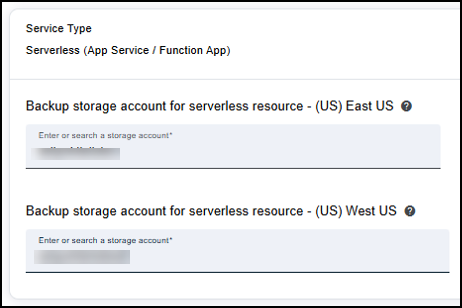
Under Service Type Serverless (App Service/ Function App), specify the Storage account where your Serverless backups should be stored; in a cross-region Assembly - for each regions. Make sure that the storage account exists in the region.
-
For enhanced security, access to the serverless resource backup storage account can be restricted to specific virtual networks (VNets), IP addresses, and applications.
In this case, VNet integration is required to provide secure, private connectivity between the serverless resources and the backup storage account for backup and restore operations. Cloud Rewind can automatically create and manage the required VNet, or you can choose to associate existing VNets with individual resources as needed.
For this security feature, enable Serverless protection using access-controlled storage accounts and select how VNet integration should be managed:
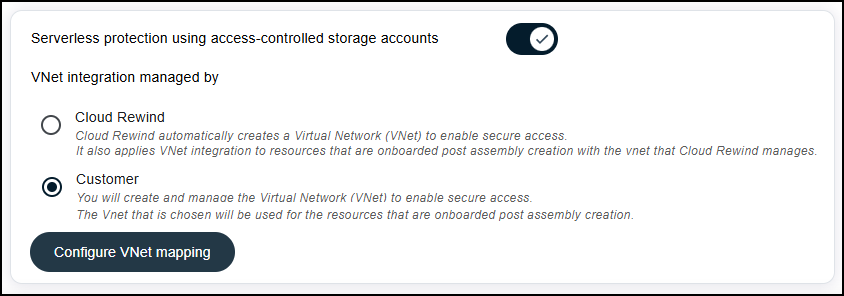
If you selected Customer, click Configure VNet mapping and map VNets to resources. Also, for serverless resources that may be added to the Assembly in the future, you can select Auto integration... and select a VNet for auto integration:
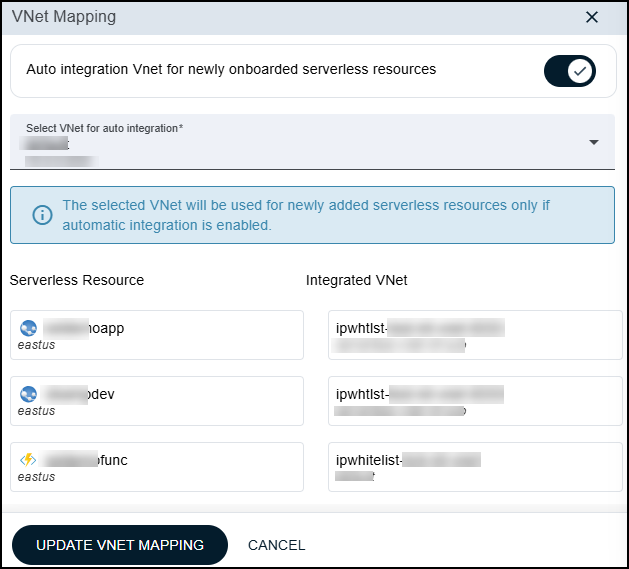
Click Update VNet Mapping and continue configuring the Assembly.
Note
Please avoid using your existing storage account, this might cause accidental backup deletion.
Note
- Cloud Rewind protects only configuration for App Service or Function App which is running in consumption mode
- If an App Service or Function App added under Cloud Rewind protection has a pre-configured Azure backup. Those backups will be overridden by Cloud Rewind new backup frequency.