Commvault Grid supports multiple network topologies and deployment models. The switch configuration depends on the selected topology and the resiliency requirements of the environment.
Because Commvault Grid relies on distributed storage, replication, and cluster communication, proper switch configuration is critical for performance, stability, and resiliency.
This page provides general switch design and configuration guidelines that apply across all supported Commvault Grid network topologies.
General Switch Configuration Requirements
The following guidelines apply to all Commvault Grid deployments:
-
Configure Commvault Grid interfaces as access (untagged) ports unless the interfaces are used for VLAN-based topologies.
-
Storage pool interfaces must be dedicated to storage pool communication and replication traffic.
-
Storage pool interfaces must not be configured as VLAN trunks.
-
Storage pool and data protection networks must use separate physical interfaces.
Bonding Requirements
Active-Backup Bonding
When using Active-Backup bonding:
- Switch port-channels are not required.
- No link aggregation configuration is required on the switch.
Link Aggregation Control Protocol (LACP)
When using LACP:
- Configure each interface pair as an active port-channel.
- Do not configure ports to negotiate aggregation dynamically.
- Verify switch support for LACP before deployment.
VLAN Requirements
When using VLAN-based topologies:
- Configure VLAN tagging on the data protection interfaces.
- Do not configure VLANs on storage pool interfaces.
- Ensure VLAN trunking is configured consistently across all nodes.
Large-Scale Deployment Considerations
Commvault Grid storage pools can span multiple racks, switches, or availability zones provided that:
- All nodes reside within the same physical building.
- Data protection interfaces remain within the same Layer-2 subnet.
- Storage pool interfaces remain within the same Layer-2 subnet.
- Inter-node traffic does not traverse firewalls or WAN links.
Commvault Grid uses a distributed storage architecture. Reads and writes require communication between multiple nodes, making latency and bandwidth critical factors.
When planning large-scale deployments:
- Minimize latency between nodes.
- Ensure sufficient inter-switch bandwidth.
- Avoid WAN links between nodes.
- Avoid firewall traversal between nodes.
Note
When sizing inter-switch links, assume that each Commvault Grid node can require up to 20 Gbps of bandwidth under load or during recovery operations.
Network Redundancy and Multi-Switch Designs
Commvault Grid supports multi-switch redundancy implementations from several vendors.
Supported examples include:
- Cisco Virtual Port Channel (VPC)
- Arista MLAG
- Mellanox MLAG
These configurations can be used together with LACP to provide switch-level redundancy.
Example: Cisco VPC
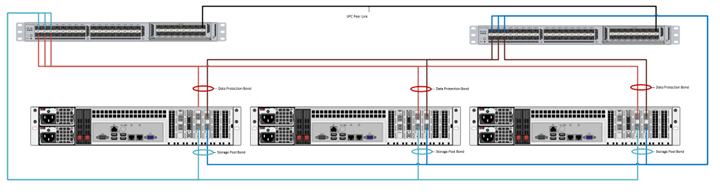
Note
When configuring multi-switch link aggregation implementations, use the configuration steps described for LACP bonding.
Frequently Asked Questions
Redundancy and High Availability
Can Commvault Grid be dual-homed to multiple switches using Cisco Virtual Port Channel (VPC)?
Yes, Commvault Grid supports using LACP over Cisco VPC.
Commvault Grid fully supports multi-switch link aggregation implementations from most vendors including Cisco VPC, Arista mLAG, and Mellanox mLAG.
See the following image for an example of the cabling configuration using Cisco VPC:
Note
When configuring the network for Commvault Grid nodes with multi-switch link aggregation implementations, use the configuration steps described in LACP Bonding.
While deploying a large number of nodes, there is a need to connect them to different switches to improve availability in the event of switch or rack failure. Is this supported?
A single Commvault Grid storage pool can be deployed across multiple switches, racks, or availability zones as long as the following conditions are met:
- All the nodes reside in the same physical building.
- Data protection interfaces in all nodes reside in the same Layer 2 subnet (VLAN).
- Storage pool interfaces in all nodes reside in the same Layer 2 subnet (VLAN).
- Inter-node communication does not traverse a firewall or WAN link.
Commvault Grid leverages a distributed file system, and all reads and writes must communicate with multiple nodes within the pool to service each operation. High latency introduced by firewalls, routers, or WAN links can severely impact the performance and stability of the cluster.
When planning large-scale deployments, pay close attention to:
- Network latency between nodes
- Available bandwidth between switches, racks, or availability zones
- Inter-switch link capacity
Even the smallest N4 Commvault Grid nodes can fully saturate a 10 GbE storage pool interface during heavy workloads or recovery operations. Ensure that inter-switch, inter-rack, or inter-zone links have sufficient bandwidth to support the expected workload.
Bonding and LACP
When using bonding (Active-Backup or LACP), are all node interfaces configured in a single port-channel?
No.
Each node must have its own dedicated port-channel configuration.
For example, in a three-node deployment:
- Create three port-channels for the data protection network (one per node).
- Create three port-channels for the storage pool network (one per node).
This results in a total of six port-channels.
Hardware Expansion
Commvault Grid nodes need to connect to multiple independent networks and require more than four network interfaces per node. Can additional NICs be added?
Yes.
Adding additional physical interfaces to Commvault Grid nodes is supported provided that:
- Sufficient expansion slots are available on the hardware platform.
- All nodes are configured consistently and have access to the required networks.
- Additional NICs for Commvault Grid are purchased through Commvault.
Contact your Commvault representative for more information.
Each appliance model supports up to one additional interface card.
Performance Optimization
Does Commvault Grid support jumbo frames?
Yes.
Jumbo frames are supported on both the data protection and storage pool networks.
However, jumbo frames must be enabled consistently across:
- The sending device
- The receiving device
- All switches
- All routers
- All firewalls
For this reason, jumbo frames are recommended primarily on the storage pool network because it is a private network used exclusively for Commvault Grid node communication.
Using jumbo frames on the data protection network can be significantly more complex because all participating clients and network devices must support and be configured for the same MTU size.
For additional information, see How to enable jumbo frames for network interfaces in Red Hat Enterprise Linux.
Organizations should work with their network administrators to determine whether jumbo frames are appropriate for their environment.
Note
During troubleshooting, Commvault Support might request that jumbo frames be disabled or that the MTU size be adjusted to isolate network performance issues.