Clumio features and enhancements, listed newest first. This page covers the latest releases; deprecations are listed separately.
October 23, 2026
New features
Singapore AWS and GCP data plane regions
Clumio now offers a control plane in Southeast Asia (ap3.portal.clumio.com). It supports data planes in five AWS regions and four Google Cloud regions across Southeast Asia and additionally South Korea. The following data plane regions are supported:
-
AWS:
-
Asia Pacific (Singapore), ap-southeast-1
-
Asia Pacific (Jakarta), ap-southeast-3
-
Asia Pacific (Malaysia), ap-southeast-5
-
Asia Pacific (Thailand), ap-southeast-7
-
Asia Pacific (Seoul), ap-northeast-2
-
-
GCP:
-
Singapore, asia-southeast1
-
Jakarta, asia-southeast2
-
Bangkok, asia-southeast3
-
Seoul, asia-northeast3
-
Note
Jakarta, Malaysia, and Thailand are AWS opt-in regions. If you back up to one of them, enable that region on every AWS account connected to Clumio, or out-of-region backups may fail.
For more information, see "Southeast Asia control plane" in Supported regions.
Early access for Clumio Remote MCP server
The Clumio Remote MCP server lets AI assistants that support the Model Context Protocol (MCP) work with your Clumio environment through plain-language requests. Every change is previewed first and runs only after you confirm it.
Specifically, customers can now do the following:
-
Review connections, assets, protection status, backups, alerts, and tasks.
-
Create, update, assign, and unassign policies.
-
Create and update protection rules and S3 protection groups.
-
Restore assets, and preview records in DynamoDB and RDS backups before restoring.
-
Generate activity, audit, consumption, and compliance reports.
-
Generate Terraform to connect AWS accounts and protect data as code.
This helps cloud and platform teams protect and recover data from the AI tools they already use, without switching to the Clumio console.
Note
Early Access is opt-in and initially available on the US West, US East, and Australia control planes. To enable it and get setup instructions, contact Clumio Support.
Clumio is available in Google Cloud Marketplace
Clumio is now available in Google Cloud Marketplace. Customers can subscribe to Clumio from the Google Cloud Marketplace listing and have their Clumio usage for Google Cloud billed through their Google Cloud billing account, under the same credit-based pricing model as AWS Marketplace. Google Cloud Marketplace and AWS Marketplace subscriptions can be active on the same Clumio organization at the same time, and each cloud's usage is billed to its own marketplace.
Specifically, customers can now do the following:
-
Subscribe to Clumio from Google Cloud Marketplace and set up their Clumio account directly from the listing.
-
Connect both AWS Marketplace and Google Cloud Marketplace to one organization, with AWS usage billed to AWS and Google Cloud usage billed to Google Cloud.
-
View the status of each marketplace subscription on the Marketplace Connections page.
For more information, see Sign up through Google Cloud Marketplace.
General updates
Pricing for Google Cloud Storage in select regions features
Effective October 21, 2026, Clumio is updating the pricing for Clumio Protect for Google Cloud Storage (GCS) in select regions. Pricing for GCS in all other regions is unchanged.
The updated pricing applies to the following regions:
-
australia-southeast1 (Sydney)
-
australia-southeast2 (Melbourne)
-
europe-west3 (Frankfurt)
-
asia-northeast1 (Tokyo)
-
asia-northeast2 (Osaka)
-
northamerica-northeast1 (Montreal)
For the current rates, see Clumio Regional Pricing.
Note
If you plan to protect GCS buckets in any of these regions within the next 90 days, contact your Clumio account team or Clumio Support about pricing.
September 25, 2026
New features
Clumio ThreatDetect for EBS volumes and EC2 instances
Clumio ThreatDetect is now generally available for EBS volumes and EC2 instances. ThreatDetect automatically analyzes backup data to identify anomalies that may indicate ransomware-like activity, bulk data manipulation, or destructive changes across protected assets.
Each protected asset is individually assessed. When anomalous activity is detected, the following actions occur:
-
An alert is raised on the asset with a risk score and confidence level.
-
A detailed assessment report is available for download with the specific findings.
ThreatDetect requires no additional agents or infrastructure. It can be enabled per policy under Advanced options for EBS volume and EC2 instance backup operations.

Clumio is available in AWS Marketplace Japan
Clumio is now available through a dedicated AWS Marketplace listing operated by Amazon Web Services Japan. Customers in Japan can purchase Clumio under a private offer extended to their AWS account, with billing in Japanese yen and Japanese Consumption Tax applied by Amazon Web Services Japan as the seller of record. Environments purchased through this listing are provisioned on the Japan control (see "Japan control plane" in Supported regions) so account metadata and backup data remain in Japan.
For more information, see "AWS Marketplace Japan" in Sign up through AWS Marketplace.
New AWS and GCP regions available for backup and restore
Clumio now supports Melbourne as a backup and restore location on the Australia control plane (au.portal.clumio.com). Melbourne joins Sydney as a data plane region for that control plane, and is available on both AWS and Google Cloud.
Specifically, customers can now do the following:
-
Connect AWS accounts in Asia Pacific (Melbourne), ap-southeast-4, and protect their data sources in that region.
-
Connect Google Cloud projects in Australia (Melbourne), australia-southeast2, and protect their Google Cloud Storage (GCS) data.
-
Select either region as a backup destination when configuring backup policies.
For more information, see "Australia control plane" in Supported regions.
September 11, 2026
Enhancements
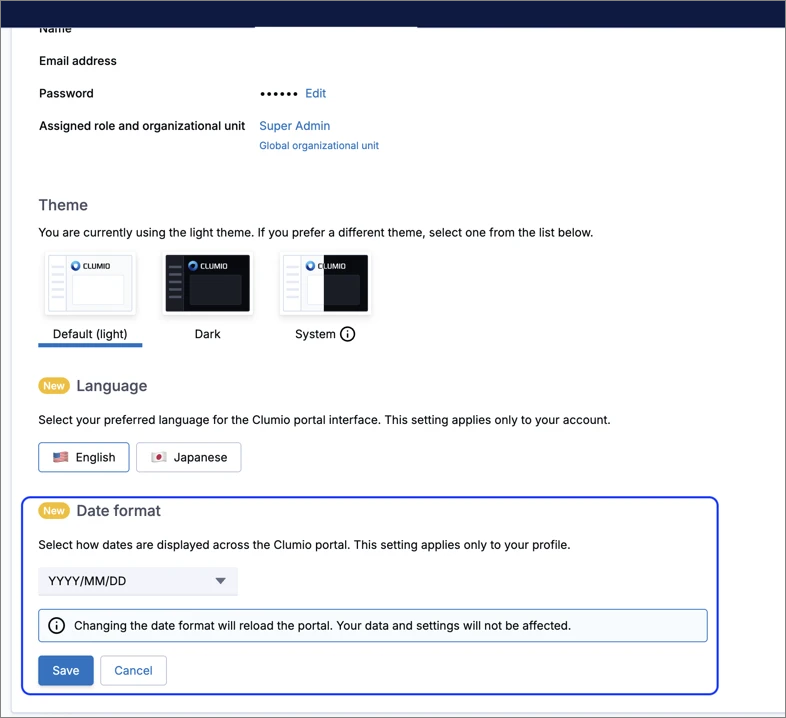
Choose how dates are displayed
You can now set a per-user Date format preference under My Profile > Profile Settings. Choose MM/DD/YYYY, DD/MM/YYYY, or YYYY/MM/DD. Your choice applies across the portal and follows you across browsers and devices.
For more information, see "Change your date format" in Clumio account.
August 28, 2026
New features
New GCP regions available for backup and restore
Clumio now supports two additional GCP regions:
-
Canada control plane (https://canada.portal.clumio.com):
- Montreal:
northamerica-northeast1
- Montreal:
-
Japan control plane (https://jp.portal.clumio.com):
- Osaka:
asia-northeast2
- Osaka:
Customers can connect their Google Cloud projects in these regions with Clumio to protect their Google Cloud Storage (GCS) data.
August 14, 2026
New features
Japan control plane
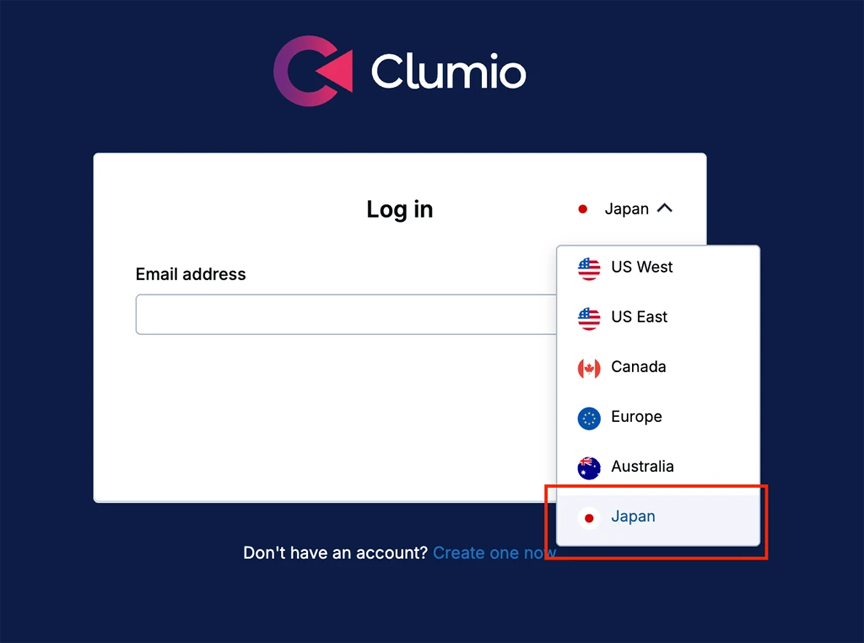
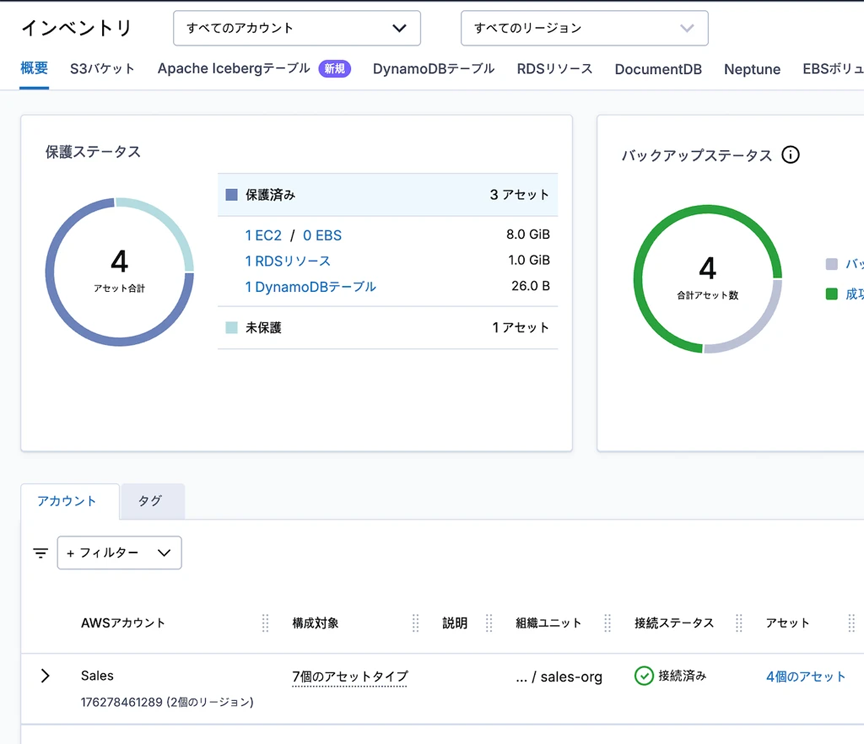
Clumio has expanded its services to the Japan region with the launch of a new control plane in Tokyo (ap-northeast-1) with support for data planes in both Tokyo and Osaka (ap-northeast-3). You can find the site at http://jp.portal.clumio.com. This control plane supports both AWS and GCP services.
Clumio now backs up and restores Apache Iceberg tables that use the V3 table format
Clumio now protects Apache Iceberg tables written in the V3 table format, on both AWS Glue and Amazon S3 Tables. V3 tables are backed up and restored with the same air-gapped, snapshot-level protection already available for V1 and V2 tables, with no new policy settings and no separate configuration. Tables that you upgrade from V2 to V3 stay protected across the upgrade, and backups taken before the upgrade remain fully restorable.
Specifically, Clumio now preserves the following V3 capabilities through a complete backup and restore cycle:
-
Deletion vectors: V3 replaces the positional delete files used in V2 with compact binary deletion vectors. Clumio captures and restores them intact, so a merge-on-read table comes back with its row-level deletes applied exactly as they were.
-
Row lineage: The row identifiers and update sequence numbers that V3 maintains for change-tracking workflows are carried through backup and restore. On restore, Clumio never reissues a row identifier that was already in use, so downstream change-data consumers stay consistent.
-
Variant columns: Semi-structured, JSON-like variant columns are preserved with their data unchanged, on both AWS Glue and Amazon S3 Tables.
-
Format version upgrades: You can upgrade a table from V2 to V3 at any time without disrupting its protection. A restore recreates the table at the format version of the snapshot you select: choose a snapshot from before the upgrade and the table is restored as V2, choose one from after and it is restored as V3.
This is especially valuable for teams adopting V3 to get deletion vectors and row lineage, which are the foundation for efficient row-level updates and change-data capture on Iceberg. Those teams no longer have to choose between moving to the newer table format and keeping a reliable recovery path for it.
General availability for snapshot-only restore for RDS, DocumentDB, and Neptune
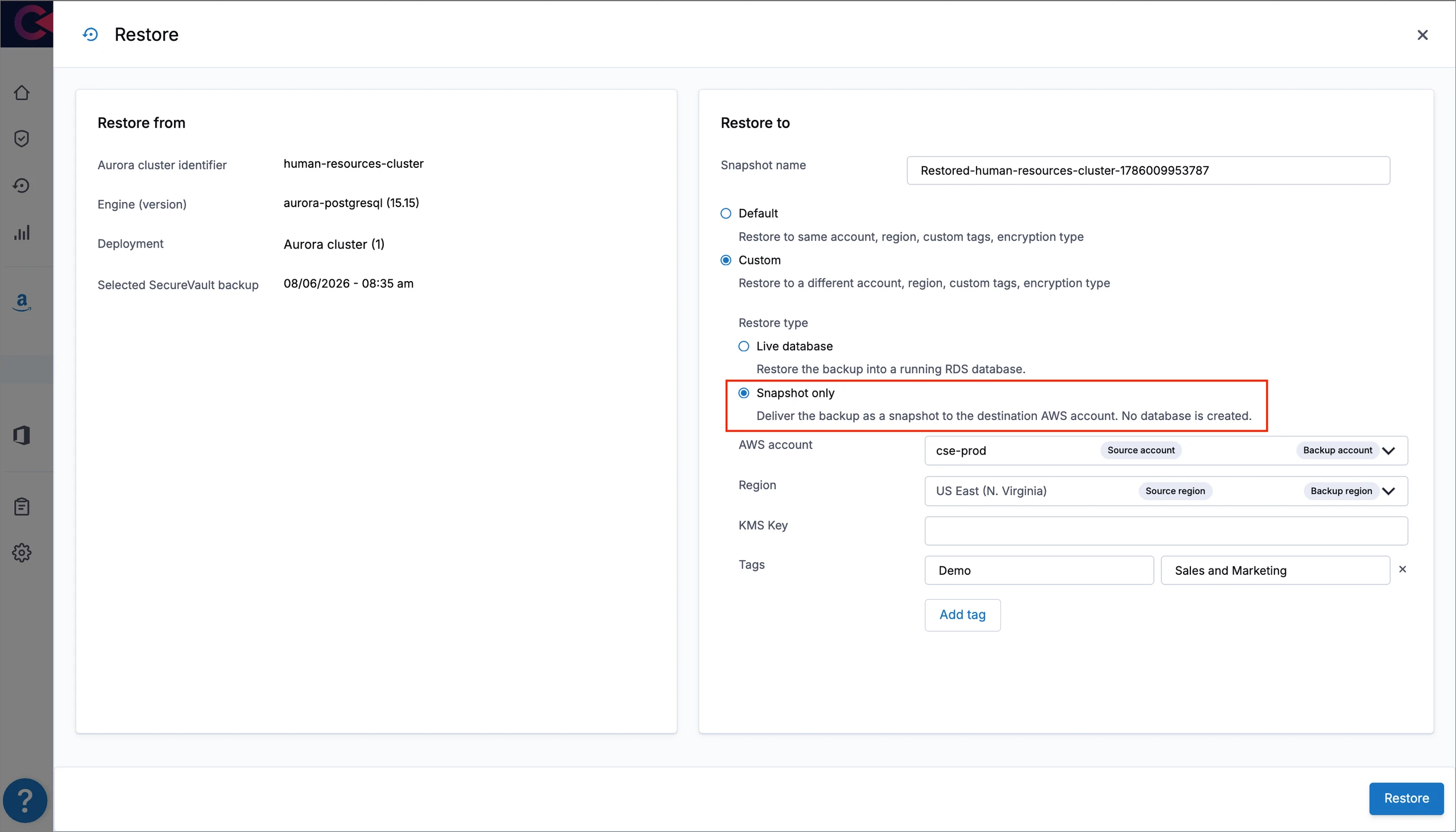
Snapshot-only restore, previously available through early access, is now generally available and enabled for all accounts.
Previously, restoring an RDS, DocumentDB, or Neptune SecureVault Standard backup created a live database in the destination AWS account. A snapshot-only restore delivers the backup as a snapshot directly to the destination AWS account, without creating a live database. You can then restore a database from the snapshot on your own schedule and with your own configuration.
Enhancements
Protection group bucket rules are removed when a protection group moves to a different organizational unit
Deleting an organizational unit reassigns its protection groups to the parent organizational unit. Previously those protection groups kept their bucket rules, which then re-evaluated against the wider scope and could auto-protect matching buckets across the entire organization.
Clumio now deletes a protection group's bucket rule whenever the protection group moves to a different organizational unit, including the move caused by deleting one. The protection group and any buckets you added to it manually are kept. Buckets that the rule had auto-added are removed from the group and are no longer protected, so after deleting or moving an organizational unit, review the affected protection groups and re-create the bucket rule or add the buckets you want to keep protecting. Backups already taken are not deleted and remain restorable until their retention expires. Assigning a protection group within the same organizational unit is unchanged.
The organizational unit delete confirmation does not list which protection groups and buckets will be affected.
August 7, 2026
New features
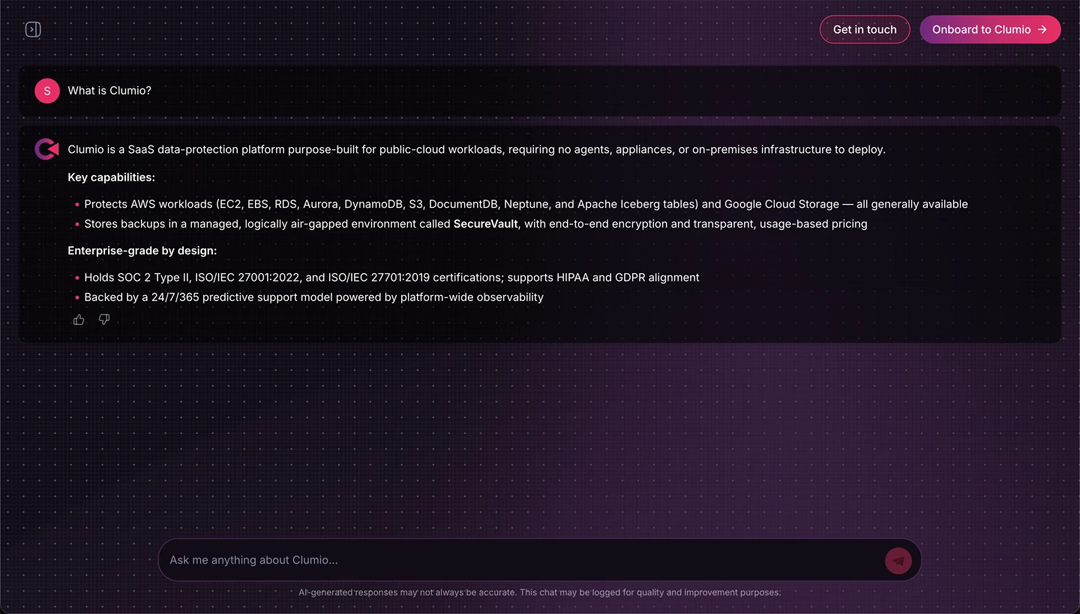
Introducing Clumio Chat — an AI assistant that answers your Clumio questions
Clumio Chat is a new AI-powered assistant that answers your questions about Clumio's data protection capabilities in a natural, conversational way — grounded in verified Clumio information.
With Clumio Chat you can do the following:
-
Get product overviews and confirm whether a specific feature or data source is supported.
-
Ask architecture-level, integration-level, and API-level technical questions.
-
Get information on Clumio's security and compliance posture.
-
Estimate approximate backup and restore costs using standard public pricing.
-
Capture a shareable summary and connect with the Clumio team when you're ready.
Clumio Chat gives prospects and customers a fast, self-service way to understand what Clumio can do for their environment. Try it now: Clumio Chat.
July 31, 2026
New features
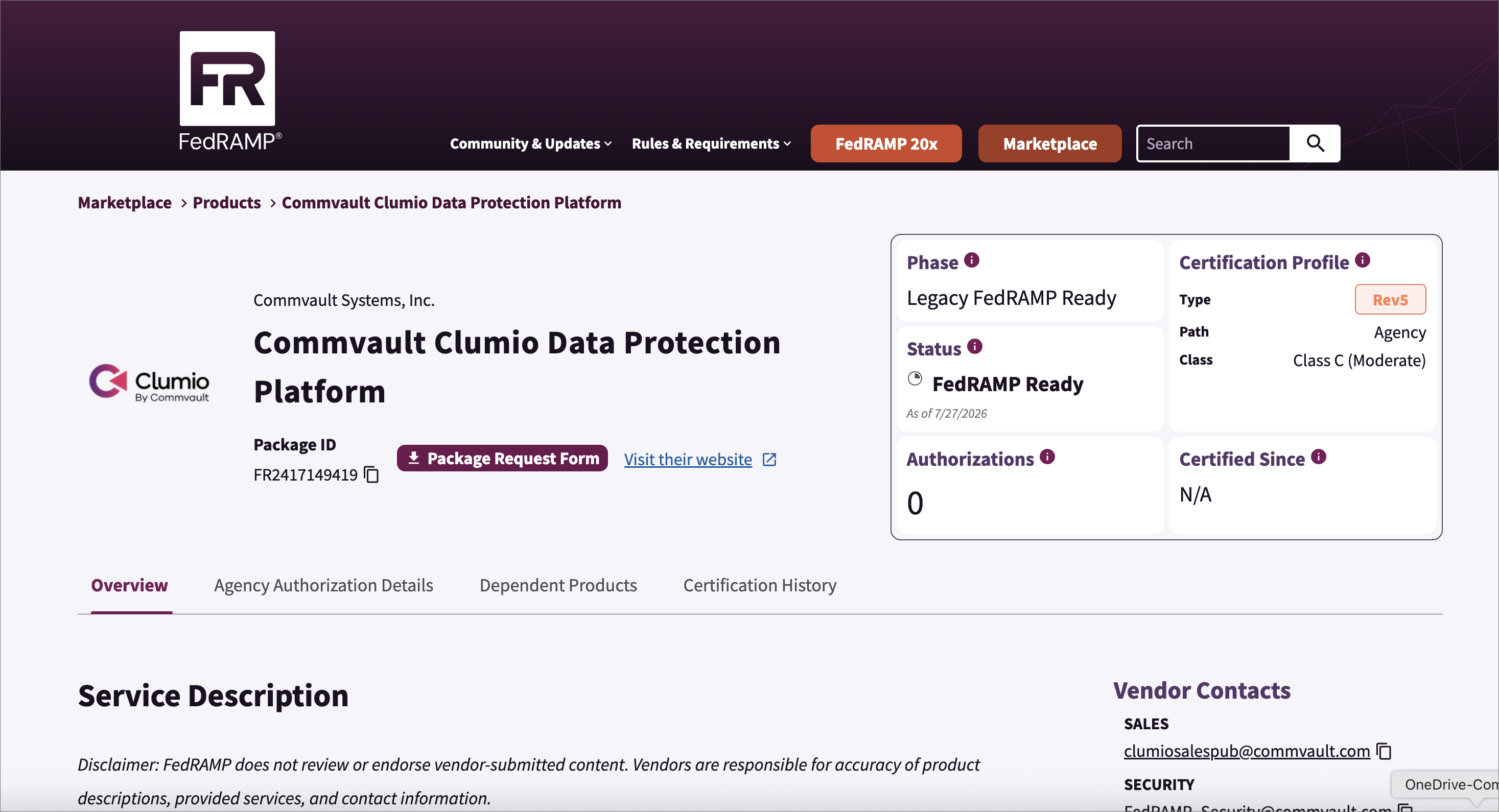
Clumio achieves FedRAMP Moderate "Ready" status
Clumio is now officially listed on the FedRAMP Marketplace with a FedRAMP Moderate Ready designation.
This designation means an accredited third-party assessment organization (3PAO) has assessed the offering against FedRAMP Moderate requirements and the resulting Readiness Assessment Report has been reviewed and accepted by the FedRAMP PMO.
July 17, 2026
New features
Early access for snapshot-only restore for RDS, DocumentDB, and Neptune
Previously, restoring an RDS, DocumentDB, or Neptune SecureVault Standard backup created a live database in the destination AWS account.
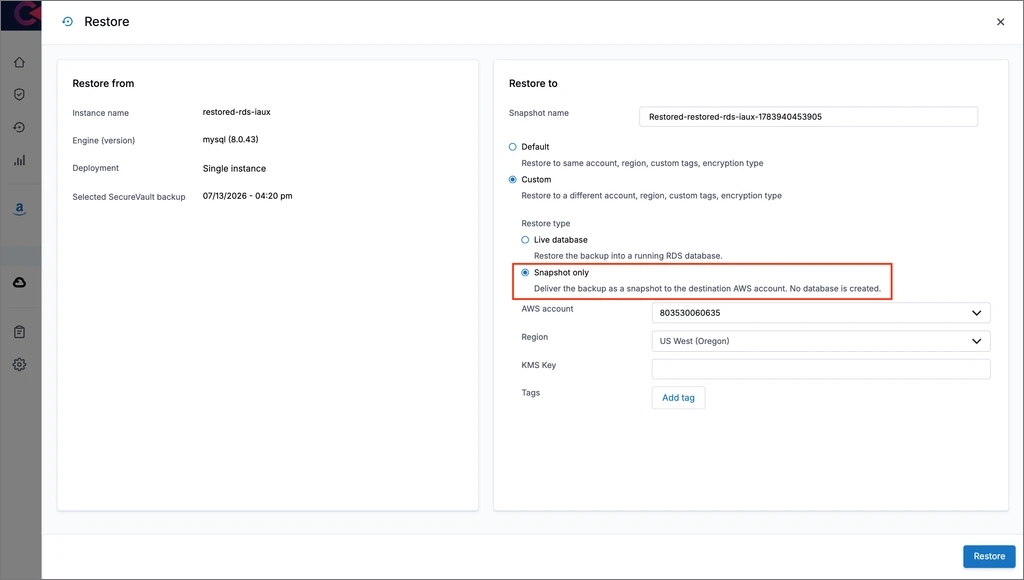
This release introduces a snapshot-only restore option that delivers the backup as a snapshot directly to the destination AWS account, without creating a live database. You can then restore a database from the snapshot on your own schedule and with your own configuration.
What's New
-
Snapshot-only delivery: Clumio copies the backed-up snapshot into the destination AWS account and region, and the restore task records the delivered snapshot name, account, and region.
-
Supported resources: RDS instances, Aurora clusters, DocumentDB, and Neptune.
How to Enable
For early access, contact Clumio Support at support@clumio.com
Once enabled, when restoring from a SecureVault Standard backup, select the Custom restore view, set Restore type to Snapshot only, and then enter a snapshot name, which becomes the delivered snapshot's identifier.
Note
Snapshot-only restore is available only for SecureVault Standard backups (not AWS snapshots or point-in-time restores). Delivered snapshots count toward the AWS manual snapshot quota for the account and region. Once delivered, the snapshot is owned and managed in your AWS account, Clumio does not manage its retention or deletion.
Enhancements
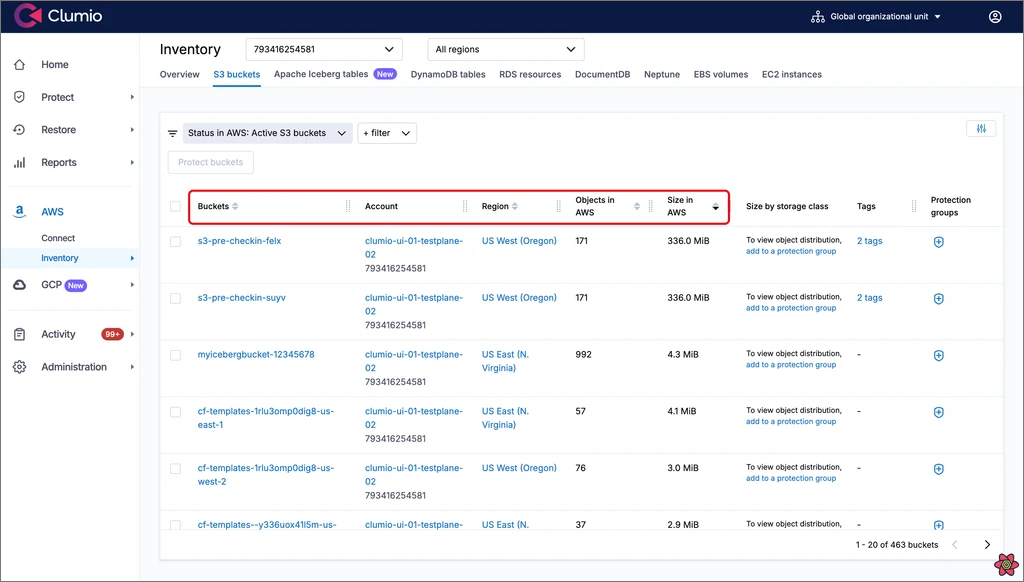
Column sorting for Asset Lists and Alerts
Previously, asset lists and the alerts list displayed records in a fixed order, so finding a specific asset or the latest activity in a large environment meant paging through results.
This release introduces column sorting on these lists. Sorting applies across all pages of results, not just the rows currently in view, so the largest assets or the most recent alerts are always one click away.
What's New
-
Sortable AWS asset lists:
-
RDS, DocumentDB, and Neptune: Database name, Region, and Size in AWS (RDS also supports Engine)
-
EC2 instances: Instance name / ID and Region
-
EBS volumes: Volume name / ID, Region, and Size in AWS
-
DynamoDB tables: Table name, Region, and Size in AWS
-
S3 buckets: Buckets, Region, Objects in AWS, and Size in AWS
-
-
Sortable GCP asset lists:
- GCS buckets: Buckets, Location, No. of objects, and Size
-
Sortable Alerts list: Alert raised on and Alert updated on. By default, the most recently updated alerts appear first.
Note
Columns not listed above (for example, Last backup time) are not sortable.
July 3, 2026
New features
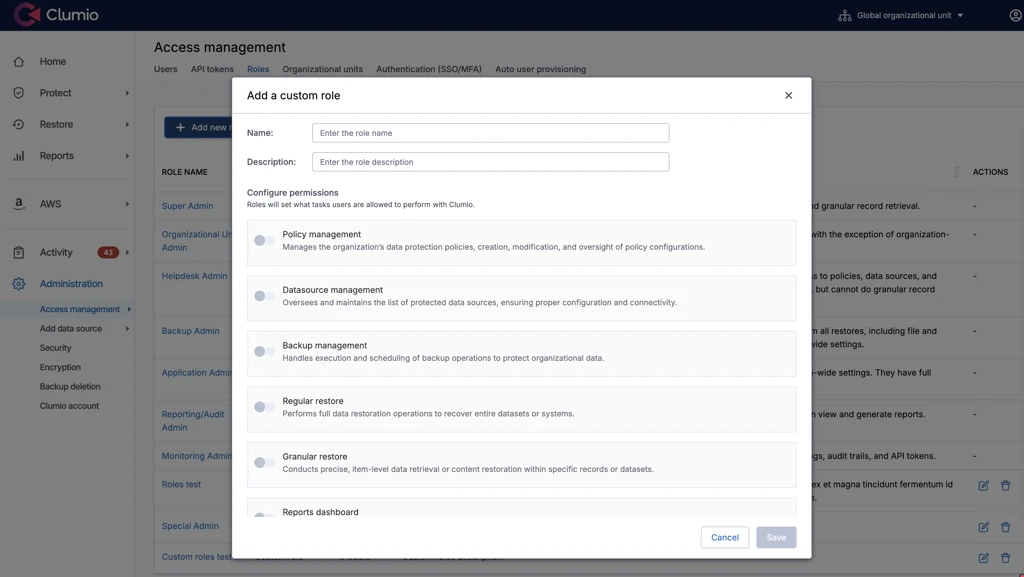
General availability for Custom roles
With Custom Roles, you can create roles tailored to your organization by selecting specific permissions, instead of relying only on predefined roles. Previously, Role-Based-Access-Control (RBAC) supported a fixed set of predefined roles with limited flexibility. Now, you can define custom roles with granular permission control to better match your operational needs.
For more information, see the following user guide:
Enhancements
Protection Rules can now match assets by name
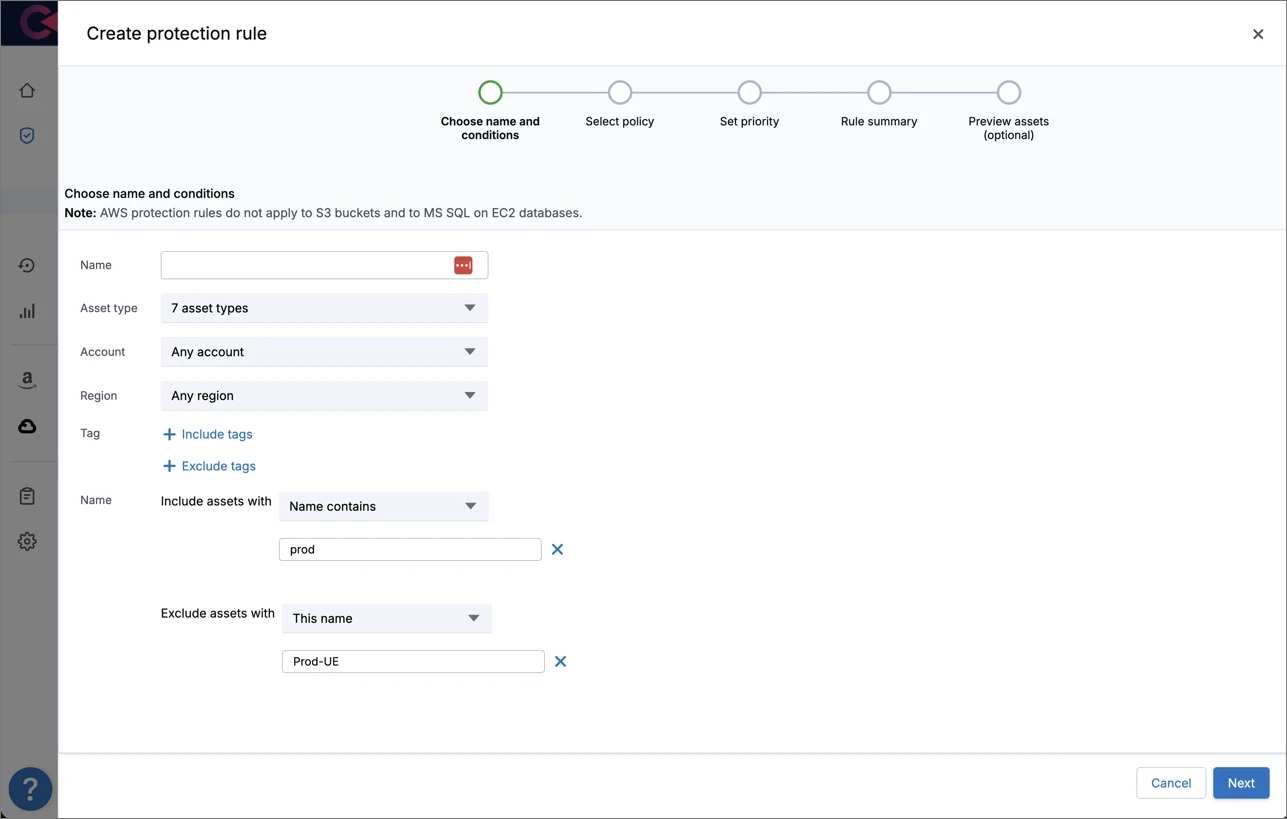
Protection Rules now support name-based matching conditions alongside the existing tag-based conditions. You can target assets by their name (for example, to automatically protect every asset whose name contains prod) and a single rule can match purely on name, purely on tags, or on a combination of both (all conditions in a rule are combined with AND). Name-based conditions are available through the Clumio UI, the REST API, and the Clumio Terraform provider, across all asset types that Protection Rules support (EBS, EC2, RDS, Neptune, DocumentDB, DynamoDB, and S3 Tables).
Each name condition can be added as an include or an exclude, using one of three operators:
-
This name: Matches a single name exactly (case-sensitive).
-
Any of these names: Matches any name in a list of up to 100 values (case-sensitive).
-
Name contains: Matches names that contain the value as a substring (case-insensitive).
Names can be up to 256 characters each.
This is especially valuable for customers looking for ways to target assets beyond tags — for example, those who follow naming conventions, or who work with asset types where the name is the natural identifier.
Note
For EC2 instances and EBS volumes, the asset name is derived from the value of the AWS Name tag. Resources without a Name tag have an empty name.
New Iceberg backup policy options to back up only the latest and/or only compaction snapshot
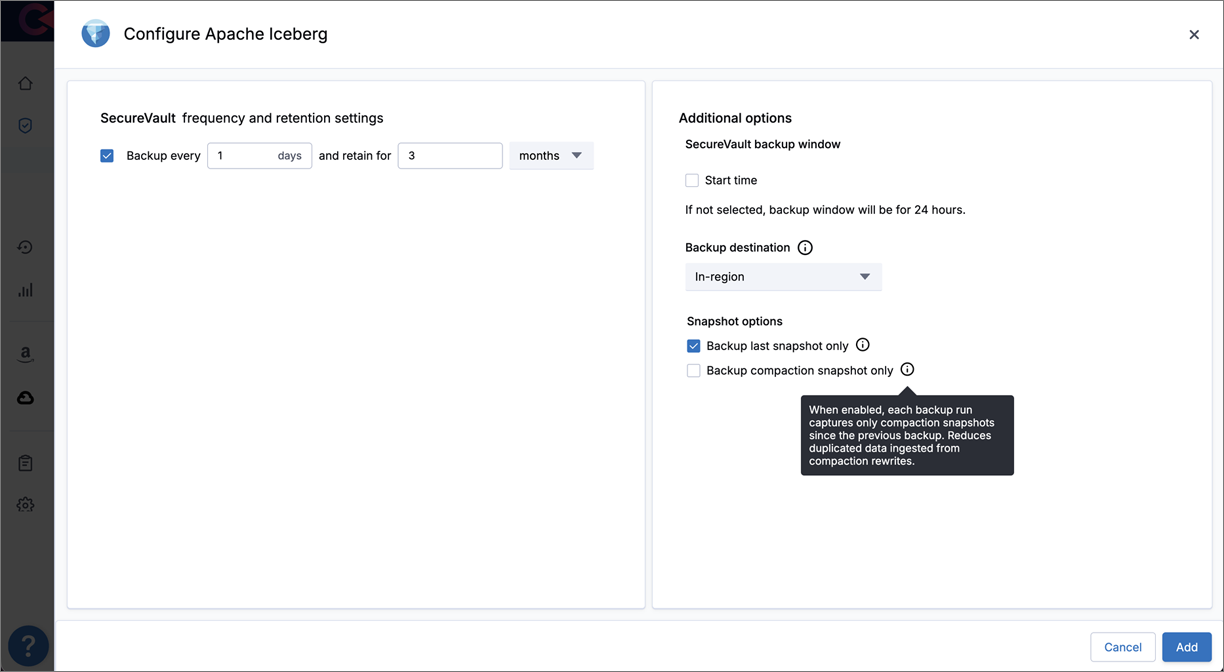
Iceberg backup policies now include two optional advanced settings that control which table snapshots Clumio captures on each backup run. By default, Clumio backs up every new snapshot created since the previous backup; these options let you narrow that scope to reduce storage consumption for tables with aggressive compaction or high-frequency snapshot schedules.
The two options can be enabled independently or together:
-
Back up only the last snapshot: Captures only the most recent snapshot created since the previous backup.
-
Back up only compaction snapshots: Captures only the snapshots produced by table compaction since the previous backup, avoiding the duplicated data that compaction rewrites introduce.
When both options are enabled, each backup run captures only the most recent compaction snapshot since the previous backup. When neither is enabled, Clumio backs up all new snapshots, exactly as before.
This is especially valuable for customers whose Iceberg tables compact and expire frequently, avoiding duplication in the data being backed up.
Note
Because these options cause Clumio to skip some snapshots, they reduce the point-in-time granularity available for restore, which can limit operational recovery. This applies whether you enable "Back up only the last snapshot", "Back up only compaction snapshots", or both.
June 19, 2026
New features
General availability for Google Cloud Storage backups
Clumio now provides SecureVault backup and restore protection for Google Cloud Storage (GCS), extending Clumio data protection to Google Cloud Platform. Connect a Google Cloud project, organize buckets into protection groups, and apply policies to back up and restore your GCS data.
This release supports the following:
-
SecureVault Standard and Archive backup tiers, with configurable backup frequency and retention.
-
Continuous backup, capturing object changes between scheduled backups.
-
Restore of objects, prefixes, or entire buckets to the same or a different project or region.
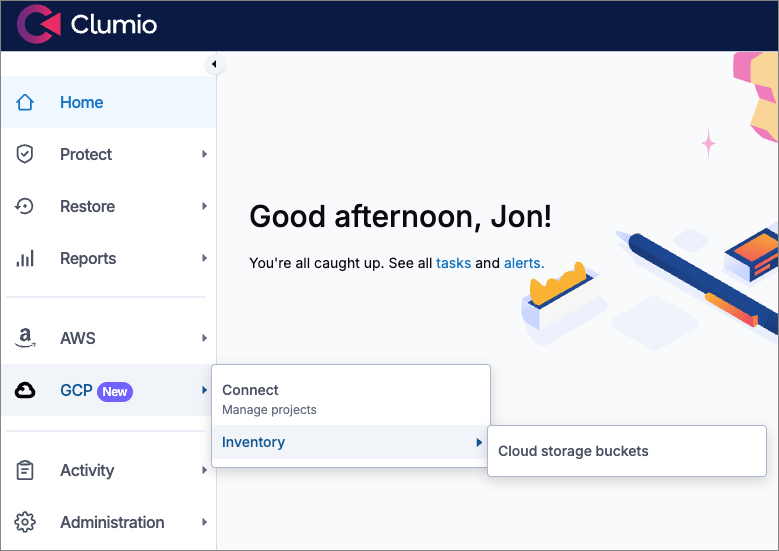
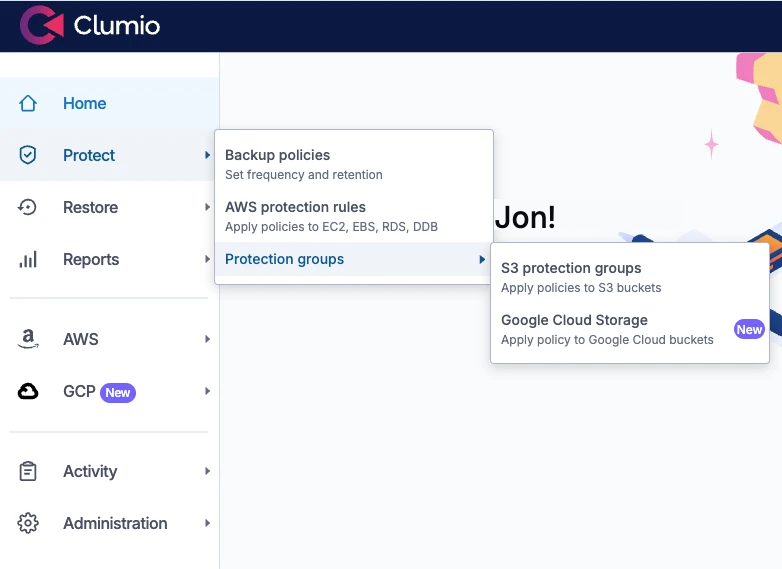
For more information, see the following:
Enhancements
AWS opt-in regions are now enabled by default
Clumio now lets you onboard AWS accounts in opt-in (restricted) regions directly, without contacting Clumio Customer Success first. These regions are enabled by default, so you can connect accounts and begin protecting workloads in them as part of the standard onboarding flow.
The following AWS opt-in regions are now available for self-service onboarding:
| Region | Name |
|---|---|
| ap-south-2 | Asia Pacific (Hyderabad) |
| eu-central-2 | Europe (Zurich) |
| eu-south-1 | Europe (Milan) |
| eu-south-2 | Europe (Spain) |
| il-central-1 | Israel (Tel Aviv) |
For a complete list of supported regions and more information, see Supported regions.
Clumio is now available in Japanese
Clumio now supports Japanese in addition to English for the portal interface. You can change your preferred language under Profile Settings > Language. This preference is applied at the individual user level, allowing each user to select their own language independently. Additional languages are planned for future releases.

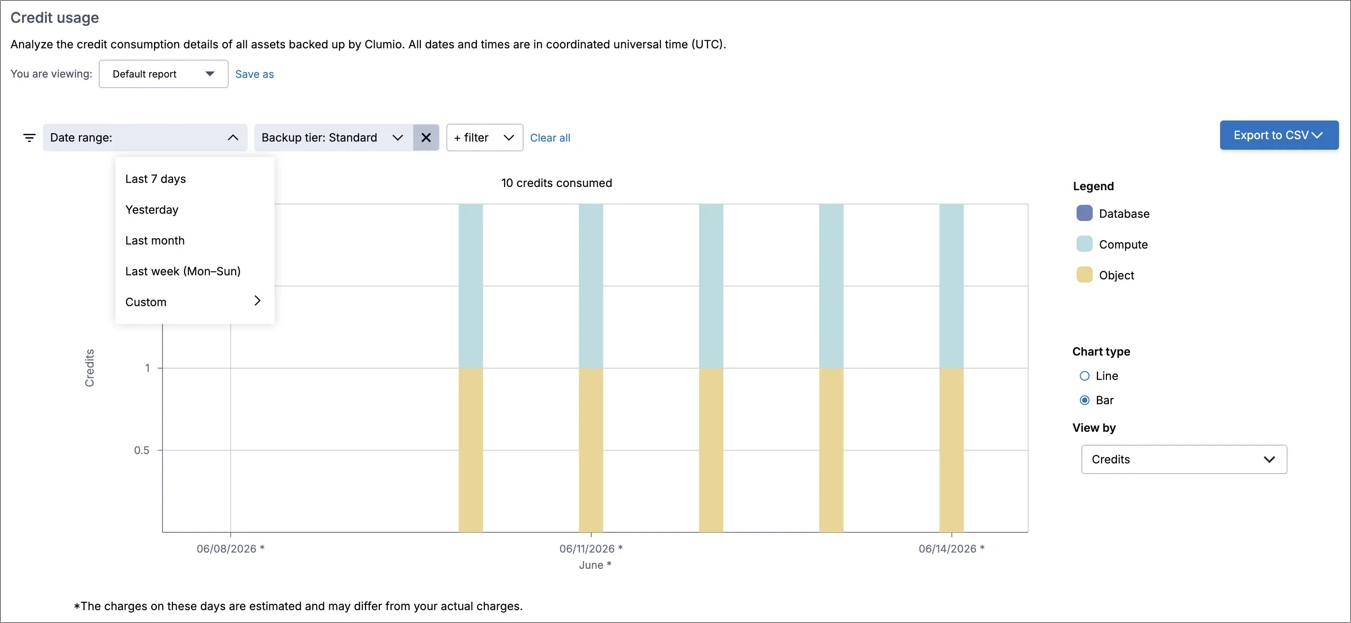
Consumption Reports now support backup-tier filtering and automatically-resolving time windows
Clumio Consumption Reports now give you finer control over what you measure and the period it covers. You can scope a report to a specific backup tier, and you can configure report time ranges that resolve automatically each time a saved or scheduled report runs.
Specifically, you can now do the following:
-
Filter consumption by backup tier, combined with existing filters such as organizational unit (OU), entity type, and time range.
-
Select a calendar-aligned relative window—Yesterday, Last Week, or Last Month—resolved relative to when the report runs.
-
Select a rolling "Last 7 Days" window, covering the 7 full days ending at the previous midnight (UTC).
Note
All relative windows are evaluated in UTC. "Last Week" is the previous Monday through Sunday; "Last Month" is the first day through the last day of the previous calendar month; "Last 7 Days" is the seven full days ending at the previous midnight (the current day is excluded).
This is especially valuable for customers who rely on scheduled Consumption Reports for ongoing cost and capacity tracking: reports stay aligned to the current period automatically, and tier-level filtering makes it easier to attribute consumption and reconcile against billing.
May 22, 2026
New features
New AWS regions available for backup and restore
Clumio now supports three additional AWS regions:
-
Europe control plane (eu1.portal.clumio.com):
-
Europe (Milan): eu-south-1
-
Israel (Tel Aviv): il-central-1
-
-
US West control plane (portal.clumio.com):
- Asia Pacific (Hyderabad): ap-south-2
Customers can connect their AWS accounts in these regions with Clumio to protect their data sources, and can also select these regions as backup destinations when configuring backup policies. This enables data residency compliance across more geographies.
Note
All three of these regions are AWS "opt-in" regions — they are not enabled by default in customer AWS accounts. Customers interested in onboarding or using any of these regions as a backup destination must contact Clumio Support at support@clumio.com to have these regions enabled for their organization.
May 8, 2026
New features
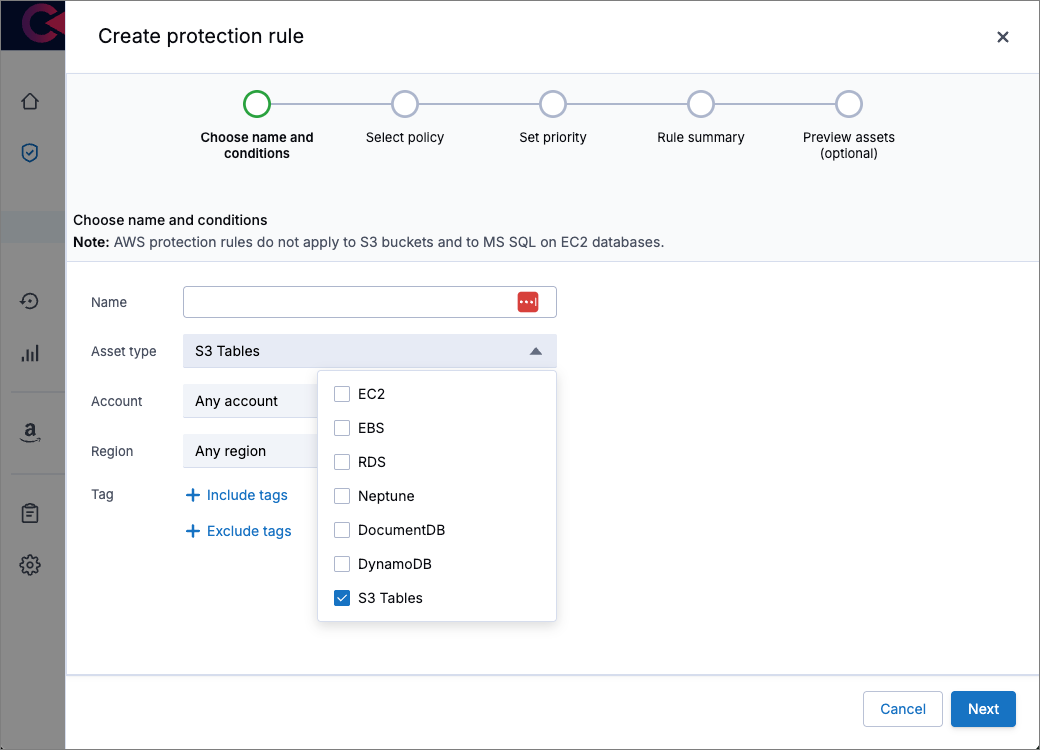
Protection Rules support for S3 Tables
Clumio Protection Rules now support AWS S3 Tables. Customers can create or update a Protection Rule that matches S3 Tables based on AWS account ID, region, and AWS tags. Tag matching is flexible — a rule can specify an "includes" list (tables must have these tags), an "excludes" list (tables must not have these tags), or both. Matching S3 Tables are automatically protected by the policy configured on the rule, including any new tables added in the future.
This is especially valuable for customers managing large data lakes with thousands of S3 Tables. Once a rule is defined, protection is applied automatically without having to assign a policy to each table individually.
Specifically, customers can now do the following:
-
Create, edit, and delete Protection Rules that match S3 Tables by account, region, and AWS tags (includes and/or excludes).
-
Preview the S3 Tables a rule will affect before saving.
-
See which Protection Rule (if any) applies to each S3 Table from the asset list and asset details pages.
-
Directly assign a policy to a specific S3 Table (direct assignment overrides the matching Protection Rule).
April 24, 2026
New features
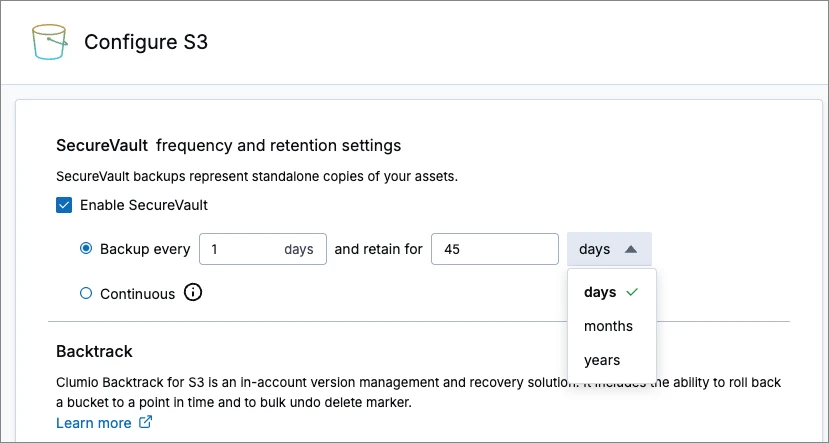
Day-based retention option for S3 backup policies
Clumio now supports configuring backup retention periods in days for S3 policies. Customers can set S3 backups to retain for a specific number of days (minimum 30 days, maximum 999 days), for both S3 Standard and S3 Archive Tier retention.
This new feature gives users one more option to specify the retention duration for any backup. Providing retention in days allows a user to set a more granular expiry setting than what was previously achievable with retention in months or years — enabling use cases like daily backups with short-term retention (for example, back up every day, keep for 45 days).
Early access for Google Cloud Storage backups
Clumio is extending SecureVault backup and restore protection to Google Cloud Platform, starting with Google Cloud Storage.
Contact Clumio Support to enable this capability for your organization.
Note
Some capabilities (for example, continuous backup and point-in-time restore) are not available at this time and will be added in future releases.
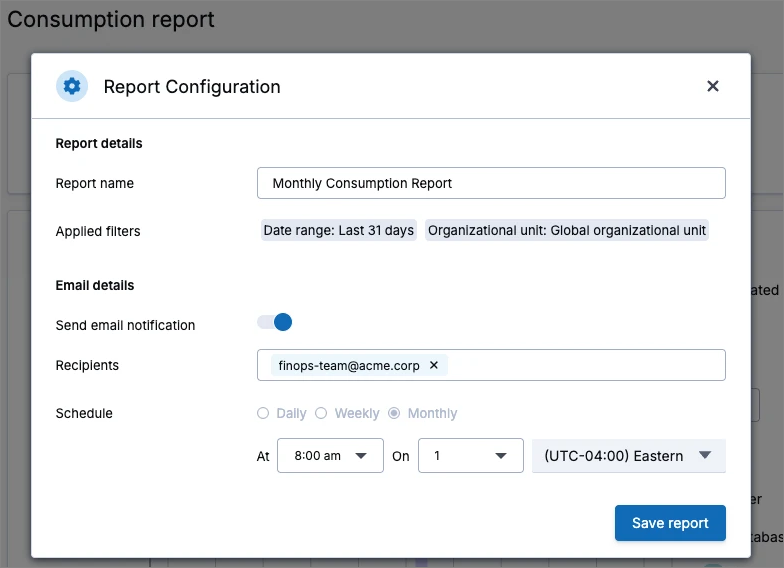
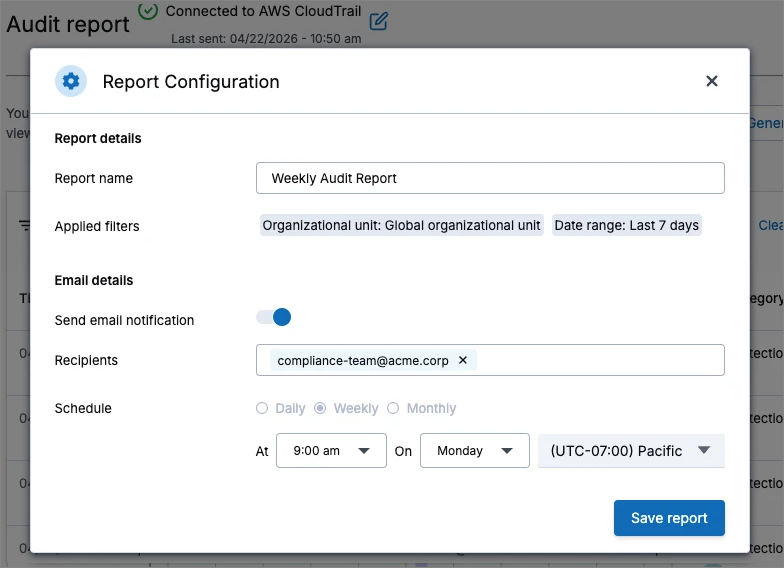
Save, schedule, and email Consumption Reports and Audit Reports
Clumio now supports saving, scheduling, and automatically emailing Consumption Reports and Audit Reports. This allows customers to automate their regular cost tracking and audit/compliance workflows without needing to manually run reports from the UI each time.
Customers can now do the following:
-
Save report configurations: Save a named report configuration with the current filter selections directly from the Consumption Report or Audit Report UI.
-
Access saved reports from the left navigation: Saved report configurations appear in the Saved Reports left navigation tab, consistent with other saved reports.
-
Schedule recurring generation: Configure a report plan to automatically generate Consumption Reports or Audit Reports on an automated schedule.
-
Receive reports via email: When a report is generated via a report plan trigger, the system automatically sends an email with the report attached.
March 27, 2026
New features
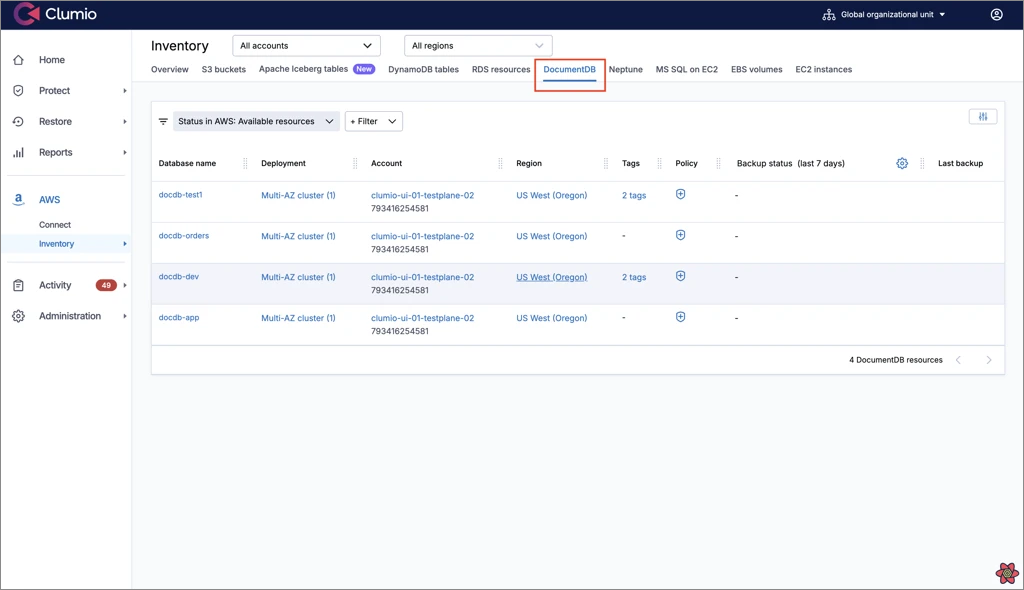
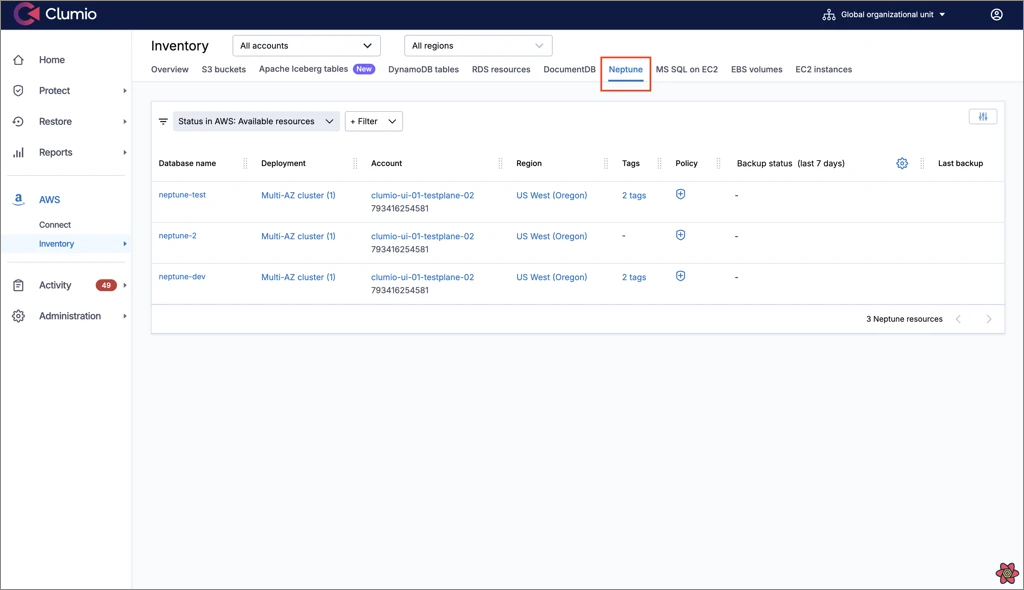
General availability for backup and restore support for AWS Neptune and DocDB
Clumio now provides SecureVault Standard backup and restore protection, along with Point‑in‑Time Recovery (PITR), for Amazon Neptune and Amazon DocumentDB.
Pricing for these services is the same as for Amazon Aurora. For more information, see Clumio pricing.
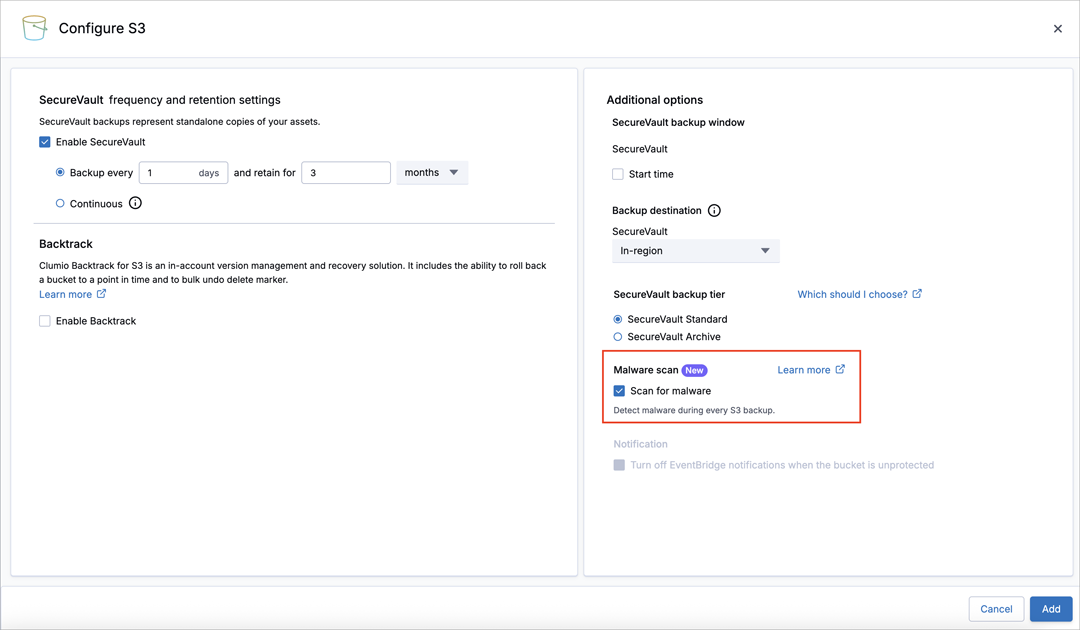
General availability for S3 threat scan (formerly called S3 malware scan)
As a follow-up to the December 19, 2025 release note, Clumio now provides threat scan for S3 with general availability.
February 27, 2026
General updates
EC2/EBS SecureVault Lite policy options
Effective March 1, 2026, we are introducing the following updates to the EC2/EBS SecureVault Lite policy configuration:
-
Daily SLA is now optional and flexible.
A Daily SLA is no longer mandatory and can also be configured to run at an interval between 1 and 31 days.
-
Minimum retention period updated.
The minimum retention period is now 30 days. Existing customers are not impacted at this time. Clumio will provide advance notice of any updates.
Pricing for recovery operations for new subscriptions
Effective March 1, 2026, we are updating the pricing for recovery operations for new subscriptions as shown below. These changes apply only to customers who purchase on or after this date. Existing customers are not impacted at this time. Clumio will provide advance notice of any updates.
-
EC2/EBS SecureVault Lite restore pricing has been reduced to $0.02 per GiB (regional multipliers may apply*).
-
EC2/EBS SecureVault Standard restore pricing is now $0.02 per GiB (regional multipliers may apply*).
-
Recovery operations across all data sources, including objects restored via S3 Instant Access, now incur a cross-geo recovery fee of $0.09 per GiB transferred (regional multipliers may apply*).
* For pricing details, see Clumio regional pricing.
January 30, 2026
New features
Custom roles (public EA)
With Custom Roles, you can create roles tailored to your organization by selecting specific permissions, instead of relying only on predefined roles. Previously, Role-Based-Access-Control (RBAC) supported a fixed set of predefined roles with limited flexibility. Now, you can define custom roles with granular permission control to better match your operational needs.
For early access, please contact support@clumio.com.